Canadian Baby Passport Photos
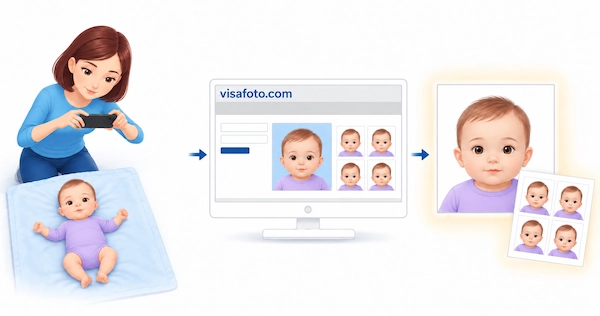
Canadian citizens of every age, including newborns, need their own passport for international air travel. A newborn's passport application follows the same process as a Canadian child passport application for any child under 16.
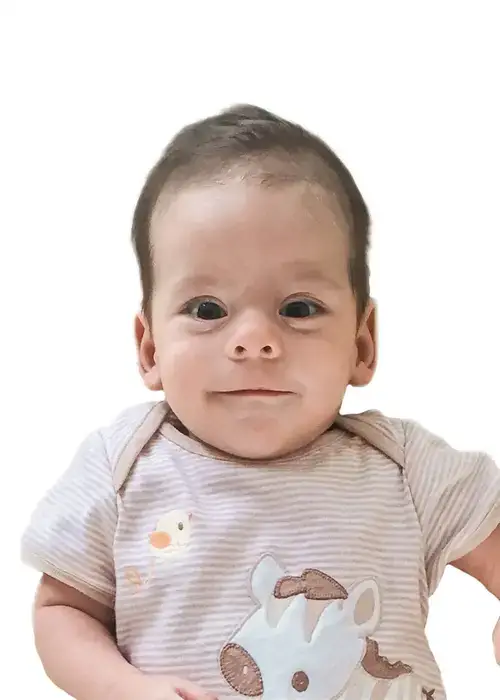
Your baby's application must include passport photos that meet Canada's requirements. Most specifications are the same as for adults, but there are additional instructions for photographing newborns.
Table of contents
- Baby Passport Photo Requirements in Canada
- Where Can I Get a Canadian Baby Passport Photo Near Me?
- Tips for Taking a Baby Passport Photo
- How Visafoto Can Help With Your Child's Document Photos
This guide explains the photo requirements, the allowances for newborn expressions, and how to prepare for your baby's photo session.
Baby Passport Photo Requirements in Canada
Submit two identical printed photos with your baby's passport application. Your baby's photos must meet these requirements:
- They must have been taken within the six months before you submit the application.
- Each photo must be 50 mm wide × 70 mm high.
- The face must measure between 31 mm and 36 mm from the chin to the crown, or top of the head.
- The background must be plain white or light-coloured, with a clear contrast between your baby's face and the background.
- The photos may be in colour or black and white.
- The image must be clear, sharp and in focus, with natural skin tones and even lighting.
- Aim for a neutral expression, without smiling or frowning.
- Your baby's eyes must be open and clearly visible, looking towards the camera.
- Aim for a closed mouth, subject to the newborn-expression allowance explained below.
- Glasses are permitted if the eyes remain clearly visible and there is no glare. Sunglasses and tinted glasses are not accepted.
- The face and shoulders must be centred and facing the camera, without the head tilted or turned.
- No other people, supporting hands or your baby's hands should appear in the photo. Keep toys and pacifiers out of the frame.
Canada allows some variation in newborn facial expressions because a perfectly neutral expression can be difficult to capture. This is not a blanket exemption for all children under one. The official guidance does not state that babies under one may automatically have closed eyes or look away from the camera.
A newborn may be photographed in a car seat, provided that:
- A white blanket covers the seat behind the baby's head.
- There are no shadows around the ears, in the background, or on the face or shoulders.
The back of one photo also needs the correct details. The photographer must write or stamp the date the photo was taken and the photographer's name and complete address. Your guarantor must write "I certify this to be a true likeness of (child's name)" and sign their name. A parent's signature alone does not replace the required guarantor endorsement.
Where Can I Get a Canadian Baby Passport Photo Near Me?
Choose a commercial photographer or photo studio that takes Canadian passport photos and has experience photographing newborns. Before visiting, ask whether they photograph babies of your child's age, whether an appointment is required, and what they charge. Prices vary, so confirm that the service includes two identical 50 × 70 mm prints and the photographer's details on the back of one photo.
Newborns and toddlers may become unsettled in an unfamiliar setting. Try to arrange the session around feeds and naps, and allow time for breaks. You do not need to make your baby cooperate like an adult: Canada recognises that newborn expressions can vary.
Tips for Taking a Baby Passport Photo
Practising at home can help you find a comfortable position and a time when your baby is calm and alert. The submitted Canadian passport photo still needs to be taken in person by a commercial photographer. These tips can help you prepare for that session:
- For a practice photo, place your baby on their back on a plain, light-coloured blanket or sheet on a safe, flat surface.
- Position the camera above your baby, leaving enough room around the head and shoulders.
- Keep the face centred and facing the camera, without tilting the head.
- Choose a moment when the eyes are open. Aim for a relaxed expression rather than trying to force a perfect pose.
- Use even lighting, with no shadows on the face or around the head.
- Take several photos and choose a clear, sharp frame. If your baby needs a feed, a nap or a break, pause rather than continuing while they are upset.
Before submitting the application, check that you have both prints, that they are the correct size, and that one has the photographer's details and your guarantor's certification and signature. Preparing these in advance gives you one less thing to deal with at your passport appointment or before mailing the application.
How Visafoto Can Help With Your Child's Document Photos
For a visa or another document whose rules allow home photography and online photo preparation, Visafoto can help you prepare your child's photo without a separate studio visit. Take the source photo when your baby is comfortable, upload a suitable frame, and select the required country and document.
You do not need the perfect shot on your first attempt. Take several photos, if that helps you catch a clear view of your baby's face, then choose the best frame to upload. Work around feeds and naps, and take breaks whenever your child needs them. For an older child, you can prepare the photo before the document appointment rather than leaving it until the last minute.
Here is an example of a source photo:
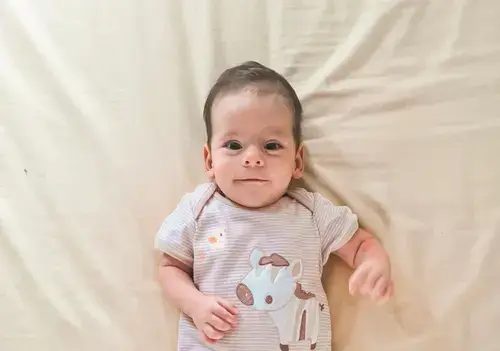
Visafoto resizes and crops the photo for the selected document, replaces the background with the required colour, and improves lighting and image quality. For documents that permit these adjustments, the starting background does not need to be perfect. The service cannot turn every unsuitable frame into an acceptable photo, so choose one with a clear view of your child's face and the required pose and expression.
You receive two files:
- A digital photo for applications that accept an uploaded image.
- A printable template with photos in the selected document's size. The individual photo dimensions depend on the document: Canada's passport format is 50 × 70 mm. The paper size used for printing is separate from the size of each portrait.
The illustrations below show the Canadian photo format and a printable layout. They are examples of the format, not a substitute for the commercial capture and printing required for a Canadian passport application.
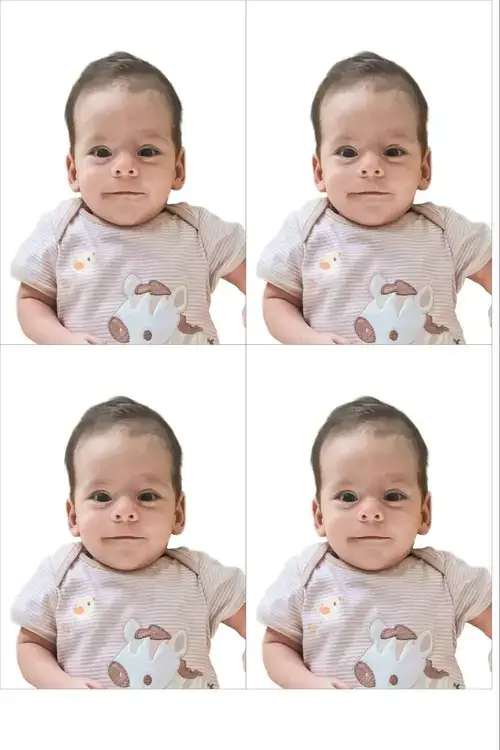
For a Canadian child's passport, use the commercially captured, professionally printed photos described above. Visafoto's edited output does not replace those required originals, and a digital file is not a substitute for the two prints submitted with a child passport application.
If you need help choosing a document format or have a question about a Visafoto order, contact our support team. If a photo purchased from Visafoto is rejected by a government authority, you can request a 100% refund under our refund policy.
Last updated: 2 October 2026