How to Apply For A Japanese Electronic Visa (JAPAN eVISA): Ultimate Guide

Although citizens of many countries must apply for a visa before coming to Japan, the Japanese government has facilitated this by launching the e-visa system.

Table of contents
- Who is eligible to apply for a Japan visa online?
- What visa type is available online?
- Documents required for Japan E-visa application
- How to fill in the Japan E-visa application form?
- How to upload a photo for the e-visa application form?
- Japan visa photo requirements
- Japan E-visa photo tool
- What to do if there’s a mistake in my application form?
- How to pay a Japan electronic visa fee
Let's explore the details of the Japanese e-visa application in this guideline.
Who is eligible to apply for a Japan visa online?
Eligibility for a Japanese eVisa depends on your place of residence, nationality and passport type. Only ordinary passport holders qualify. Travellers who are visa-exempt for their intended short stay do not need an eVisa.
The official JAPAN eVISA eligibility rules distinguish direct applications from applications through accredited agencies:
| Application route | Countries and regions of residence | Who can use this route |
|---|---|---|
| Direct online application | Australia, Brazil, Cambodia, Canada, Saudi Arabia, South Africa, Taiwan, United Kingdom, United States | Residents who need a short-stay visa and meet the eVisa conditions |
| Accredited agency | China | Chinese nationals residing in China |
| Accredited agency | Philippines | Filipino nationals residing in the Philippines on a designated agency's package tour |
| Accredited agency | Vietnam | Vietnamese nationals residing in Vietnam on a designated agency's package tour |
| Accredited agency | Hong Kong, India, Indonesia, Macau, Mongolia, South Korea, Singapore, United Arab Emirates | Residents who need a short-stay visa; the jurisdiction of Japan's Consulate-General in Jeju is excluded |
Use the route for your place of residence. Where an agency is required, check the responsible Japanese mission's instructions before starting an application yourself.
Please note that you can enter Japan with an electronic visa by air or on an international scheduled passenger ferry between Japan and Busan or Shanghai. This does not cover every sea crossing.
What visa type is available online?
Currently, there is only one Japanese e-visa category available: a tourist one. It is a Temporary Visitor visa allowing you to come to Japan for recreation. The length of stay is up to 90 days. It is a single-entry visa. If you want to return to Japan, you must reapply for a new one.
Remember that an electronic visa covers arrival by air or the specified scheduled passenger ferries from Busan or Shanghai.
The visa terms explicitly state that you are not allowed to have any remunerated activity during your stay in Japan.
Other purposes, such as visiting relatives or friends, business, study, work or transit, are not covered by the tourist eVisa. Multiple-entry visas are also unavailable through this system. Use the paper-visa route through the responsible Japanese mission or an accredited agency where required.
The Japanese e-visa validity is three months. You must enter Japan within this period; otherwise, you must get a new visa. This entry window is not your permitted stay: an eVisa may grant 15, 30 or 90 days, rather than an automatic 90 days. Follow the period granted for your trip. Chinese nationals residing in China receive 15 or 30 days; qualifying Vietnamese and Filipino package-tour applicants receive 15 days.
Documents required for Japan E-visa application
You will need electronic copies of these documents:
- An identity photo matching the Japanese visa photo specifications;
- Passport;
- Itinerary with flight or ferry information;
- Document proving your financial solvency;
- Schedule of stay;
- Hotel information.
Also, you may need:
- Parental consent form for minors;
- Letter of authorization (if you are a proxy).
In some cases, you might need some additional documents.
Upload formats depend on the field:
- Facial photo: JPG, PNG, GIF, BMP, HEIC
- Passport data page: PDF, TIF, JPG, PNG, GIF, BMP, HEIC
- Supporting documents: PDF, TIF, JPG, PNG, GIF, BMP, HEIC
Files up to 2 MB are recommended. PDF is not a portrait format. The recommended resolution of 640 × 480 pixels or higher concerns the passport data page, not the facial photo.
Check your passport's expiry date before applying. If you renew it while an application is pending, contact the responsible Japanese mission about withdrawal and reapplication. If you receive a new passport after your eVisa is issued, you must apply again using the new passport details.
How to fill in the Japan E-visa application form?
You can apply from three months before your trip. Processing normally takes five working days after the mission confirms a complete application. Allow extra time for delays.
First of all, create an account on the official JAPAN eVISA website. You will need an email address. Enter it, choose your language, your citizenship, and your country of residence. Then you will receive an email with an activation link.
You are allowed to fill in the forms for your family members or other people using your own account.
The form consists of 7 steps. Let’s have a look at them.
In the first step, you must agree to the terms and conditions of issuing the visa.
In the second step, Basic information, you must enter your passport data. You are required to upload a scan of your passport bio page. If the scan is of poor quality, it will be rejected. Check any automatically filled details against your passport and correct errors before submitting. Also, you will be asked about the data of your spouse and information on your occupation and purpose of visit (which can be only the tourist one). You are also asked to upload your photo, and we will discuss this step in the next section.
Step 3 is the Travel Information. You will be asked about the dates of your stay, details of your flight or ferry and hotel.
Step 4 is the Address. Give details on your current address and employer. Concerning the latter, you must only tell their name, address, and telephone number. No more information is needed.
Step 5 is personal information. You must answer the questions about your criminal and immigration history accurately. Also, indicate whether you are the applicant or applying on someone else's behalf.
Step 6 is Application documents. Here you are asked to upload the supporting documents. If several files cannot be uploaded together, combine the documents into one PDF.
Step 7 is the Review application. All your entered information appears here, so you have an opportunity to recheck it. On the top, you will see your uploaded photo.
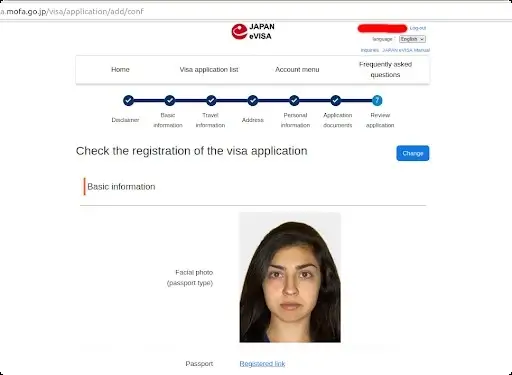
Then press Next, and on the next page, after selecting the newly created form, press Submit.
When your visa is issued, you will get an email notification about that. Before departure, open your account's Visa application list, select the applicant and choose "Visa issuance notice (to display)". Show the live notice on your device at check-in, with its countdown timer running. You need internet access; a saved PDF, screenshot or printout is not a substitute.
If you applied through an agency or proxy, use the individual QR code on the notice they provide and enter the required details to open the live display. The PDF carrying that QR code is a way to access the notice, not the live notice itself.
How to upload a photo for the e-visa application form?
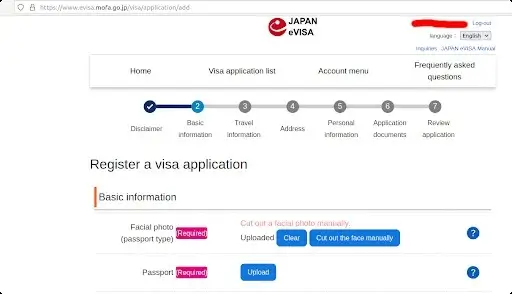
Prepare your picture in advance, press the Upload button and choose your photo. Wait without other actions until uploading finishes. Select "Cut out the face manually" to adjust the crop.
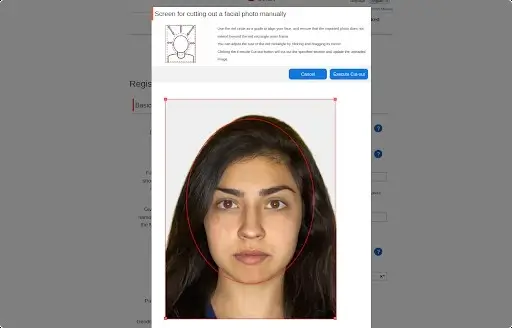
In a new window, you will have to highlight your face and the image’s edges using a red frame. Expand it so it covers most of the photo by dragging its corner. Make sure that the red frame does not exceed your photo borders; otherwise, you won’t be able to crop it. Then press the Execute Cut Out button. If the frame is out of the image, you will get the "The specified area is out of the image" message. In this case, shrink the frame slightly so it stays inside the photo.
Then the Uploaded message will appear. If you have accidentally uploaded the wrong picture, press the Clear button and upload the correct one.
Photo or document preview missing? Allow pop-ups for the portal. A missing preview alone does not establish photo rejection. These fixes follow the official JAPAN eVISA upload and troubleshooting FAQ.
Once you’ve done this step, continue with the passport upload if prompted.
Japan visa photo requirements
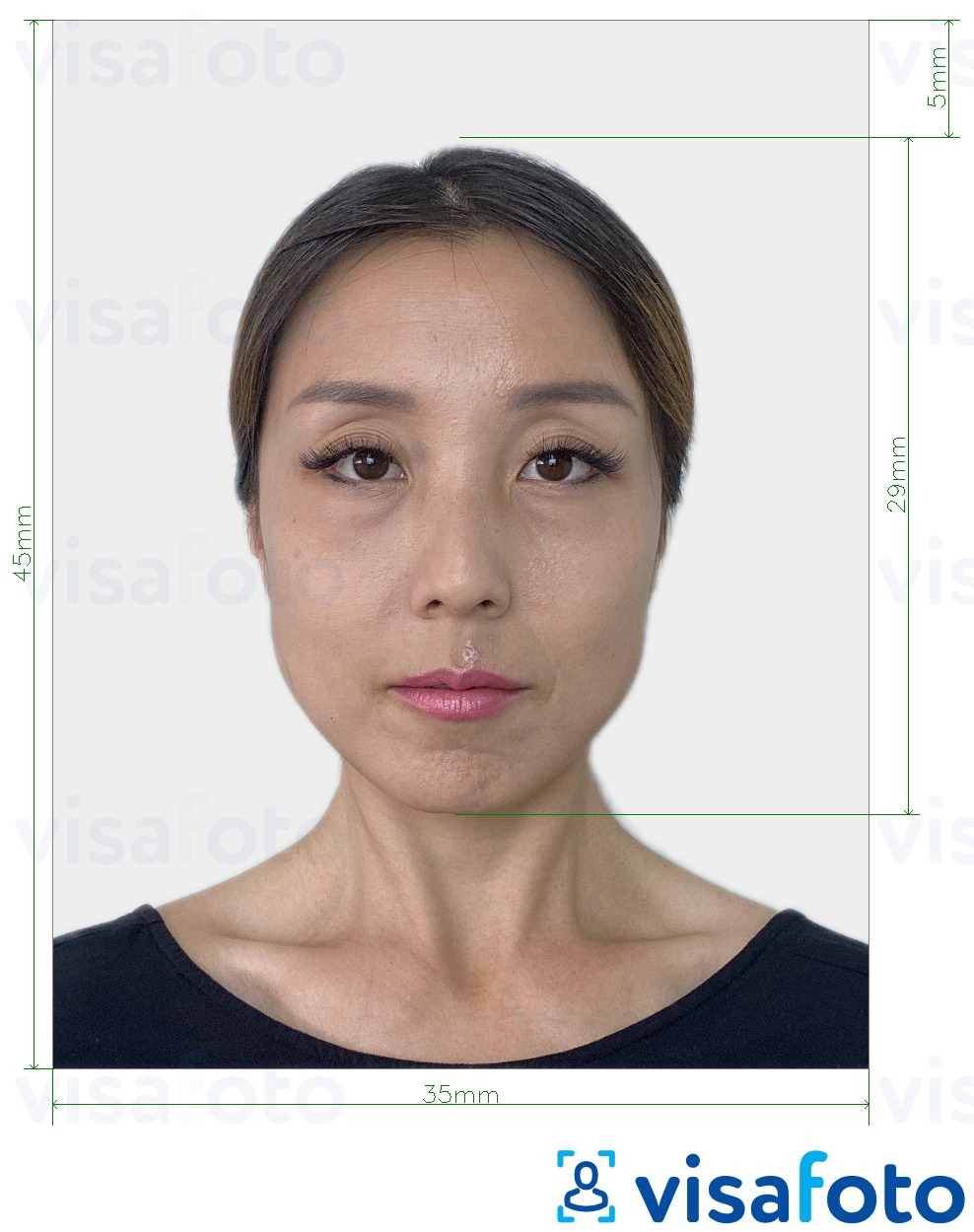
Here are the parameters your photo must meet to be uploaded successfully:
- The picture must be taken within 6 months
- Scans are prohibited
- A file size up to 2 MB is recommended
- The file format can be JPG, PNG, GIF, BMP, HEIC
- The photo must be a rectangular one
- The background is a plain one
- There must be no texture in the background
- The image must be a clear one
- The face is in the center of the photo
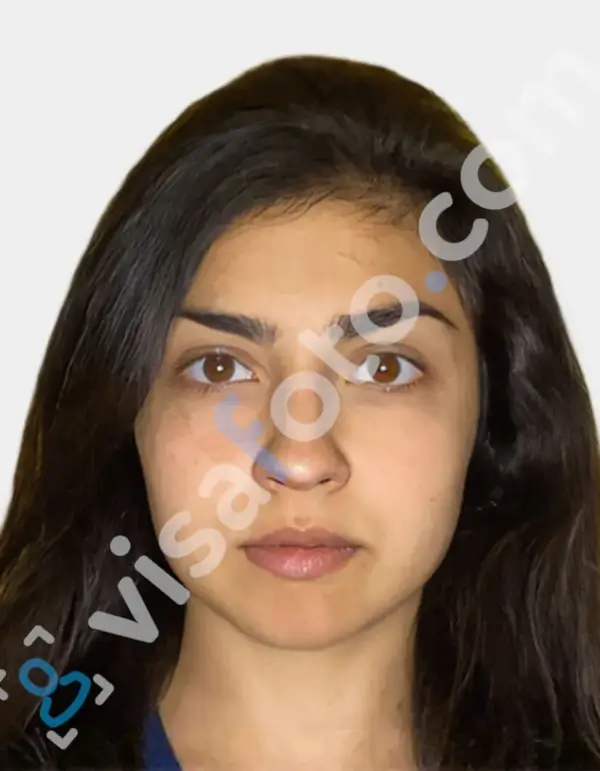
Here is an example of a Japanese E-visa photo:
Japan E-visa photo tool
Where is the best place to take a photo for a visa application? As Japanese visa photo requirements are pretty specific and differ from most passport-sized photographs, it is better to commit this job to specific online instruments. With Visafoto, you can take a picture for your visa application online anywhere on Earth!
Use our visa photo cropping tool for the quickest result. Simply upload your full-face picture taken in normal light.
It should look like this:

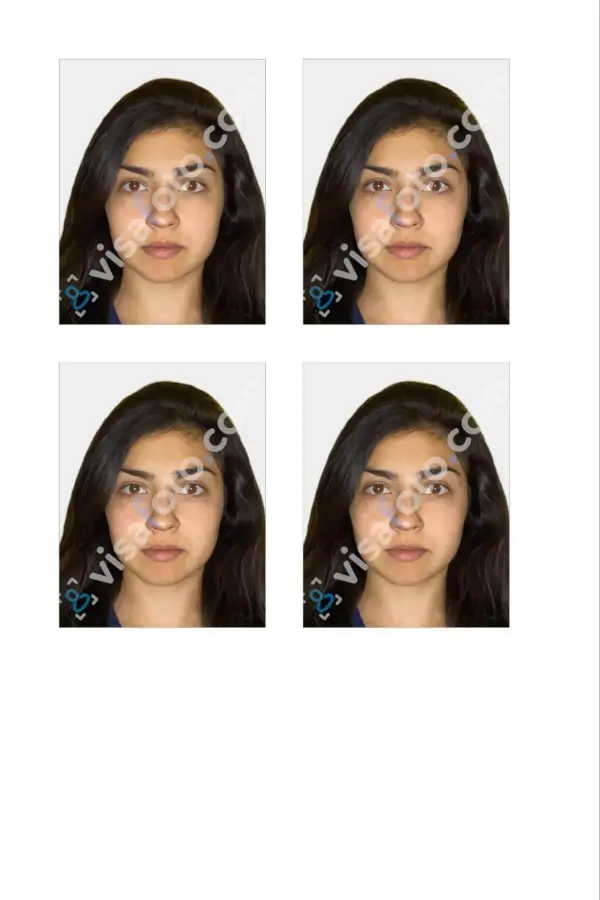
Visafoto will immediately modify the size and format, replace the background with plain white, and improve the image quality. The resulting picture will be 100% submissive to the established requirements.
You will get two types of files. A digital one is for electronic submission, and a template is for printing. Although you do not need to print a photo for a Japanese e-visa, you can use the template for other documents.
What to do if there’s a mistake in my application form?
Submitted applications cannot be edited. At "Temporarily received", select "Withdraw the application" and wait a few hours before reapplying. At "Under examination", "Fee payment", or after additional documents are registered, contact the mission to request withdrawal.
How to pay a Japan electronic visa fee
The standard Japanese single-entry visa fee is approximately 15,000 yen for applications accepted from 1 July 2026. Some nationalities qualify for a reduced fee or exemption. Agency handling charges are separate. The official visa fee revision replaces the former standard fee of 3,000 yen.
For a direct JAPAN eVISA application, wait for the fee notification email, then log in and pay online by credit card. Cash at a mission is not an eVisa payment option.
No visa fee is charged if the visa is not issued. Once issued, the eVisa fee is non-refundable.
Last updated: 15 October 2026.