How to apply for a Japanese passport online: My Portal instructions

Applying for a Japanese passport no longer requires completing every step in person. Through My Portal, eligible applicants can submit passport requests, upload supporting documents, and track the process online.
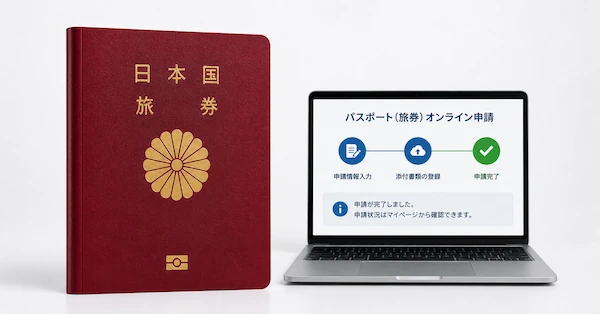
In this guide, you'll learn everything you need to know about the online Japanese passport application. We’ll also give you tips on how to easily take a compliant passport photo.
Table of contents
- Who can use the Japanese online passport application system?
- Online Japanese passport application checklist
- Japanese passport photo requirements for online applications
- Get your Japanese passport photo online!
- How to apply for a Japanese passport online through My Portal: step-by-step
- How to apply for a Japanese passport online from outside Japan
- Documents required for an online Japanese passport application
- How long does a Japanese passport application take?
- How to collect your new Japanese passport
- FAQ
Who can use the Japanese online passport application system?
The online passport application portal is exclusive to Japanese citizens, with requirements varying depending on whether you reside in Japan or abroad. Below are the details.
For residents of Japan: My Number Portal
Japanese citizens who live in Japan can submit their applications through the My Number Portal using their My Number Card.
Eligibility requirements:
- Must be a Japanese citizen.
- Must possess a valid My Number Card with active digital certificates.
- Must be registered as a resident in a Japanese municipality.
- Must have a compatible smartphone with the My Number Portal app installed.
- Must use a 4-digit user authentication PIN and a 6-16 digit signature PIN (uppercase letters and numbers).
For Japanese citizens living abroad: ORR Net
Japanese citizens residing outside Japan can use the ORR Net (Online Resident Registration) system, accessible via a dedicated smartphone app.
Eligibility requirements:
- Must be a Japanese citizen.
- Must be registered with the Online Resident Registration (ORR Net) system.
- Must have been living abroad for at least 3 months.
- Must have an NFC-capable smartphone with a camera (iPhone or Android).
- Must use the "Passport Application for Japanese Residents Abroad" app.
Online Japanese passport application checklist
Before you begin your online passport application via My Portal, make sure you have everything needed. This checklist applies to both Japanese passport online renewals and new applications, available from March 24, 2025.
My Number Card requirements
Ensure you have:
- a My Number Card with valid digital certificates;
- a user authentication password (4-digit) for logging into My Number Portal;
- a signature electronic certificate password (6-16 characters, uppercase alphanumeric) for application submission.
Note: If you forget your passwords, visit your municipal office to reset them before applying online.
Smartphone and NFC requirements
Ensure you have:
- a smartphone with NFC capability to read the My Number Card's IC chip;
- the My Number Portal app installed (available on the App Store or Google Play);
- a stable internet connection.
Alternative: You can apply using a computer, which requires a separate IC card reader.
Current passport and personal information
Ensure you have:
- your current Japanese passport (necessary for renewals or exchanges);
- a passport with less than one year remaining or depleted visa pages.
Digital passport photo
Have a digital photo that meets Japanese passport standards, as specified below in the article.
Digital signature
Ensure you have:
- a piece of white paper (clean, no lines or patterns);
- a black or dark blue ink pen;
- your signature, clearly written on the paper, ready for smartphone photography.
For minors: Children aged 6 and above must sign for themselves. For children under 6, a parent can write the child's name followed by "代筆" and their own name.
Payment method
Ensure you have a credit card available for online fee payment if an online payment option is offered.
Japanese passport photo requirements for online applications
Your photo requirements will vary depending on whether you apply from within Japan or abroad. Rejected photos are the leading cause of application delays, so it’s crucial to meet these standards before uploading your photo. Here you'll learn what requirements your photo must satisfy.
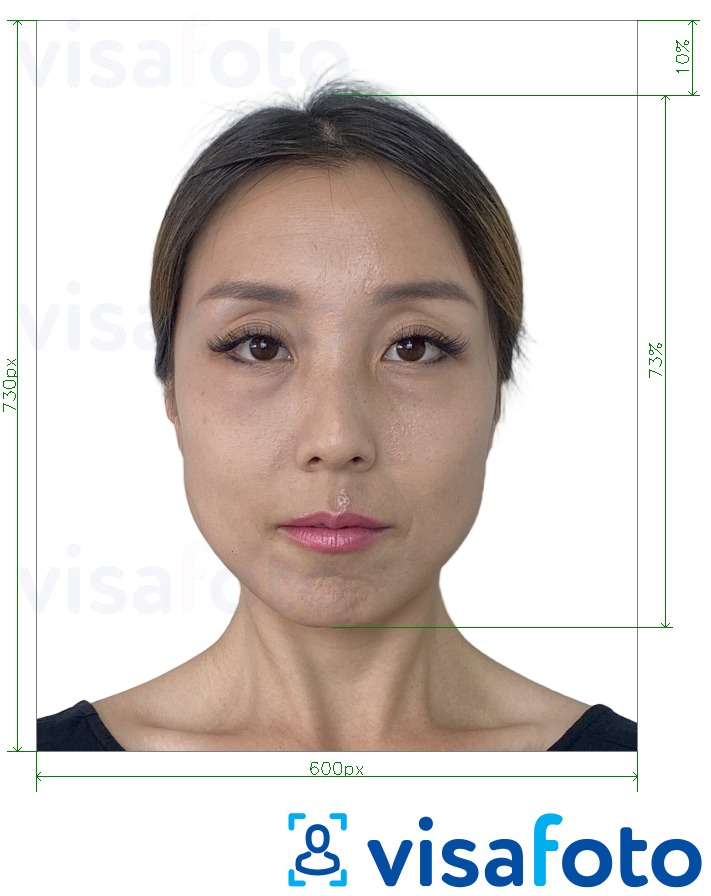
Digital Japanese passport photo dimensions:
The key distinctions between domestic and overseas applications are as follows:
- Applicants in Japan: Use JPG format with a file size up to 600 KB.
- Applicants outside Japan: Use JPG, JPEG, BMP, or PNG format with a file size ranging from 20 KB to 2 MB.
General photo standards:
- Photo dimensions must be 730х600 pixels.
- The photo must be recent, taken within the last six months.
- Use a solid background; white is highly recommended.
- Face the camera directly.
- Do not wear hats, masks, or sunglasses, and keep hair away from your eyes.
Here is a photo example:
Get your Japanese passport photo online!
With Visafoto you don’t need to visit a studio to get a compliant photo for your passport application. You can produce a professional biometric photo in minutes by following these simple steps:
- Upload a photo taken in natural light to the Visafoto tool below.
- Select Japan and passport as a country and document type.
That's all! Visafoto takes care of the rest, adjusting the image to comply with the official requirements, including background, size, and head positioning. You'll receive a digital file for online submissions.
Visafoto can also enhance photo quality when needed. It optimizes lighting for a studio-like effect, improves clarity and resolution, and corrects framing errors. You don't need to take a new photo. You can take a photo of your passport with your phone and have Visafoto improve the quality of the scan. If your photo already meets quality standards, Visafoto makes no unnecessary alterations.
Original photo sample:

Edited result:
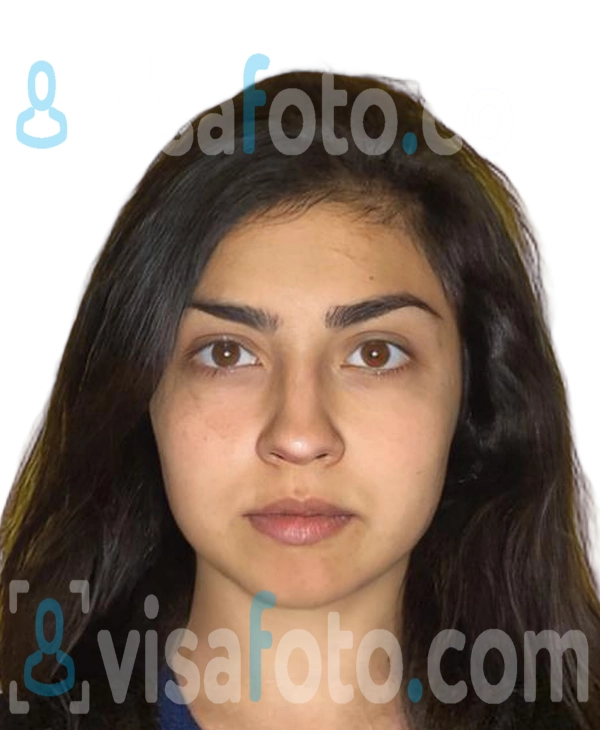
Visafoto boasts a 99.7% acceptance rate with over 1,000,000 successful submissions. If your photo is rejected, you'll receive a full refund. Our tech support is available around the clock to assist you.
How to apply for a Japanese passport online through My Portal: step-by-step
Applying for a Japanese passport through the My Number Portal is a straightforward process. Since March 24, 2025, both new applications and renewals are done online, requiring only one in-person visit to collect your passport. Here you'll find a clear breakdown of the entire application procedure.
Step 1: Go to the My Number Portal App
- Launch the My Number Portal app on your smartphone.
- Select "Use your card" and place your My Number Card on your phone’s reader.
- Enter your 4-digit User Authentication password.
- Search for "Passport" at the top screen and select "Passport Application."
Step 2: Select your application type
Choose the option that fits your situation:
- New application: For first-time users or holders of expired passports.
- Renewal: For those with a passport that’s valid for less than a year or has full visa pages.
- Information change: For updates like name or domicile changes.
Step 3: Select passport pickup location
Decide which passport office or municipal office you will collect your passport from. Note that you cannot change this decision later.
Step 4: Upload your passport and signature photos
Upload your photo following the app's instructions. Additionally, upload your signature photo, ensuring it meets these criteria:
- Written in black or dark blue ink on clean white paper.
- Signed by the applicant if they are 6 years or older; otherwise, a parent or guardian may sign.
- Ensure no stains, wrinkles, or shadows are present in the photo.
Step 5: Enter applicant information
Provide your contact and necessary details:
- For new applications: Your domicile data is auto-imported from the family registry system; no paper certificate needed.
- For Japanese passport renewals online: The app imports your current passport’s IC chip and photo page details.
Step 6: Submit your application
Tap your My Number Card to the phone again to transfer your name, birth date, address, and photo. Enter your signature electronic certificate password (6-16 characters, uppercase letters, and numbers).
Confirm the information, agree to the terms, and tap "Apply."
Step 7: Pay the fees and collect your passport
You'll receive a notification in My Number Portal with the delivery date and a QR code reception slip, which you should download. Collect your passport in person within six months of the issue date (mandatory regardless of age).
What to bring for pick-up:
- smartphone displaying the reception slip QR code (or a printed copy);
- your current or old passport, if applicable;
- your My Number Card or other valid ID.
Pay online by credit card through the delivery notification link, or purchase revenue stamps in advance at a post office if you prefer to pay in person. Completion of payment occurs during the document collection.
How to apply for a Japanese passport online from outside Japan
Applying for a Japanese passport while living overseas involves a different process than the one used domestically. Overseas residents must use the ORR Net system and a specific smartphone app for their application. Here, we explain how the overseas online application process works.
Step 1: Registering with ORR Net
To apply online, you need an active ORR Net account. If you reside overseas for more than three months, you must submit a residence notification. Register online through the ORR Net website.
If you previously submitted a paper residence notification, switch to ORR Net to access the online passport system.
Step 2: Accessing the Overseas Passport Electronic Application System
Log in to the ORR Net website using your PC or smartphone browser with your registered email (User ID) and password. Go to the ORR Net menu and select "Apply for Passport/Certificate Online."
The system will generate a QR code. Open the "Passport Application (for Japanese Residents Abroad)" app on your smartphone. Scan the QR code with the app or tap the link shown on your mobile browser.
Note: The app works alongside the browser; you can't use it independently.
Step 3: Uploading supporting documents
After finishing the ORR Net passport application form, upload digital copies or photos of the required documents:
- proof of residence status (visa, residence card, green card);
- family register certificate (for new applications or updated information);
- any additional documents needed by your local embassy or consulate.
Step 4: Paying passport fees abroad
Choose between two payment options:
- Online payment: Register your credit card online. The payment processes when you collect your passport.
- In-person payment: Pay in cash at the embassy or consulate during collection.
Note: Credit card payments are only for online registration; you cannot use a credit card at the counter.
Step 5: Receiving approval and collection instructions
Once your passport is ready, you'll get an email with the issuance date. Pick up your passport in person, as this is mandatory. Collect it within six months of issuance to avoid expiration. If your passport expires because of non-pickup, expect higher fees for the next passport application within five years.
What to bring for pickup:
- the email notification (printed or on your phone);
- your current or old Japanese passport (will be voided and returned);
- original versions of all uploaded documents (except the photo and family register if submitted electronically);
- your residence card or visa;
- payment, if not paying online.
Documents required for an online Japanese passport application
The documents needed depend on whether you apply inside Japan via My Number Portal or from abroad using ORR Net. Below is a breakdown of the required documents and situations where additional paperwork is necessary.
Documents required in Japan
Use the My Number Portal and have these ready:
- My Number Card: Ensure it has valid digital certificates and the necessary passwords (4-digit user authentication PIN and 6-16 digit signature PIN).
- Recent photo: Taken within the last six months, sized 35 × 45 mm, and uploaded through the app.
- Signature photo: Written in black ink on plain white paper, photographed, and uploaded via the app.
- Current passport: If renewing, bring the original when collecting the new passport.
Documents required for applications from abroad
Japanese citizens applying from overseas through ORR Net need these documents:
- Application data: Complete this through the ORR Net system.
- Recent photo: Taken within six months, sized 35 × 45 mm, and uploaded via the app.
- Applicant's signature: Written in black ink on plain white paper. Applicants aged six and above must sign for themselves. Upload via app.
- Proof of legal residence: Upload documents like a valid visa, residence card, or green card to prove your lawful status and present the original at pickup.
- Current Japanese passport: If renewing, upload via app and present the original at pickup.
Family registry documents (Koseki Tohon)
A recently issued family register certificate is needed if:
- You're applying for your first passport.
- Your passport has expired.
- You've changed your name due to marriage, divorce, etc.
- Your registered domicile (honseki) has changed.
- You want to add a non-Hepburn romanization or an alias.
Note: If your passport is valid with no name or domicile changes, you typically don’t need a new Koseki Tohon.
Additional supporting documents
- For minors in Japan (aged 15-17): A signed Letter of Consent from a parent or guardian to upload during the application.
- For minor applicants abroad:
- Legal guardian's signature: Required for all minors, signed by a parent or guardian in kanji.
- Letter of Consent: For those under 16, if one parent isn’t present or applying. Signed by the non-applying parent.
- Copies of both parents' passports or IDs: Required for applicants under 16.
- For dual citizens:
- Birth certificate: Required for dual citizens born abroad.
- Consular report of birth abroad: For those born outside their parents' country of citizenship.
- Other country's passport.
- For lost or stolen passports abroad:
- Police report: Submit the original or provide a police case number.
- Proof of ID: Such as a Japanese driver's license or other government-issued ID.
- For name changes outside Japan: Proof of the current name, like a marriage certificate or birth certificate.
Important note for dual citizens: If you've gained citizenship from another country through naturalization, you have lost your Japanese nationality and can't apply for a Japanese passport. Report this change immediately.
How long does a Japanese passport application take?
The processing time varies based on your location and the application method. Below is a detailed breakdown.
Processing times in Japan:
- Online via My Number Portal: Once your documents are reviewed, expect processing to take about 2 weeks, or roughly 9 to 13 business days.
- In-person: Generally, the process takes around 11 days, not including weekends and holidays.
Processing times at Japanese embassies and consulates
Since March 24, 2025, Japanese passports have been centrally produced in Japan to include advanced anti-fraud features and laminated photo pages, affecting overseas processing times. Normally, it takes about 1 month to process a passport abroad.
Can you get a Japanese passport faster? If you are applying in Japan, yes, you can speed up the process by applying in person at a passport office, where it takes about 11 days. Online applications generally take longer.
For applicants outside Japan, standard expedited processing isn't usually available. However, if you urgently need to return to Japan without a valid passport, apply for an Emergency Travel Document through your local Japanese embassy or consulate. Provide a written application, required documents, and a photo, explaining your emergency.
Note: This document only allows travel back to Japan and isn't valid for further international travel. Once in Japan, you must apply for a regular passport through standard procedures.
How to collect your new Japanese passport
You must pick up your new Japanese passport in person, whether you applied online or in person, from within Japan or overseas. This applies to all applicants, including infants. Below, we explain both scenarios.
Collecting your Japanese passport in Japan:
- Visit the passport office where you applied.
- Bring the following:
- Your current or old Japanese passport (required for renewals and exchanges).
- QR code reception slip from My Number Portal (for online applicants) or your application receipt.
- My Number Card or another government-issued photo ID (recommended).
- If you haven't paid online, pay the fee at the office.
- Collect your new passport.
Collecting your Japanese passport from abroad (at embassy/consulate):
- Go to the Japanese embassy or consulate where you submitted your application.
- Bring the following:
- Your current or old Japanese passport.
- Proof of legal residence, like a green card, visa, or residence card (original documents).
- The notification email from the embassy (either printed or on your phone).
- Original copies of uploaded documents.
- Cash for the fee (exact amount required).
Important: You must collect your passport within 6 months of its issuance. If you do not collect it within this time frame and it expires, your next 10-year passport will cost ¥22,300 instead of ¥16,300.
FAQ
Can I apply for a first Japanese passport online?
Yes, you can apply for your first Japanese passport online:
- From inside Japan: Use the My Number Portal if you have a valid My Number Card.
- For Japanese passport application from abroad: Use the ORR Net system and the "Passport Application for Japanese Residents Abroad" smartphone app.
Do I need to submit a printed passport photo?
No, you don't need a printed photo for online applications. Digital photos can be submitted by taking a new photo through the application, or by uploading an existing digital photo taken within the last 6 months. Printed photos are required only for in-person applications.
Can someone else collect my passport for me?
No, you must collect the document in person. This rule applies to everyone, including infants. It serves as a security measure to confirm identity before issuance.
What happens if my online application is rejected?
You'll get a correction notice through the system if your application is rejected. Use the same application number to correct issues like photo size or signature problems – don't start a new application. Once corrected, the review continues.
How long is a submitted passport application valid?
A passport becomes valid once issued, but you must collect it within 6 months. Failure to do so voids the document. Applying for a new one within 5 years incurs an additional fee of about ¥6,000.
Can minors apply for a Japanese passport online?
Yes, minors can apply, but there are special requirements. The rules differ based on the child's age:
- Under 15 years: A parent or guardian must apply through their My Number Portal account using both their My Number Cards.
- Ages 15 to 18: Can apply online independently with a consent form from a parent or guardian.
What should I do if my passport expires soon?
Renew your passport before it expires. In Japan, you can renew online if your passport has less than 1 year left or 3 or fewer blank pages. If expired, apply in person for a new one. From abroad, online renewal or new applications are available. Plan to apply at least 2–4 weeks ahead in Japan or 1 month overseas.
If your passport expires, you'll need a new Family Register certificate (Koseki Tohon), and the application will be treated as new, not a renewal.