U.S. Passport Photo Online

Are you going to renew your U.S. passport or get the first one? Pay strict attention to the passport picture! Your photo identification will accompany you throughout the whole lifetime of your passport and it is important that it meets certain requirements. In addition, an incorrect ID photo can lead to a rejection of the application and the passport processing will be delayed. Here’s what you need to know about U.S. passport photo requirements and how to prepare a compliant picture.

In this guide
- Get the passport photo online now
- How many photos do I need for my U.S. passport application?
- What are the main U.S. passport photo requirements?
- How to take a U.S. passport photo with your phone
- I already have a digital passport photo. How do I print it?
- Where can I get my passport photo taken in person?
- How much does a U.S. passport photo cost?
- How do I check my passport photo and fix problems?
- Do I need a new passport photo if my appearance has changed?
- DV Lottery photo requirements
- Can I edit a U.S. passport photo?
- How can I use a passport-size photo?
- Frequently asked questions
Get the passport photo online now
It is the easiest and most quick way of getting the passport photo. Visafoto.com works 24x7. The process takes just a couple of seconds. It automatically sets the right size, head size and background of a photo, and makes sure your photo 100% meets the requirements. For only $9 you instantly get professional-quality passport photos in two formats: a digital one for online submission and one for printing on 4x6" photo paper.
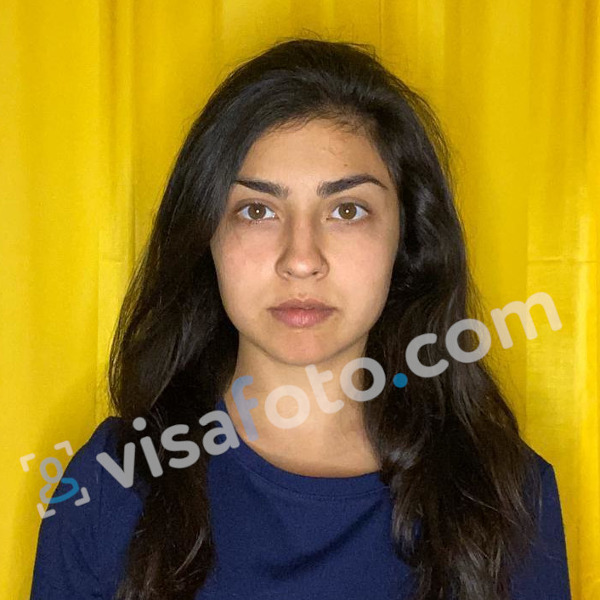
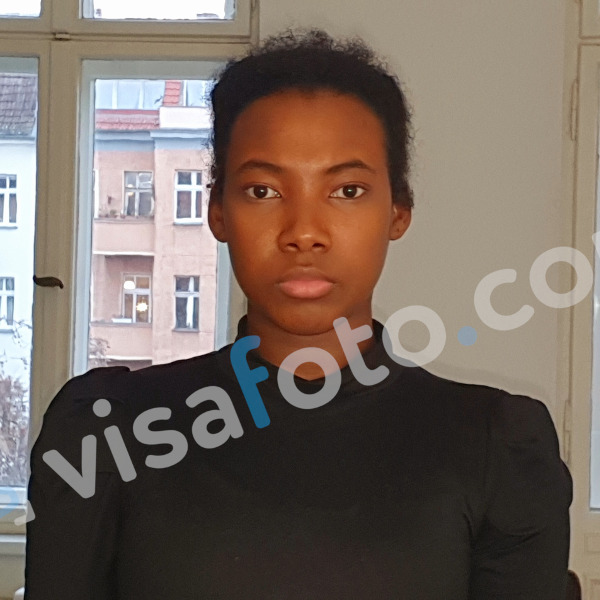
First, take a selfie or ask someone to take a photo of yours with your smartphone. Your face and shoulders should be fully seen. Your eyes should be opened. Mouth should shut. Look straight into the camera. Wear your everyday clothes. Your passport photo selfie should look like this:
Now, upload this photo to online USA passport photo maker. You will get a digital result passport photo like this (it is 600x600 pixels):


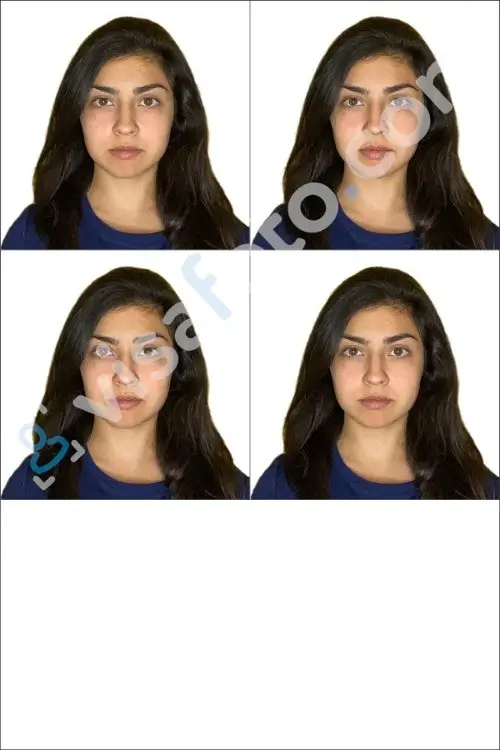
Plus you will get a 4x6 inch printable image like this with 4 passport photos on it, and each photo is 2x2" (you can see it as 2 photos occupy all width of 4 inch paper, and thus each is 2" wide, and since they are square, then each is 2" high as well):

How many photos do I need for my U.S. passport application?
| Application | Photo to submit |
|---|---|
| Applying in person on paper, including for a child's passport | One color print measuring 2 × 2 inches. |
| Renewing by mail | One color print measuring 2 × 2 inches. Follow the form's instructions for attaching it. |
| Standard online passport renewal | One original digital color photo in JPG, JPEG, PNG, HEIC or HEIF, between 54 KB and 10 MB. You can reposition or crop it inside the application. |
For standard online renewal, use the original photo saved by your phone or camera. A scan of a print or a 4 × 6 sheet with several copies is unsuitable for the upload. See the State Department's digital photo instructions and our guide to renewing a U.S. passport online.
What are the main U.S. passport photo requirements?
Use a color photo taken within the last six months that shows what you look like today. For a paper application, check that the finished photograph is 2 × 2 inches (51 × 51 mm) and that the head measures 1 to 1⅜ inches (25 to 35 mm) from the chin to the top of the head.
- Background and lighting: Plain white or off-white, with even lighting and no distracting shadows, objects or texture.
- Position and expression: Face the camera directly, keep your head and shoulders centered, and make sure your eyes are visible. A neutral expression works well. A natural, closed-mouth smile is also allowed for a paper application.
- Clothing: Wear everyday clothes. Avoid uniforms, clothing that looks like a uniform, and camouflage.
- Glasses and head coverings: Remove glasses unless you need them for a medical reason and can supply a signed doctor's note. A religious head covering requires a signed statement, and a medical head covering requires a signed doctor's statement. Your face must remain fully visible.
- Photo quality: The image should be sharp and in focus. For paper applications, use matte or glossy photo-quality paper and submit a clean, undamaged print.
For babies, the State Department allows eyes that are not fully open. Older children must have their eyes open, and nobody else should be visible in the photo. See the State Department's paper photo requirements, our U.S. passport photo requirements guide, and our U.S. baby passport photo guide.
How to take a U.S. passport photo with your phone
Use the regular Camera app in Photo mode. Turn off beauty filters and effects that blur the background. Set the camera at eye level and shoot from several feet away. Leave a little room above your head and around your shoulders so they fit comfortably in the frame.
Face a window or another soft light source so both sides of your face are evenly lit. A window behind you can leave your face in shadow. Leave some space between yourself and the background to keep your shadow out of the shot. Look into the lens with your shoulders square, your head upright and your mouth closed. Take a few photos, then zoom in on the saved images to check that your eyes and facial features are sharp.
How to take a passport photo by yourself
- Set your phone on a tripod, a phone stand or a stable shelf at eye level. Use the rear camera in regular Photo mode if you can.
- Take a test shot to check the framing. Mark the spot where you'll stand so you can return to it without guessing.
- Set a timer long enough to get into position. Ten seconds works well if your phone offers that option. Look at the lens and hold still until the photo is taken.
- Open the photo in your camera roll and check the crop, focus and lighting. If the camera is pointing up or down, adjust the phone and take another shot. Keep the original camera file for online renewal.
Check that the saved selfie isn't mirrored
If you use the front camera, turn off selfie mirroring before you take the photo. On an iPhone, look for Mirror Front Camera in Settings > Camera. On a Google Pixel, look for Save selfie as previewed in the Camera settings. The name varies by phone.
The preview can look like a mirror even when the saved image is correct. Check the file in your camera roll. For a quick test, photograph a piece of paper with a word on it. If the letters appear backward in the saved image, switch off mirroring or use the rear camera, then take your passport photo. Use the paper only for the test.
I already have a digital passport photo. How do I print it?
Download your Visafoto print template and order it as a standard 4 × 6 photo print. Walgreens lists it at $0.39, and CVS lists a glossy 4 × 6 print at $0.42.
Where can I get my passport photo taken in person?
You can go to a pharmacy photo counter, a participating USPS passport location, a shipping and print store, or a local photography studio. Ask for the format your application needs when you arrive. For online renewal, some stores offer an emailed photo, while others supply it on a USB drive.
- Walk-in pharmacies: Walgreens and select CVS stores take passport photos.
- Post offices: Many USPS passport locations offer photo appointments, including photo-only appointments.
- Shipping and print stores: FedEx Office offers printed or digital passport photos. Check with your local UPS Store for availability and price.
How much does a U.S. passport photo cost?
Compare the cost of the format you actually need. Some providers include the digital copy, while others sell it as an add-on or let you choose between print and digital.
| Provider | Listed price | What's included |
|---|---|---|
| Visafoto | $9 | Photo preparation, a digital image and a printable template. Physical prints are purchased separately. |
| USPS | $15.00 | Published Post Office photo fee. Many passport locations also offer digital photos on USB. Confirm which photo service is available when you book. |
| FedEx Office | $15.95 | Choice of two 2 × 2-inch prints or one digital copy on USB. |
| Walgreens | $16.99 | Two 2 × 2-inch prints, with an emailed digital copy available on request at no extra charge. |
| CVS | $17.99 | Two 2 × 2-inch prints. An emailed digital copy costs $3.99 extra at participating stores, for a total of $21.98 before tax. |
Prices checked November 23, 2026. Taxes and delivery charges may apply. For more options, see our guide to U.S. passport photo prices. Costco's former in-store service and Rite Aid's old photo counters are covered in our Costco passport photo guide and Rite Aid passport photo guide.
How do I check my passport photo and fix problems?
For a paper application, measure the finished print and look closely at the face and background. Make sure cropping hasn't cut off the head, light isn't reflecting across the face, and the print is sharp. If a retailer's print came out at the wrong size, reorder from the properly sized template.
For online renewal, the portal checks basic photo requirements during upload. If it flags the file before you submit, read the message, check its format and size, and try another original photo if needed. A government employee reviews the photo after submission. If the State Department asks for a replacement by letter or email, follow the instructions in the notice. See common reasons passport photos are rejected for examples.
If there's a problem with your photo, Visafoto's 24/7 support team can review your case and help you identify what needs to change. If the passport authority rejects a photo you purchased from Visafoto, you can request a 100% refund for the photo.
Do I need a new passport photo if my appearance has changed?
A haircut or a new beard usually doesn't mean you have to replace a valid passport. If you can no longer be identified from the photo, you may need a new passport. See what to do if you no longer look like your passport photo.
DV Lottery photo requirements
The Diversity Visa Lottery has its own digital photo requirements. If you're entering the lottery, use our DV Lottery photo guide for the correct dimensions and file limits.
Can I edit a U.S. passport photo?
Keep the original photo and make sure it reflects your current appearance. Avoid beauty filters and changes to facial features. If you need a paper photo, preparing a print layout lets you print at the required size.
How can I use a passport-size photo?
The 2 × 2-inch format is used for printed U.S. passport photos and some other U.S. documents. Follow the photo instructions for the form you're filing. Our U.S. visa photo guide explains which format to use for visa applications.
Frequently asked questions about U.S. passport photos
Do I need two photos if I apply for a U.S. passport book and card together?
One photo is enough when you request both the book and the card on the same paper application. Select both documents on the form. See our guide to the U.S. passport book and card for more on applying for both.
Can I print a U.S. passport photo on my home printer?
Yes, if you can produce a sharp color print at the correct size on matte or glossy photo-quality paper. Check for streaks, visible dots and inaccurate colors before you submit it. Use photo paper rather than standard copier paper.
Should I staple my passport photo to Form DS-11 or DS-82?
For an in-person application on Form DS-11, bring the photo loose. The acceptance agent staples it after checking it. For renewal by mail on Form DS-82, staple the photo where the form indicates, using four vertical staples close to the corners. See our Form DS-82 guide.
Can I wear earrings or a nose piercing in a U.S. passport photo?
Yes. The State Department allows jewelry and facial piercings as long as they leave your face visible. You can keep in small earrings or a nose stud that doesn't cover any facial features.
Can I wear a hearing aid in my U.S. passport photo?
Yes. You can wear a hearing aid or cochlear implant in a U.S. passport photo. The instruction to remove headphones and wireless earbuds applies to those accessories.
Can my wheelchair headrest show in a U.S. passport photo?
Yes. The State Department allows part of a wheelchair's head support to appear in a paper passport photo. Include a note with the application explaining why the background isn't entirely white.
Additional information
Other passport photo formats: UK, Canada, India, Singapore, Malaysia, Ireland, Australia, New Zealand, China, Hong Kong, Taiwan, Philippines, UAE, Bahrain, Pakistan, Sri Lanka, Bangladesh, Ghana, Nigeria, Kenya, South Africa, and all passport photo formats.
- U.S. Passport Application in Mexico: Detailed Guideline
- How Much is a US Passport? The American Passport Fees Explained
- Passport Renewal: DS-82 Form Filling Out Guideline
- USA Passport Ultimate Guide with Frequently Asked Questions
- DS-11 Form
- Passport size photo dimensions
- US Photo Tool problems
- US passport photo requirements
- Passport renewal
- Walgreens passport photo
- Costco passport photo
- Rite Aid passport photo
- CVS passport photo
- UPS passport photo
- USPS passport photo
- Passport photo near me
- Cheap passport photos
- Baby passport photo
- Passport photo examples
- US passport photo size
- Photo 2x2
- DV Lottery photo
- US baby passport photo
- Passport photo requirements
- Passport photo with blue background
- How can you check if your photo is DV Program compliant?
- Passport photo background editor
- Taking good passport photo
- US passport card vs book
- US passport status check
- Passport photo dress rules, makeup style, hair style
- Getting the USA Passport for a Child
- U.S. passport renewal abroad: full guide
- “What if I lost my U.S. passport overseas?” The complete guide
- USA PADI (Professional Association of Diving Instructors) Certification
- Passport Validity Rules | Planning Your Trip Abroad
- Passport Photo Hair Rules: Look Your Best and Meet Requirements
- Passport Photo Cropping Tool | Take Your Passport Photo At Home
- New York Metrocard for Seniors: Application, Photo, Fare
- How to Change the Name on Your U.S. Passport?
- Do You Need to Change Your Passport If Your Appearance Changes?
- USPS Passport Application FAQ: How To Apply At a Post Office
- Expedited Passport Application: Get US Passport Faster
- American Veteran ID Card (VIC) Application and Photo
- Bad passport photos: reasons why your passport photo may be rejected
- Passport Photo Makeup Tips: How to Take a Perfect Passport Photo?
- Emergency Passport Guide (USA): When and How Can You Gen One?
- Passport Renewal for 16-Year-Olds in the USA: Rules To Follow
- US Passport Photo With Hijab: How to Take One?
- How to Order 2x2 Photo Prints Online?
- U.S. Citizenship Application for Children Born Abroad
- Passport Photo With Glasses: Rules
- USA Passport Photo FAQ | Make a Compliant Passport Photo Online
- How to Convert a Selfie To A Passport Photo
- Guide to Flawless Passport Photo Lighting
- U.S. passport photo prices
- How to Renew a U.S. Passport Online
- Can You Wear Jewellery In A Passport Photo?
- How to Apply for a U.S. Passport at FedEx
- Do You Need a U.S. Passport for the Caribbean? Travel Rules for Cruises and Flights Explained
Get your U.S. passport photo online
Last updated: November 23, 2026
