Japan Passport Photo: Requirements and Online Maker

Applying for a Japanese passport requires a photo that meets strict government standards.
Today, applicants in Japan can obtain a passport photo in several ways: at a professional photo studio, in one of the country’s many photo booths, through convenience-store printing services, or entirely online using a smartphone.
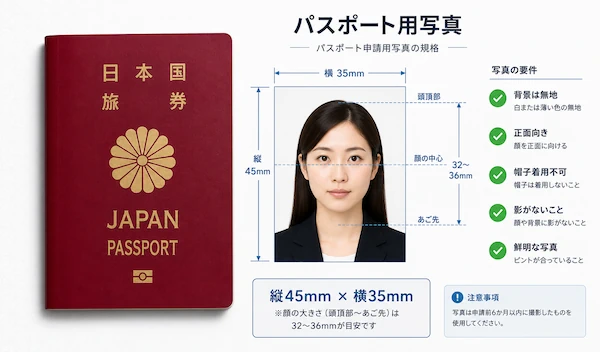
In this guide, you’ll learn the current Japanese passport photo requirements, digital photo specifications for online applications, clothing and appearance rules, where to print your photo in Japan, and how to create a compliant passport photo online in just a few minutes.
Table of contents
- Japan Passport Photo Size and Format Requirements
- Background Requirements
- What to Wear for a Photo for a Japan Passport and Other Documents?
- Get Your Japan Passport Photo Online!
- How to Upload a Digital Passport Photo to Myna Portal?
- Where to Print Out a Passport Photo in Japan?
- FAQ
Japan Passport Photo Size and Format Requirements
Printed Photo Size and Dimensions
For paper passport applications in Japan, the submitted photo must comply with the following parameters:
- Photo size: 35 mm wide × 45 mm high;
- Head height (chin to crown): 32–36 mm;
- Space above the head: 2–6 mm;
- Plain light-colored background (white is preferred);
- Neutral facial expression;
- Eyes open and clearly visible;
- Face directed straight toward the camera;
- No head tilt;
- No heavy editing or beauty filters;
- Photo taken within the previous six months.
The image should be printed on high-quality photo paper and must not show visible pixelation, blur, stains, creases, or printing defects.
A common reason for rejection is an incorrectly scaled head. Even when the overall photo size is correct, the image may still be rejected if the face occupies too much or too little of the frame.
Digital Japan Passport Photo Requirements for Online Applications
For online applications submitted through MynaPortal (マイナポータル) system, the uploaded facial photograph must meet the following specifications:
When applying online in Japan
- Passport photo size: 730 x 600 pixels;
- File format: JPG;
- Maximum file size: 600 KB;
- Color mode: RGB color.
When applying from abroad
- Resolution: 730 x 600 pixels;
- File format: jpg, jpeg, bmp, png;
- File size: 20KB to 2MB;
- Color mode: RGB color.
The image must follow the same composition rules as a standard 35 × 45 mm passport photo. The same facial positioning rules apply to both printed and digital photographs:
- Face centered in the frame;
- Neutral expression;
- Plain light background;
- No shadows;
- No sunglasses;
- No appearance-altering filters.
Background Requirements
Japanese passport photos require a plain, light-colored background. The background should be:
- White, off-white, or another very light color;
- Uniform throughout the image;
- Free of patterns or objects;
- Free of shadows behind the head and shoulders.
Busy backgrounds, furniture, decorations, visible room interiors, or textured walls are not acceptable.
When taking a passport photo at home, standing about half a meter away from a plain wall and using even front-facing lighting usually produces the best results.
What to Wear for a Photo for a Japan Passport and Other Documents?
The Japanese authorities focus on facial visibility rather than fashion. Choose everyday clothing that contrasts with the background and does not obscure your neck, jawline, or shoulders.
Avoid uniforms whenever possible unless they are required for religious or professional reasons.
Your clothing should:
- Leave the entire face visible;
- Not cover the chin;
- Not hide the neck outline;
- Not create strong shadows.
Scarves, oversized collars, and bulky outerwear may interfere with identification and should generally be avoided.
Preferred colors for clothing on a passport photo
Dark or medium-colored clothing usually works best against a white background. Good choices include:
- Navy;
- Black;
- Dark gray;
- Dark green;
- Burgundy.
White tops can blend into the background and may reduce contrast between the applicant and the backdrop.
Are glasses allowed?
Yes, ordinary prescription glasses are generally permitted. However:
- The eyes must remain fully visible;
- Lenses must not create reflections;
- Frames must not cover the eyes;
- Sunglasses are not allowed;
- Tinted lenses are not allowed.
If glare cannot be eliminated, it is usually safer to remove the glasses before taking the photograph.
Headwear and accessories requirements
Head coverings are normally prohibited. Exceptions may be granted for religious and medical reasons. Even in such cases, the face must remain fully visible from the chin to the forehead.
Large accessories that obscure facial features should also be removed before taking the photo.
Get Your Japan Passport Photo Online!
Instead of visiting a photo studio, you can create a compliant Japanese passport photo online with Visafoto.
Simply take a picture using your smartphone against any background and upload it to Visafoto. The service automatically adjusts the image to meet Japanese passport photo specifications, including proper sizing, head positioning, and background replacement.
Unlike simple cropping tools, Visafoto also uses an advanced enhancement system that can automatically improve lighting, increase image quality, refine resolution, and correct framing issues. If clothing does not fully fit the required composition, Visafoto can intelligently extend the visible clothing area to create a professional passport-style result.
Visafoto also enhances scanned or low-quality photos, helping restore clarity and detail so you do not need to retake a new photo in many cases.
Example of the source photo
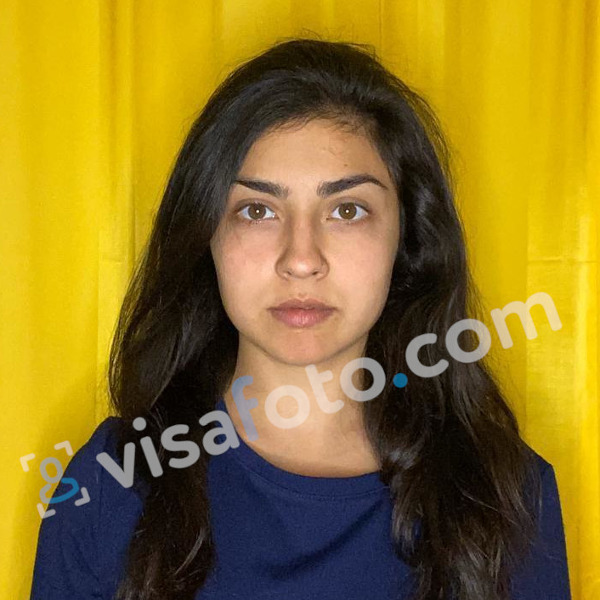
You receive:
- A digital file ready for online submission;
- A print-ready template;
- Correct Japanese passport photo dimensions;
- Automatic background correction;
- Automatic quality enhancement.
After Visafoto edit:
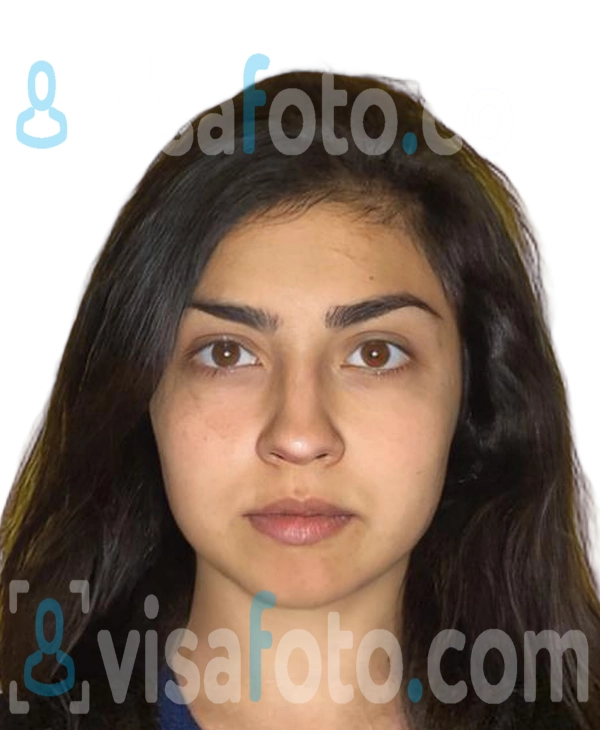
For extra peace of mind, all paid orders are covered by a 100% acceptance guarantee. If your photo is rejected by a government authority because it does not meet the official photo requirements, Visafoto will refund your payment. Our 24/7 support is always ready to assist you.
How to Upload a Digital Passport Photo to Myna Portal?
When applying online for a Japanese passport online through MynaPortal, prepare your photograph before beginning the application.
The process is straightforward:
- Sign in to MynaPortal.
- Start a passport application.
- Prepare a JPG image meeting the MynaPortal specifications.
- Upload the photograph.
- Review the preview carefully.
- Submit the application.
Before final submission, ensure that the entire head is visible, the image is correctly cropped, there are no shadows, the face is centered, and the file size is within the permitted limit.
Where to Print Out a Passport Photo in Japan?
Visafoto provides clients with a print-ready template with 4 separate photos on it. To print it out, chain stores in Japan offer several inexpensive printing options.
Passport photo printing at 7-Eleven (Netprint)
The Netprint service allows you to upload an image online and print it at a nearby 7-Eleven store.
- Upload the photo online;
- Receive a print code or QR code;
- Print the image at a store multifunction printer.
This is often one of the cheapest ways to print passport photos in Japan.
FamilyMart (FamiPrint)
FamilyMart stores provide similar self-service printing through the FamiPrint system.
Users can upload files from a smartphone or use supported storage devices depending on the machine configuration.
Color prints generally cost only a small fraction of the price charged by photo studios.
FAQ
How much does a passport photo cost in a photo atelier in Japan?
Professional photo studios typically charge around ¥2,000–¥2,500 for a set of passport photos, although prices vary by city and provider.
Passport photo price at Visafoto is $9 US dollars.
Do I need to print out a passport photo if I apply for a Japanese passport online?
No. When applying online through MynaPortal, you upload a digital photograph instead of submitting a printed passport photo. The image is reviewed electronically during the application process.
Can I wear makeup for my Japanese passport photo?
Yes. Natural-looking makeup is generally acceptable. However, makeup should not significantly alter your appearance or interfere with identification.
Can I take my passport photo in a hoodie?
A simple hoodie is not automatically prohibited. However, the hood should not be worn over the head, and bulky clothing should not obscure the neck, jawline, or facial contours.
What should I do if my passport photo is rejected?
Review the rejection reason carefully and take a new photograph that addresses the specific issue.
Using a dedicated passport photo service such as Visafoto can help reduce the likelihood of rejection by automatically adjusting the photo to match official requirements. In case the rejected photo was purchased at Visafoto, contact our support for a refund.