Poland MOS photo: requirements and online photo tool

MOS, or Moduł Obsługi Spraw, is Poland's Case Handling Module. Since 27 April 2026, applications for temporary residence, permanent residence and long-term EU resident permits are generally submitted electronically through MOS.
Along with your MOS application, you should upload a digital biometric photograph. The file must be a colour JPG, measure at least 684 × 883 pixels, maintain the proportions of a 35 × 45 mm photo, and be no larger than 2.5 MB. It must show the correct applicant and have been taken within the six months preceding submission of the application. Below, we list the detailed MOS photo requirements and explain how to take a compliant photo for your Polish residence permit at home.
Table of contents
- Poland MOS portal photo requirements
- MOS photo size and file requirements
- How to make a Poland MOS photo online with Visafoto
- How to take a MOS photo at home
- What should a MOS photo look like?
- How to upload a photo to MOS portal
- MOS photo for children
- MOS photo vs printed residence permit photos
- MOS photo checklist
- Frequently asked questions
Poland MOS portal photo requirements
The MOS photo specifications cover both the digital file and the applicant's appearance. A file can pass an automatic technical check and still be questioned later by the voivode if the image itself does not meet the biometric rules.
| Requirement | Poland MOS specification |
|---|---|
| File format | JPG |
| Pixel dimensions | At least 684 x 883 px, width x height |
| Maximum file size | 2.5 MB |
| Proportions | Equivalent to 35 x 45 mm, width x height |
| Photo age | Taken within 6 months before submission |
| Colour | Colour image with natural skin tone and good sharpness |
| Background | Uniform and light |
| Face size | 70-80% of the photograph, from the top of the head to the upper shoulders |
| Pose | Frontal, looking straight at the camera |
| Eyes | Open, clearly visible and not covered by hair |
| Expression | Natural, with the mouth closed |
Source: Polish Office for Foreigners, MOS questions and answers.
MOS photo size and file requirements
The official Poland TRC photo size for MOS portal is at least 684 x 883 pixels, with a maximum file size of 2.5 MB. The file must keep the proportions of a 35 x 45 mm portrait photo.
These digital specifications form part of the Polish residence permit photo requirements for temporary residence, permanent residence and long-term EU resident applications submitted through MOS.
| Digital requirement | Value | What it means |
|---|---|---|
| Minimum canvas | 684 x 883 px | The file may be larger, but should not be smaller in either dimension |
| Required proportions | 35:45 | A vertical image corresponding to a 35 x 45 mm biometric photo |
| Maximum file size | 2.5 MB | Compress or re-export the image if it exceeds the limit |
| Format | JPG | HEIC, PNG and PDF are not the specified MOS photo formats |
684 x 883 px digital canvas -> 35 x 45 mm photo proportions
The official requirements do not specify DPI or PPI. For a MOS upload, focus on the JPG format, minimum pixel dimensions, file size, proportions and biometric composition.
How to make a Poland MOS photo online with Visafoto
Visafoto prepares a digital Poland residence card photo from a selfie or a portrait taken by anyone with a phone or camera. You do not need a studio setup or a plain white wall. Select the dedicated Poland MOS 684 x 883 px document format so the output is prepared for the portal rather than for a paper-only procedure.
- Upload a clear portrait to Visafoto.
- Select Poland and the MOS 684 x 883 px photo format.
- Visafoto automatically applies the required portrait crop, background, lighting and file formatting.
- Check the preview and download the JPG for your MOS application.
The result is a digital file intended for MOS submission. Visafoto checks the size and framing for the chosen format, and you can complete the process from a phone without visiting a studio. The final acceptance decision remains with the voivodeship authority.
Visafoto includes a money-back guarantee for photo compliance. If the authority rejects the result because the photo does not meet its technical or biometric requirements, contact Visafoto support with the rejection details to request help or a refund under the guarantee terms.
How to take a MOS photo at home
You can take the source image with a recent smartphone. Do not crop it tightly in the camera app, since the final tool needs space to position the head and shoulders correctly.
- Face a window and take a selfie, or ask anyone to hold the phone at your eye level and photograph you. Use the rear camera if practical because it usually produces a sharper image.
- Look straight into the lens with your head upright. Leave space around your head and show the upper shoulders.
- Keep both eyes visible, move hair away from the face, close your mouth and use a neutral expression.
- Check that the image is sharp and that no shadow, glare or bright highlight hides facial details.
- Do not use beauty filters, portrait effects, face reshaping or strong retouching. Your natural features and skin tone must remain identifiable.
Take a photo -> Upload it -> Select Poland MOS -> Download the MOS-ready JPG
The source picture can have any background and does not need perfect lighting or a pre-crop to 684 x 883 px. Upload it to Visafoto, which automatically replaces the background, improves the lighting and image quality, and handles the MOS crop and digital formatting.
What should a MOS photo look like?
A compliant MOS photo must identify the applicant without reasonable doubt. It should show the face squarely from the top of the head to the upper shoulders, occupying 70-80% of the image.
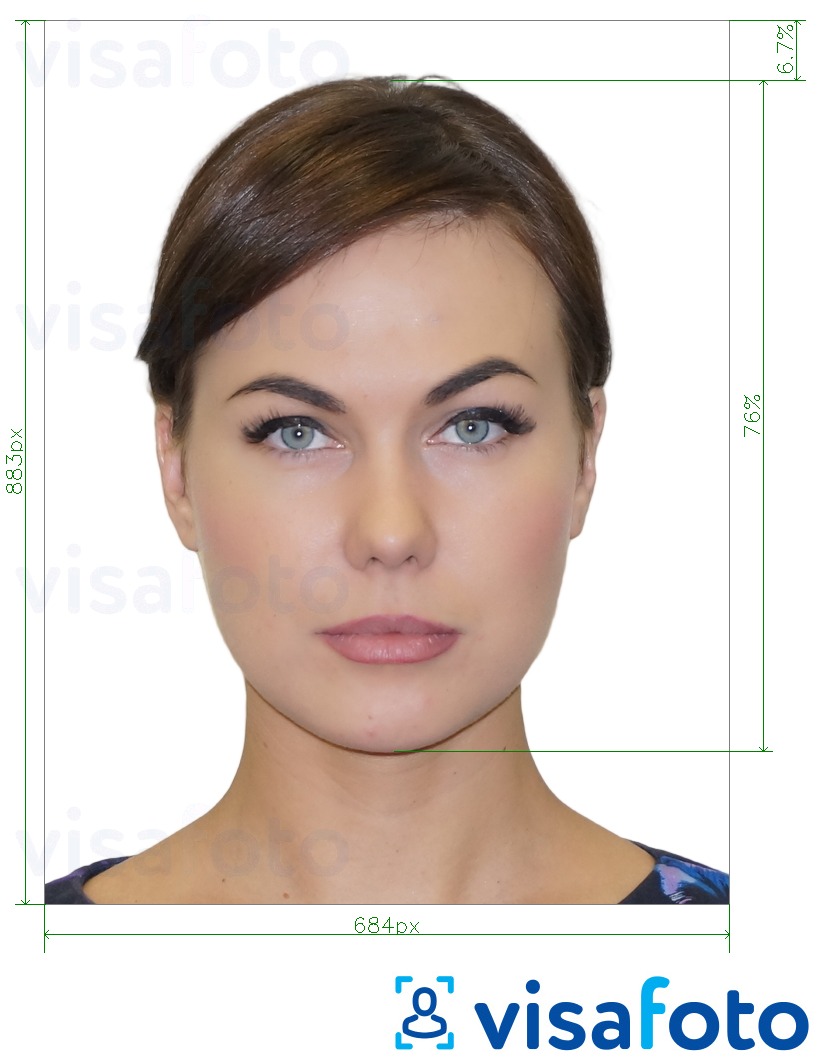
Head and face position
Keep your head upright and centred. Face the camera directly, without turning or tilting your head. Both sides of the face should be visible, and the image should reproduce your natural skin colour.
Eyes and eye line
Look directly into the lens. Both eyes and pupils must be sharp and clearly visible. The eye line should run parallel to the top edge of the photo, so a noticeably tilted head is unsuitable.
Hair and facial visibility
Move hair away from the eyes and the main features of the face. Hair can remain visible around the head, but it must not obscure the eyes or make identification difficult. Avoid deep shadows across the face.
Facial expression
Use a natural, neutral expression with your mouth closed. Do not smile broadly, raise your eyebrows, squint or show your teeth. The standard rule can be relaxed in a justified case, including circumstances in which the applicant cannot keep the eyes open, the mouth closed or a neutral expression.
Background and lighting
Use a plain, uniform, light background. Light the face evenly from the front or from both sides. Avoid patterned walls, objects, strong backlighting, red-eye, glare and shadows behind the head.
Glasses, religious headwear and justified exceptions
The MOS photo rules expressly prohibit dark glasses. Dark lenses are permitted for only for applicants with a congenital or acquired visual disability. In such cases, the application must include documents confirming the disability or, if those cannot be provided, the applicant's own disability statement.
Clear prescription glasses are not expressly prohibited, but the eyes and pupils still have to be completely visible. Reflections, tinted lenses or frames covering the eyes can make a photo unsuitable, so removing clear glasses is the safer choice when they are not medically necessary.
Religious headwear is permitted if the entire face remains visible. The applicant must attach a statement confirming membership in the religious community. Other medical, disability-related and justified exceptions are assessed in context, so include the relevant evidence or explanation with the application.
How to upload a photo to MOS
Upload the JPG while completing the relevant residence application. Check the applicant and preview carefully before signing because a sent MOS application cannot be undone or edited in the portal.
- Create an account and log in to the official MOS portal through login.gov.pl.
- Start the relevant temporary residence, permanent residence or long-term EU resident application.
- Add the JPG in the section for the applicant's digital photograph.
- Confirm that the correct image is attached and that it opens properly.
- Complete the other required fields and attachments.
- Sign through login.gov.pl with a trusted signature, qualified electronic signature or personal signature, then send the application.
- Download and save the Official Confirmation of Receipt, known in Polish as Urzędowe Poświadczenie Odbioru or UPO.
The UPO confirms that the application was technically signed and sent successfully. It does not mean that the photograph has received final substantive approval. The voivode can still request a compliant replacement if the uploaded image fails the legal requirements. If no UPO appears, the official guidance says the application was not successfully submitted.
MOS photo requirements for children
A photo is also required for a minor’s MOS application. If a parent or guardian completes a child's application, the file must show the child, not the adult operating the MOS account..
The normal frontal pose, visible eyes and neutral expression rules apply to children. For newborns, the regulations allow a photo with closed eyes, an expression other than neutral, or an open mouth.
MOS photo vs printed residence permit photos
A MOS photo and a printed Polish residence permit photo follow similar biometric composition rules. Check the procedure before ordering or uploading anything.
| Procedure | Photo submission | Important distinction |
|---|---|---|
| Temporary, permanent or long-term EU resident permit submitted through MOS | One digital JPG uploaded with the application | At least 684 x 883 px and no more than 2.5 MB |
| Residence procedures that remain paper-based under a statutory exception | Printed photographs may be required | Follow the checklist for that specific procedure and voivodeship office |
| Replacement or reissue of an existing residence card | Separate paper procedure | It is not the same as applying for a residence permit through MOS |
Since 27 April 2026, the main temporary, permanent and long-term EU resident permit applications are electronic through MOS. However, limited categories still use paper applications, including certain applications concerning a foreign national who is outside Poland. The application to issue a new residence card also remains a paper procedure. Do not assume that every Polish residence procedure accepts the same digital file.
MOS photo checklist
Before uploading, confirm every point:
- The file is a real JPG, not a renamed HEIC or PNG.
- The image is at least 684 x 883 px, width x height.
- The file is 2.5 MB or smaller.
- The crop follows 35:45 portrait proportions.
- The photo was taken within the last 6 months.
- The image is in colour and sharp.
- The background is uniform and light.
- The face is frontal and occupies 70-80% of the image.
- Both eyes and pupils are visible, unless a justified exception applies.
- The eye line is parallel to the top edge.
- The mouth is closed and the expression is natural, unless a justified exception applies.
- The photo shows the correct applicant.
Frequently asked questions
Can I use a photo taken more than six months ago if I have not changed my appearance?
No. The photo must have been taken within the six months before the application submission date, even if your appearance has not changed.
What should I do if my MOS application stays in draft and my photo becomes older than six months?
Replace it with a new photo before submitting. MOS drafts can be edited, and the six-month limit is measured against the date the application is sent, not the date the draft was started.
Can I submit a MOS photo with clear prescription glasses?
The MOS guidance specifically bars dark glasses, not clear prescription lenses. However, the eyes and pupils must remain fully visible, with no glare or frame obstruction. Removing clear glasses is safer if they are not medically necessary.
What documents do I need if I have to wear glasses because of a visual disability?
For dark glasses, attach a scan of a document confirming the congenital or acquired visual disability. If you cannot provide that document, the official MOS guidance allows your own statement confirming the disability.
Can I wear religious headwear in a MOS photo?
Yes, if the entire face remains visible. Attach a personal statement confirming your membership in the religious community.
What should I do if my child cannot keep a neutral expression for the MOS photo?
Try to meet the standard rule first. In a justified case, the regulations allow closed eyes, an expression other than neutral or an open mouth. The image must still clearly identify the child.
Can I upload a scanned photo to MOS?
The official rules do not specify whether the source must come directly from a camera or from a scan. MOS evaluates the uploaded file, which must be a recent, sharp colour JPG that meets every dimension, file-size, proportion and biometric requirement. An original digital photo is safer because scans can introduce texture, glare, blur or incorrect scaling.
Can I upload a photo in HEIC or PNG format to MOS?
No. JPG is the specified photo format. Convert or export the image as JPG rather than changing only the filename extension.
What should I do if MOS does not accept a photo that meets all the requirements?
Recheck the actual file format, minimum width and height, 2.5 MB limit and 35:45 crop. Export a fresh JPG with a simple filename and try again. If the problem persists, check the Office for Foreigners notices for a system failure and report a technical issue to the MOS support address listed in the official FAQ.
Can I replace the photo after submitting a MOS application?
You cannot undo or edit a sent application in MOS. Contact the voivode handling the case and follow its instructions. The authority may request a replacement photo or tell you how to correct the application outside the portal.
Can I send my MOS photo by email instead of uploading it to the portal?
No. A residence permit application downloaded from MOS and sent by email or e-delivery is not examined. Upload the photo as an attachment and submit the signed application through MOS.
Do I need to upload my photo again when I attend the voivodeship office?
Normally, no. The digital photo attached in MOS is intended for identification and, if the permit is granted, for the residence card. Bring or upload another photo only if the voivode specifically requests one.
What is the difference between a MOS photo and a photo for a residence card replacement?
The MOS photo is a digital JPG attached to an online permit application. An application for a new residence card, including a replacement or reissue, remains a separate paper procedure with its own document and printed-photo checklist.
What should I do if I accidentally upload the wrong person's photo to MOS?
Do not submit the application if it is still a draft. Remove the file and attach the correct applicant's photo. If the application has already been sent, contact the voivode immediately because sent MOS applications cannot be edited in the portal. Follow the office's correction instructions and do not send a duplicate application unless told to do so.
Official sources
- Office for Foreigners: MOS questions and answers
- Office for Foreigners: Basic information about the MOS system
- MOS: Common application mistakes
- Regulation of 10 April 2026 on temporary residence permit applications
- Wielkopolska Voivodeship Office: Biometric and digital photographs
Last updated: 28 August 2026