Absher Photo Requirements and Online Maker (Saudi Arabia)

Absher portal provides online access to many Saudi government services, but photo submissions must meet the applicable identity-document standards. Even a clear personal photo may be deemed unsuitable if it has the wrong background, composition, or technical format.
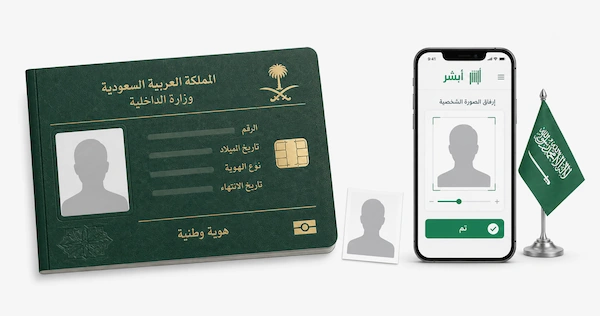
Read on to learn how to change your Iqama photo in Absher, what your photo should look like, and how to prepare it with an online photo editor.
Table of contents
- When do you need an Absher photo?
- Absher ID photo requirements
- Absher photo requirements for Iqama
- How to make an Absher photo online
- How to upload the photo to Absher
- Absher photo rejected: common reasons
- How to update my photo at Absher?
- When you need to visit an Absher/Civil Affairs branch
- FAQ
When do you need an Absher photo?
A photo is required for several Absher services related to identity documents, residency, and passports. The exact requirements depend on the service and the type of document you are applying for:
- Saudi National ID renewal: A recent photo may be required when renewing your National ID, generally within 180 days of the card’s expiry.
- Lost or damaged National ID: You must provide a photo when requesting a replacement for a lost or damaged card.
- First National ID for a family member: The application requires a personal photo that meets the applicable specifications.
- Iqama / Resident ID photo: Resident photo updates use a dedicated service called "Change Resident ID Photo" with its own prerequisites and limits. The resident must be in Saudi Arabia, be at least 18 years old, not be absent from work, not have a lost Iqama report, and not have an active final exit. They can change the photo once per calendar year.
- Saudi passport services: A photo is required for certain passport procedures. However, not every service demands a new photo upload. For example, one e-service allows you to upload a photo of a dependent specifically for passport issuance or renewal. The requirements can vary depending on the specific service.
Absher ID photo requirements
Here, you’ll find out about the main Absher requirements for a Saudi National ID photo.
- The photo must be recent and taken within the last six months.
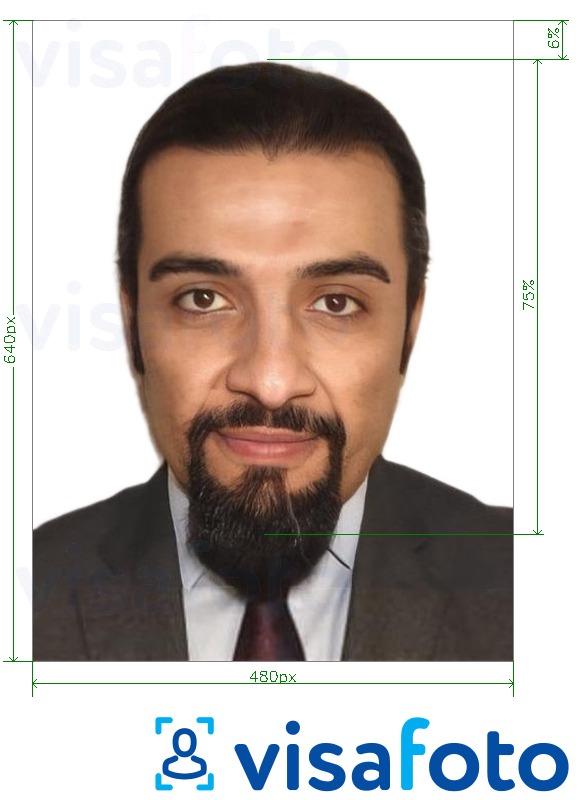
- Saudi ID card photo size and dimensions for digital upload are as follows:
- 480 × 640 pixels (width × height) and no larger than 1 MB.
- The required file format is JPEG.
- The official size of the Absher digital passport photo is stated as multiples of 2:3, which refers to the photo's aspect ratio (width to height), directly related to the Saudi Arabia passport photo size of 4 × 6 cm.
- The background must be solid white with no patterns, shadows, or colors.
- Your face should be clearly visible with a neutral expression (do not smile), and you should not wear any cosmetics. You must look directly at the camera.
- The image should be well lit, with no shadows or reflections hiding features. Red eye is strictly prohibited.
- Head covering rules for men: Men may wear the traditional ghutra, provided that it does not affect the overall appearance or hide basic facial features.
- Head covering rules for women: Women may wear a head and neck covering, but it must not hide the basic features of the face.
- Glasses are not permitted. This includes regular eyeglasses and contact lenses that hide eye color.
Example of a Saudi National ID photo:
Absher photo requirements for Iqama
To update your Iqama (Resident ID) photo via Absher, you must upload a compliant biometric photo. Below, we explain the rules that reflect the current "Change Resident ID Photo" service and standard Iqama photo specifications used across Absher and Jawazat.
Digital Absher Resident ID photo requirements:
- Format: JPEG or JPG.
- Dimensions: The Absher resident photo service commonly uses 480 × 640 pixels (width × height).
- File size: The upload limit may vary by service interface; keeping the file small while maintaining good image quality helps prevent upload problems.
General photo requirements:
- Use a plain white background with even lighting and no shadows.
- Keep your entire face clearly visible.
- Look directly at the camera with your eyes open, mouth closed, and a neutral expression.
- Do not wear glasses or other items that obscure your facial features.
- Head coverings are permitted for religious reasons if they do not cover the face.
- Use a recent photo that accurately reflects your current appearance.
Example of an Iqama photo:
How to make an Absher photo online
The Absher system uses artificial intelligence to verify your photo, so it's important to comply with the requirements. You can prepare an Absher photo at home without visiting a photo studio. Visafoto is an online photo editing service that formats your image according to Saudi ID and Absher requirements, including background, dimensions, and facial positioning. Here's how to create an Absher photo in just two steps:
- Upload a photo taken in good natural light to the Visafoto tool below.
- Select the country and document type (e.g., Saudi Arabia ID card Absher).
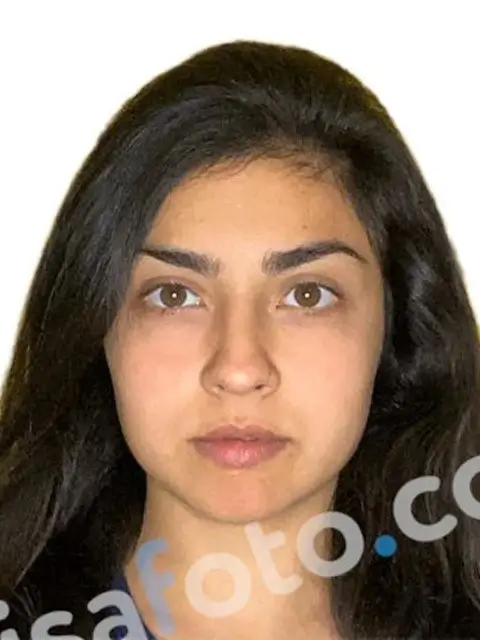
Visafoto then prepares the image for online submission. It adjusts the background, size, framing, and head position according to the selected requirements and provides a digital file suitable for uploading, along with a printable version.
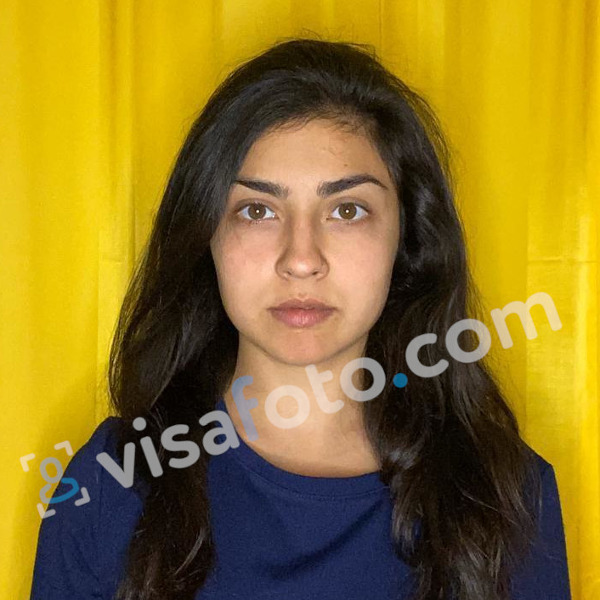
The tool can also improve the original image when necessary. It can correct lighting, enhance clarity and resolution, and adjust framing when the face is positioned too close to the edges. You can even photograph an existing passport or ID photo with your phone and use the image as the source. If the original already meets the required quality, Visafoto avoids unnecessary changes.
Original photo:
After Visafoto editing:
Visafoto reports a 99.7% acceptance rate based on more than 1,000,000 approved images. If your photo is rejected, we offer a full refund, and 24/7 tech support is available if you need help.
How to upload the photo to Absher
You can submit a resident photo through Absher by following the relevant service in your account and completing identity verification. Before you start, prepare a digital image that meets the required format and photo standards.
Follow these steps:
- Log in to the Absher Individuals website or app. Go to My Services → Passports → Change Resident ID Photo/Update Resident Photo.
- Choose the person. If you are a sponsor with dependents, select the person whose photo you want to update. The service applies to individuals 18 or older.
- Tap “Attach/Update Resident Photo” (or the + button) to start the upload.
- Choose “Upload from Gallery/Library” and select your prepared digital photo.
- Open the Nafath app when you receive the verification request and confirm your identity using the available biometric or PIN verification. If facial verification cannot be activated, the system may offer an alternative.
- Pay the fee of approximately SAR 149.50, including VAT, using an available payment method.
- After payment, the service submits the request for processing. The uploaded photo undergoes automated checks before final approval.
Absher photo rejected: common reasons
Absher uses automated checks to verify submitted photos, so even small problems with the image can lead to rejection. The most common issues concern file specifications, image quality, background, and facial appearance. Below, we explain the main reasons a photo may not be accepted.
Technical and file issues:
- Incorrect dimensions: The photo should measure 40 × 60 mm (4 × 6 cm).
- Wrong file format: Submit the image in JPEG format.
- Incorrect file size: The file should not be excessively large or heavily compressed. Images compressed by messaging apps may lose too much quality.
Background and image quality:
- Non-white background: Use a plain, uniform white background without shadows, gradients, or color tints.
- Poor lighting or shadows: Make sure your face and the background are evenly lit, with no visible shadows.
- Glare or red-eye: Flash reflections, red-eye, and glare on glasses can affect the automated check.
- Low image quality: Blurry, pixelated, or heavily edited photos may be rejected.
Appearance and compliance:
- Head coverings: Wearing prohibited headwear or coverings that hide basic facial features may result in rejection.
- Glasses: Glasses are not accepted.
- Incorrect facial expression: Look directly at the camera with a neutral expression and keep your mouth closed.
- Obstructed facial features: Hair, accessories, or other objects must not cover the face or eyes.
- Outdated photo: Use a recent photograph taken within the last six months.
Other service-related issues:
- Photo update frequency: An Iqama photo can generally be updated once per calendar year.
- Existing application: You cannot submit another photo-update request while a previous request is still being processed.
How to update my photo at Absher?
You can update your Iqama photo through Absher without visiting a government office. The service is available through the Absher Individuals app and website, with Nafath verification required during the process.
Here is how to update the Iqama photo in the Absher app:
- Log in: Open the Absher Individuals app and sign in.
- Open the service: Go to My Services → Passports → Change Resident ID Photo. The menu name may vary slightly between app versions.
- Select the resident: Choose the resident whose photo you want to update, then tap Attach/Update Resident Photo or the + icon.
- Upload the image: Select Upload from Gallery and attach your prepared photo in JPEG format. Absher checks the image automatically. If it fails validation, upload a corrected version.
- Verify your identity: Open the Nafath app when prompted and complete the verification using the available biometric or PIN method.
- Pay the fee: Pay the applicable service fee, currently around SAR 149.50 including VAT, using an available payment method.
- Check the status: After submission and approval, the updated photo is used for your Iqama record and subsequent card issuance or renewal.
How to change my photo on the Absher website? Follow these steps:
- Log in to Absher Individuals.
- Open Services → Passports → Change Resident ID Photo.
- Select the resident and choose Attach/Update Resident Photo.
- Upload the prepared JPEG and complete the automated photo check.
- Finish Nafath verification and pay the applicable fee.
How to change a dependent photo in Absher? If you are a sponsor, select the relevant dependent from your account and follow the photo-update instructions shown by the system. The service applies to eligible dependents who are 18 or older.
When you need to visit an Absher/Civil Affairs branch
Absher handles many government procedures online, but some transactions still require an in-person visit. A branch may also be necessary when your situation falls outside the eligibility rules for a digital service or when an online application cannot be completed.
You may need to visit a government office in these situations:
- If the service is not fully digital: Certain Civil Affairs procedures, including some marriage, divorce, birth, and death-related services, may require an office visit. Some citizens may also need to visit to receive physical identity documents when delivery is unavailable.
- If you are not eligible for an online photo update: Although the Iqama photo service is digital, cases that fall outside its eligibility requirements may need to be handled through a Jawazat (Passport) office.
- If a passport case requires in-person service: Some passport procedures require a branch visit, including certain cases involving a recently issued passport, previous use of an online service within the applicable period, or a lost passport.
- If the online transaction cannot be completed: Before visiting an office, you can use Tawasul through Absher to submit a request for assistance with a transaction that could not be completed online.
- If someone else is handling the transaction: For eligible services, Absher's E-Authorization feature allows you to authorize another person to complete certain procedures at a Civil Affairs office on your behalf.
Check the specific service in Absher before going to a branch. The platform indicates whether your transaction can be completed online or requires an in-person appointment or visit.
FAQ
Can Absher reuse my previous National ID photo?
Yes. When replacing a National ID, Absher can reuse your previous photo if it was changed within the last 720 days. You can also choose to upload a new photo.
How long can Absher reuse a previous photo after it was changed?
Absher can reuse the previous photo for 720 days, or about two years, from the date it was last updated. After that period, you must submit a new photo that meets the current requirements.
Does a child under 10 need a photo for a Saudi passport?
Yes. A recent passport photo is required for children under 10. When renewing the child’s passport through Absher, you must upload a clear photo that meets the official requirements.
Do I need a new photo when replacing a lost or damaged Saudi National ID?
Not necessarily. Absher lets you either upload a new photo or use your previous one if it was updated within the past 720 days. The system automatically checks the submitted image against the required specifications.
Do I need to use Nafath when updating my resident photo through Absher?
Yes. Updating a resident’s photo through Absher requires verification with the Nafath app. If you cannot complete facial biometric verification, the system may provide an option to continue without it.
How long do I have to complete Nafath face verification for an Absher resident photo update?
You have 60 seconds to complete the biometric verification. If the request expires, the service displays an error, and you must return to the platform and submit a new verification request.
Why can’t Absher detect my face in the uploaded photo?
The service may reject the image if its biometric checks cannot identify your face clearly. Common problems include a small or blurry face, uneven lighting, shadows, a non-white or patterned background, glasses or headwear covering facial features, or an incorrect JPEG size or format. Use even lighting, a plain white background, a clear front-facing pose, and the required image dimensions.
Does Absher require a profile photo?
No. Creating an Absher account does not require you to upload a separate profile or portrait photo. The official Absher registration page asks for an ID/Iqama/Border Number, mobile number, email address, username, password, preferred language, and a verification code. There is no field for uploading a personal photograph during account registration.