How to Get a Passolig (Passo Taraftar) Card in Turkey

If you're planning to attend a football match in Turkey with tickets sold through Passo, make sure you get a Passo Taraftar card, the current name for Passolig.
Keep reading to learn all about the Passolig card, including how to apply, how stadium entry works, and where to take the perfect photo for your Passolig card.
Table of contents
- Passolig card benefits
- Passolig card types
- Passolig card for foreigners: eligibility and requirements
- How to apply for a Passolig card online
- How to purchase a Passolig card at the stadium
- Passolig photo requirements
- Get an ID photo for a Passolig card online
- Passolig card cost
Passolig card benefits
So, what is a Passolig card? Now called Passo Taraftar, it is a personalised card for football supporters in Turkey. It gives access to match tickets for participating clubs. Depending on the card type, it can also be used for shopping or banking transactions.
The card stores your personal information such as your name, passport number, phone number, photo, and birth date, transforming it into a digital ID that replaces paper tickets. This allows for swift entry into stadiums, as match tickets are electronically loaded onto the card. It also ensures each ticket holder is accounted for, boosting security at events.
By simplifying access to games and enriching the fan experience, the Passolig card also supports local sports clubs. It offers users a chance to engage in special promotions that provide gifts, discounts, and exclusive experiences related to their favorite teams.
You can continue using an existing Passolig card until its e-ticket validity expires. When that period ends, apply for the appropriate Passo Taraftar card.
Passolig card types
The current Passo Taraftar range includes digital and physical debit cards, plus digital and physical prepaid cards:
Passo Taraftar Digital Debit Card
A digital card linked to a bank account, with banking and payment functions.
Passo Taraftar Physical Debit Card
A physical bank card for purchases and supported ATM transactions as well as match access.
Passo Taraftar Digital Prepaid Card
A digital prepaid option, with funds loaded before use.
Passo Taraftar Physical Prepaid Card
A physical prepaid option. Its features differ from those of the debit card, so do not assume that every card offers cash withdrawals or other banking services.
Foreign applicants are offered the prepaid card, rather than the full choice of banking products. Existing Passolig credit cards are legacy products, not the standard new-card options listed above.
Passolig card for foreigners: eligibility and requirements
Foreign nationals need a Passo Taraftar card for matches sold through Passo. Apply using your passport details and the prepaid-card option. The card forms part of the electronic ticketing system introduced under Law No. 6222.
Even if you haven't received your physical card yet, you can still get into matches using the Passo app, provided your tickets are properly linked to your account.
Check the home club's ticketing arrangements before applying: clubs outside the Passo network use their own contracted platforms. Club-logo restrictions can also affect which tickets you may buy. The official Passo Taraftar FAQ explains these restrictions.
How to apply for a Passolig card online
Here is how to apply for the current Passo Taraftar card:
- Visit the official Passo Taraftar website and start a card application.
- If you are applying with a foreign passport, select the foreign-passport option. Enter your personal details as they appear in your passport.
- Provide the contact details requested by the application and complete its verification steps. Keep access to the phone number and email you use.
- Select the available prepaid-card and club options appropriate to your application. Check any club-logo restrictions for your intended match.
- Provide your own portrait photo if requested, following the current upload field's instructions.
- Follow the delivery instructions if applying for a physical card. Do not assume same-day stadium collection is available.
- Review your application and pay the annual e-ticket system usage fee shown for your card. This does not include a match ticket.
- After completing the application, use your Passo account or the Passo Mobile app to buy your match ticket. Top up the prepaid card if needed for your chosen payment method.
- Check that the ticket appears in your account before travelling to the stadium. Use the app's match-entry function for digital admission.
How to purchase a Passolig card at the stadium
For a new card, apply online before match day rather than relying on immediate issuance at a stadium. Stadium box offices sell match tickets, but that does not guarantee they will issue or hand over your personalised card on the spot.
- Check the home club's official match notice for the correct ticketing platform, box-office opening hours and entry restrictions.
- Complete your card application in advance and make sure your e-ticket validity covers the match.
- Have your passport and the contact details used for registration available if you need assistance at the ticket office.
- Buy a ticket for the relevant match and check that it is linked to your account. Do not assume a temporary entry card replaces registration or the match ticket.
If you have completed a physical-card application but are waiting for delivery, you can use Passo Mobile's "Enter the Match" function for admission with your valid ticket. The app supports QR-code entry on phones without NFC.
The Passo iPhone app lists English and Turkish as supported languages. Some match notices or club-specific instructions may still be in Turkish.
Passolig photo requirements
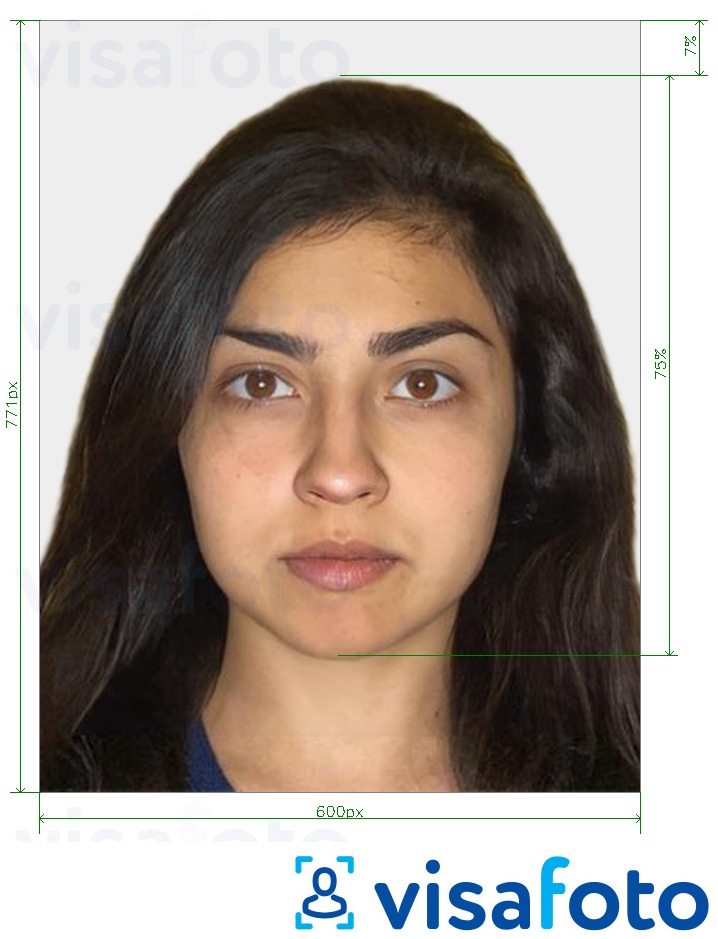
Use these guidelines to prepare a clear portrait, and follow any additional photo instructions shown in the current application:
- Follow the current upload field's instructions on dimensions, file format and file size. Do not assume a generic passport-photo format is required.
- Keep your whole head visible, with your face clearly shown and enough space around it for cropping.
- Use a plain white background without any patterns or colors that might merge with the background.
- Avoid wearing white clothes, as they can blend with the background.
- Keep a neutral expression. Avoid large smiles, which can alter your facial features.
- Your eyes should be completely open and visible. If you wear glasses, they must be prescription glasses without any tint. Sunglasses or tinted lenses are not permitted.
- Hats or scarves are only allowed for religious reasons.
Here is an example:
Get an ID photo for a Passolig card online
For a high-quality Passolig Identity Card photo, online professional tools are your best bet. Visafoto.com is a great option that quickly converts your photo to meet all official standards. Since 2013, Visafoto has been handling document photos and is familiar with the requirements for IDs, passports, visas, and similar documents worldwide.
How do you begin? Take a photo of yourself in natural light and upload it to Visafoto.com. The tool will adjust the image size, format, background color, and correct your face's positioning. If you're not happy with the photo, we offer free replacements. Plus, if your photo gets rejected by the officials, you can claim a full refund.
You'll get a digital copy for online use and a print-ready version as well.
Take an image with a smartphone or camera against any background, upload it here, and instantly get a professional photo for your visa, passport, or ID.

You will get a digital photo like this one:

Passolig card cost
The amount you pay depends on your club or card logo. There is no separate standard card fee, but the annual e-ticket system usage fee is required for match-ticket access. Match tickets are purchased separately.
The official fee schedule, checked on 25 October 2026, lists:
| Club or card logo | Annual e-ticket fee |
|---|---|
| Beşiktaş, Fenerbahçe, Galatasaray or Passo Taraftar | TRY 1,200 |
| Trabzonspor | TRY 750 |
| Göztepe or Kocaelispor | TRY 600 |
| Ankaragücü or Gençlerbirliği | TRY 500 |
| Konyaspor | TRY 400 |
| Other listed club logos | TRY 350 |
The same schedule lists a TRY 181 courier fee for physical-card delivery. Fees can change, so check the final amount before paying.
The e-ticket fee covers one year. If its validity expires, you cannot buy match tickets or use the card for stadium entry until the relevant e-ticket service is active again. This is different from the expiry date printed on the physical card.
Last updated: 26 October 2026.