Cambodia e-Visa Guide

Teeming with culture, symbolized by its temples, Cambodia attracts tourists worldwide. Eligible travellers can arrange their visa online before departure. This guide explains the application, documents, photo requirements and fees, along with accepted entry points and the separate e-Arrival declaration.

Table of contents
- Cambodia e-visa policy
- How to apply for a Cambodia e-visa?
- Documents required for electronic visa applications
- Cambodia e-visa photo requirements
- Get a digital Cambodia visa photo online!
- How long does it take to issue a Cambodia e-visa online?
- Cambodia e-visa cost
- Cambodia e-visa validity and extension
Cambodia e-visa policy
Except for citizens who qualify for visa-free entry, foreigners need a visa to enter Cambodia. E-visa eligibility depends on your nationality, passport and purpose of travel. Check your eligibility in the official application before paying.
Tourist e-visas (Type T) and ordinary e-visas (Type E) are single-entry visas, valid for use within three months of issue, with an initial stay of one month. The visa's entry window is different from the permitted stay after arrival.
The portal also announces electronic applications for Type A (Diplomatic), Type B (Official) and Type C (Courtesy) visas from 1 August 2026. These are separate categories, not alternatives to select for an ordinary holiday.
For Chinese citizens holding People's Republic of China passports, including Hong Kong and Macao SAR passports, the portal announces a temporary exemption for stays of up to 14 days per entry from 15 June through 15 October 2026. Do not assume it applies after that date without an official extension. Eligible visitors must still complete e-Arrival.
Where can you enter Cambodia with an e-visa?
The official portal lists these entry points as accepting e-visas:
- Techo International Airport (KTI): Phnom Penh gateway
- Siem Reap Angkor International Airport (SAI): Siem Reap
- Sihanoukville International Airport (KOS): Sihanoukville
- Bavet: Svay Rieng, border with Vietnam
- Tropaeng Kreal: Stung Treng, border with Laos
Cham Yeam and Poipet are listed as temporarily closed for e-visa entry until further notice. E-visas are not accepted at every checkpoint. Check the intended crossing before booking your journey.
Cambodia e-Arrival is separate from your visa
Submit the official Cambodia e-Arrival declaration within seven days before arrival or on arrival. The declaration is free. Air travellers should complete it before landing and keep the confirmation available.
An e-visa does not replace e-Arrival, and e-Arrival does not grant a visa or visa exemption. The free declaration is separate from any visa fee.
How to apply for a Cambodia e-visa?
To apply for a Cambodian e-visa, follow these steps:
- Visit the Cambodian e-visa official platform;
- Start a new application and choose the appropriate visa category;
- Get through security verification;
- Fill out your personal information and travel details in the form, and upload a separate portrait photo and a clear image of your passport data page in their respective fields;
- Review your name, passport number, travel dates and entry point before proceeding to payment;
- Complete the payment using your preferred method;
- Save your application reference and payment confirmation, then wait for processing;
- Check your email, including the spam folder, or use "Check & Change" to retrieve the approval;
- Download and print your approved e-visa certificate, and keep a digital backup for your journey.
The portal announces that QR codes replace the certificate's traditional barcode from 1 August 2026. Keep the complete certificate readable; do not crop it down to the code alone.
Documents required for electronic visa applications
The Cambodian e-visa requirements list isn’t a long one:
For T (tourist) visas:
- Your passport, with more than six months' validity remaining at entry, and a clear image of its data page;
- A recent passport-size portrait photo, uploaded separately from the passport image;
- E-mail address for registration and receiving e-visa;
- Visa or MasterCard credit/debit card for payment.
For E (ordinary) visas:
- Your passport, with more than six months' validity remaining at entry, and a clear image of its data page;
- A recent passport-size portrait photo, uploaded separately from the passport image;
- E-mail address for registration and receiving e-visa;
- Supporting documents requested for your purpose of entry, such as an invitation, employment or sponsorship letter, labour contract or business documentation;
- Visa or MasterCard credit/debit card for payment.
Travel medical insurance is recommended, but the portal's published standard Type E requirements do not establish it as a universal mandatory upload. Supply any additional documents requested for your particular application.
Cambodia e-visa photo requirements
The official Cambodian e-visa instructions specify a recent passport-size digital photo in JPEG or PNG format. Follow the portrait upload field's current framing and file-size instructions. The published visa-type information does not specify an exact pixel size, DPI or maximum file size, so a printed-photo measurement should not be treated as a compulsory digital upload size.
For a clear passport-style portrait, use these practical preparation tips:
- The image should have adequate brightness and contrast and show natural skin tone;
- It should show a close-up of the head and partial shoulders;
- Face the camera, keep your head centered and use a neutral expression. The face should be in clear, sharp focus;
- Keep your eyes visible and hair away from the face;
- Avoid reflections or frames obscuring the eyes. Follow any glasses instructions shown by the application;
- Head coverings, hair or facial ornaments should not obscure the face;
- Use a plain, light background for the finished photo, with no other people or objects;
- Avoid distracting shadows on the face or background;
- Avoid red-eye.
Your portrait and passport data-page image are different uploads. Do not crop the photograph out of your passport scan and submit it as your new portrait. If the portal reports that the passport image is unclear, provide a sharper, complete image of the data page with readable details and machine-readable lines. Changing the portrait's size will not fix an unclear passport image.
For guidance on other application routes, see our Cambodia visa guide. An embassy's printed-photo requirements do not automatically apply to an e-visa upload.
Here is a passport-style photo example, not a statement of the portal's exact digital dimensions:

Get a digital Cambodia visa photo online!
With the e-visa policy, getting a permit to enter Cambodia is now easier than ever. But you can make it even easier and make the process even smoother by getting your photo done professionally online. This way, you minimize the chances of a rejected application.
Using Visafoto, an online photo editor that has been adjusting photographs for various documents worldwide since 2013, you can easily prepare a digital Cambodian e-visa application photo online. Visafoto helps with photo preparation; the Cambodian authorities make the final decision on your application.
Just take a picture of yourself following the guidelines stated in the requirements. Don’t worry about the size, background, positions, and proportions: Visafoto will handle the technicalities.
Take an image with a smartphone or camera against any background, upload it here, and instantly get a professional photo for your visa, passport, or ID.
The original photo:
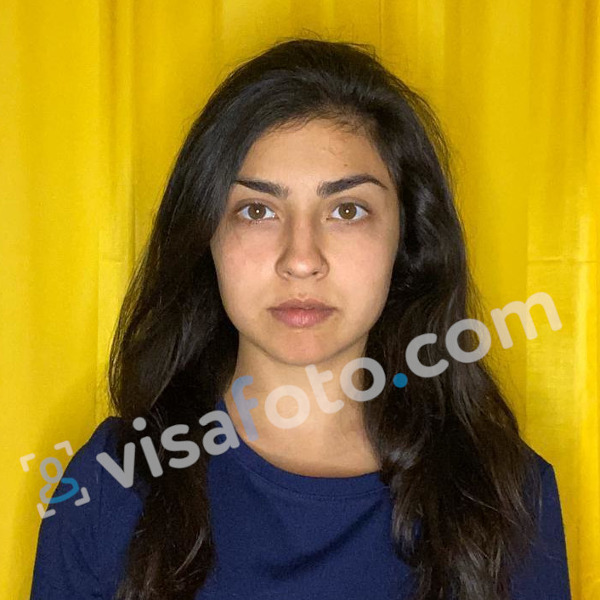
The result:


Visafoto can replace the background and improve brightness and contrast, including correcting uneven lighting on part of the face, while preserving your facial features. Before uploading the downloaded digital photo, preview it and check its file format, size and framing against the portal's current portrait-field instructions. If you need help with the prepared photo, contact Visafoto's support team.
How long does it take to issue a Cambodia e-visa online?
The published Cambodian e-visa processing time is three business days. Allow extra time before departure; this is not a promise of approval within three calendar days. If you are asked to correct an upload or provide more information, respond promptly and check the application status before travelling.
Cambodia e-visa cost
The official application fee depends on the visa category:
| E-visa category | Official fee |
|---|---|
| Tourist visa, Type T | US$30 |
| Ordinary visa, Type E | US$35 |
The portal lists these amounts without the old additional US$6 processing surcharge. Charges made by a third-party application service are separate from the official visa fee. Review the total and payment terms before paying.
Cambodia e-visa validity and extension
Tourist and ordinary e-visas are valid for entry within three months of issue and allow a single entry with an initial stay of one month. Follow the dates and conditions on your issued visa and entry stamp. Leaving Cambodia and returning requires a new visa unless you qualify for an exemption.
Tourist visas can be extended for another 30 days through Cambodian Immigration, as explained in the Cambodian Embassy's tourist-visa instructions. Apply before your permitted stay expires. Ordinary-visa extensions depend on the relevant extension category and supporting documents; do not assume that the initial e-visa automatically grants a long-term stay or permission to work.
Last updated: 14 October 2026.