Canadian Citizenship Certificate: Application, Replacement and Photo Requirements

As a Canadian citizen, you may need a citizenship certificate to apply for a Canadian passport, replace a lost citizenship document or confirm citizenship through a Canadian parent.
This guide explains how to apply for your first certificate, replace or update an existing one, choose between online and paper applications, and prepare the documents and photographs you need.
Table of contents
- Canadian Citizenship Certificate Explained
- Who can apply for a Canadian citizenship certificate?
- Can you apply for a Canadian citizenship certificate online?
- Documents required for a Canadian citizenship certificate
- Canadian citizenship certificate photo requirements
- Get your Canadian citizenship certificate photo online with Visafoto!
- How to apply for a Canadian citizenship certificate
- Canadian citizenship certificate fees
- Canadian citizenship certificate processing time
- Canadian citizenship certificate: urgent processing
- Receiving your paper certificate or e-certificate
- Replacing a lost citizenship certificate or updating your details
- How to change the name on your Canadian citizenship certificate
- Frequently asked questions
Canadian Citizenship Certificate Explained
A citizenship certificate is official proof of Canadian citizenship. It can support a passport application or establish citizenship when applying for a job, a pension or a Social Insurance Number. Eligibility for the service or benefit itself is a separate matter.
The certificate is not a passport, travel document or photo ID. It also serves a different purpose from a permanent resident card, which documents permanent resident status rather than citizenship.
You can generally choose a paper certificate or an electronic certificate, known as an e-certificate. Both are valid proof of citizenship.
Canada stopped issuing wallet-sized citizenship cards in February 2012. An existing valid card can still prove citizenship, but if you replace or update it, you receive a citizenship certificate rather than another card. Older certificates do not need replacement simply because their design differs from the current version.
Who Can Apply for a Canadian Citizenship Certificate?
You can apply if you need proof that you are already Canadian, or if you want Immigration, Refugees and Citizenship Canada (IRCC) to determine whether you are a citizen. A parent or legal guardian may apply for a minor child. IRCC's certificate eligibility guidance distinguishes the main situations below.
Applying for Your First Proof of Citizenship
People born outside Canada to a Canadian parent may need a certificate before applying for a Canadian passport. The application establishes the citizenship connection through birth, parentage and the relevant citizenship records.
If you were born in Canada, a provincial or territorial birth certificate generally already proves citizenship, subject to exceptions such as certain children of foreign diplomats. You can still apply for a citizenship certificate if you need one.
If you became Canadian through naturalisation, you normally receive a certificate as part of that process. You do not need a second proof application just to obtain the certificate issued with your citizenship grant. Our Canadian citizenship application guide covers applying to become a citizen.
Replacing or Updating an Existing Certificate
Use the application process when your Canadian citizenship certificate has been lost, stolen or destroyed, or when you need an eligible update, such as a legal name change. A damaged document or an older citizenship card can also require replacement.
An error made by IRCC is different from a later change to your details. If a newly issued certificate contains a mistake, contact IRCC about the correction procedure before paying for a replacement application.
Citizenship by Descent: What Applicants Born Abroad Should Check
The rules changed on December 15, 2025: the citizenship by descent was extended beyond the former first-generation limit for many people born abroad. A Canadian grandparent or earlier ancestor can therefore be relevant, but you still need records establishing the family and citizenship chain.
For a person born outside Canada on or after December 15, 2025 to a Canadian parent who was also born abroad, the parent generally needs a total of at least 1,095 days of physical presence in Canada before the child's birth. The days do not have to be consecutive. Exceptions exist for qualifying Crown servants.
Where this requirement applies, the paper application instructions identify the parent's physical-presence form, CIT 0555, and supporting evidence. Adoption has separate rules: being adopted abroad by a Canadian parent does not automatically establish citizenship by descent.
Can You Apply for a Canadian Citizenship Certificate Online?
Some applicants can apply online; others must use a paper application. Your citizenship history, reason for applying and family circumstances determine the available route. Choosing an e-certificate does not automatically make you eligible to apply online.
| Question | Online application | Paper application |
|---|---|---|
| Who can use it? | Applicants who meet IRCC's online eligibility conditions | Applicants required to use paper, or choosing to do so |
| Typical requests | First certificate or eligible replacement of a lost, stolen or destroyed certificate | First certificate, replacement or an update requiring paper submission |
| Application format | Questionnaire in an online account | Form CIT 0001 and the applicable checklist |
| Photo submission | One colour digital photo | Two identical colour printed photos |
| Supporting documents | Uploaded electronic images | Copies, originals and translations as specified for the case |
IRCC's online guide says that applicants born outside Canada to a Canadian parent who was also born outside Canada must apply on paper. Do not confuse broader citizenship eligibility under the new descent rules with eligibility to use the online application.
Use the questions on the official certificate application page to select the route for your circumstances. That page also leads to the current forms and instructions. If you have already submitted a paper application, do not submit a duplicate online request.
Documents Required for a Canadian Citizenship Certificate Application
The checklist depends on whether you are proving citizenship for the first time, replacing a document or updating its details. Paper applicants use the relevant scenario in the Document Checklist, CIT 0014; online applicants receive a personalised checklist.
Documents for a First Certificate
Prepare the following, as applicable:
- A completed application, using CIT 0001 for the paper route.
- Two valid identity documents showing your name and date of birth, with a photograph on at least one.
- Your birth certificate or other accepted evidence of birth and parentage.
- Documents proving the Canadian citizenship of your parent, grandparent or earlier ancestor, where relevant.
- Records connecting each generation and explaining different names, such as birth, marriage or legal name-change documents.
- The parent's physical-presence calculation and evidence if required.
- Required photographs, translations and payment receipt.
For identification, examples include a passport, driver's licence or an eligible government-issued health or age-of-majority card. Equivalent foreign government ID may be used by applicants abroad who cannot provide Canadian ID. A birth certificate, SIN card, bank card or previous citizenship certificate does not count as personal identification for this application.
If a child does not have two identity documents or photo ID, include an explanation letter. The application photograph must show the child.
Documents Required for Canadian Citizenship Certificate Replacement or Update Applications
Include your current identifying information, the available details of the previous citizenship document and the evidence for the replacement or update. Explain when and how a certificate was lost, stolen or destroyed. For a name change, provide the legal documents connecting your previous and current names.
Existing paper certificates and citizenship cards that you still hold must be returned as instructed. The handling of an existing e-certificate is different; see the replacement section below.
Translations and Missing Family Records
Documents not in English or French need a translation. If the translator is not a Canadian certified translator, an affidavit confirming the translation is also required. You and your family members must not translate your own application documents.
For a descent application, obtain records from the authority that created or holds them. Genealogy websites can help you locate records, but third-party family trees alone are insufficient. If an official birth record cannot be obtained, explain why and include evidence of your attempts, along with any other accepted records that establish birth, parentage or citizenship.
Follow the checklist's distinction between colour copies, certified copies and originals. Do not send every original family document simply because you have it.
Canadian Citizenship Certificate Photo Requirements
You need a new application photograph even if you choose an electronic certificate. IRCC publishes separate photo instructions for proof-of-citizenship applications; select the certificate option and your submission method.
Digital Photos for Online Citizenship Certificate Applications
| Requirement | Digital photo specification |
|---|---|
| Number | One colour digital photo |
| File format | JPG or JPEG, with minimal compression |
| Minimum dimensions | 420 × 540 pixels |
| File size | Approximately 240 KB; no more than 4 MB |
| Recency | Taken no more than six months before submission |
| Accompanying information | Applicant's first and last name, photographer or studio's name and complete address, and date taken, on the receipt or in a separate text file |
The 420 × 540 figure is a minimum pixel requirement; approximately 240 KB is not a 240 KB maximum. The digital photo must also follow the face-size and appearance requirements below. Upload the individual portrait, not a printable sheet containing several photos.
Printed Photos for Paper Applications
Provide two identical colour photographs, each 50 mm wide × 70 mm high. Face height must be 31–36 mm from chin to the natural top of the head. Use plain, high-quality photographic paper. The reverse must carry the applicant's first and last name, the photographer or studio's name and complete address, and the date taken. Do not glue or staple the photos to the form.
For either route, keep your face and shoulders straight towards the camera, eyes visible and expression neutral. The background should be white or light-coloured, the image sharp, and lighting even. Clear glasses are permitted without glare or frames covering the eyes. Daily religious or medical head coverings must leave the face visible.
Infants have some allowance for facial expression, but the photograph must show only the child's head and shoulders, without the parent's or child's hands. Canadian passport and citizenship photographs have separate instructions, so check the certificate requirements even if you have a passport-photo file.
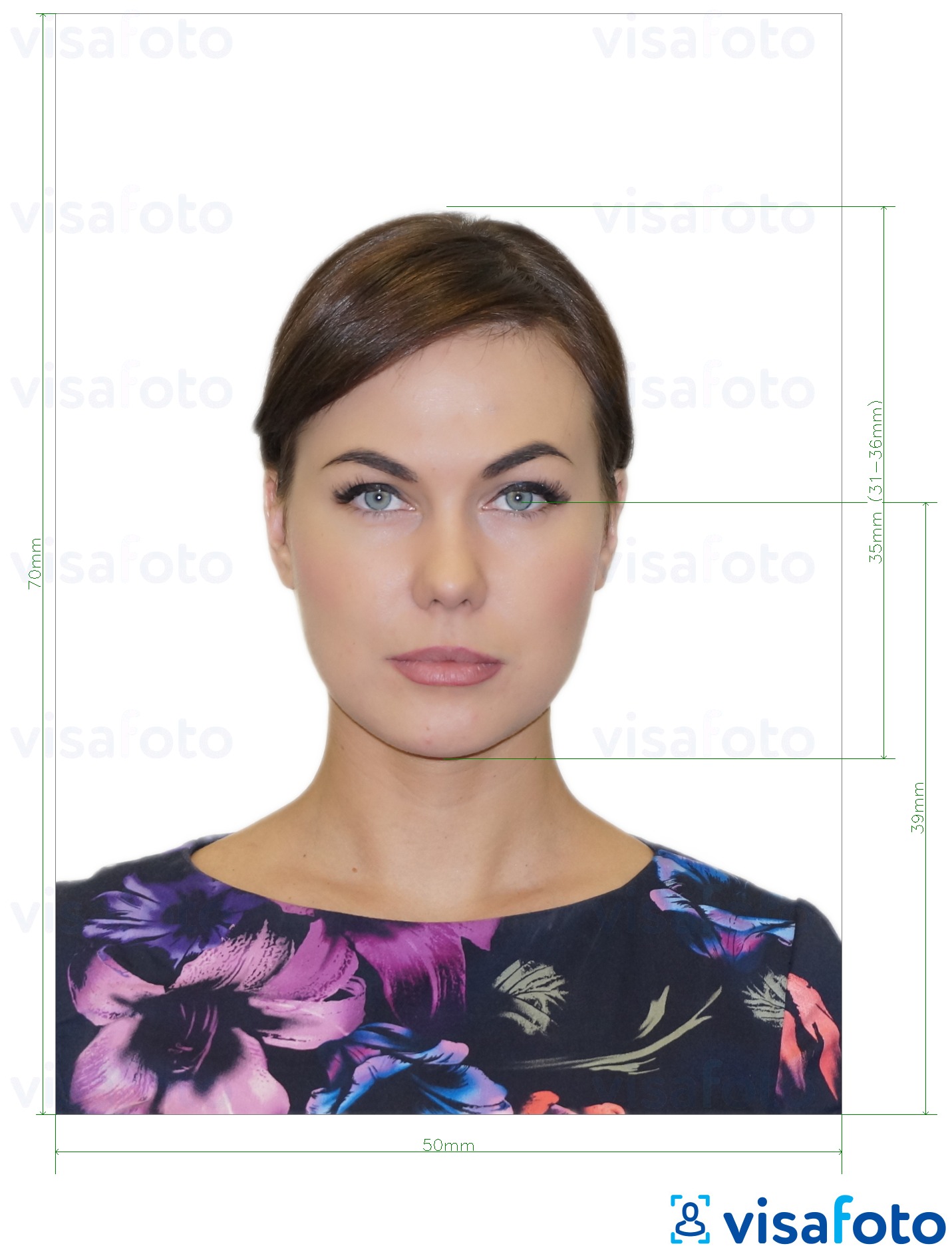
Get Your Canadian Citizenship Certificate Photo Online With Visafoto!
Visafoto helps you prepare the photo format at home, including when local shops are unfamiliar with Canadian document photos. Take a clear photograph with a smartphone or camera, with your face and shoulders visible. You can ask someone to take it from a comfortable distance; you do not need a perfect background or studio equipment.
Upload the image to Visafoto and select Canada and the IRCC photo format. The service adjusts the crop, image dimensions and face positioning, replaces the background and improves lighting and image quality while preserving your facial features. It handles the measurements so you do not have to estimate the head size yourself.
You receive an individual digital portrait and a separate printable template. Use the individual JPEG for an online application, checking the downloaded file against the digital limits above. For a paper application, print the template on photographic paper at its intended paper size, with automatic scaling switched off. Each cut photograph must measure 50 × 70 mm; include two matching prints.
For a child's citizenship certificate photo, take several shots when your baby is comfortable and choose one that clearly shows the face. Photographing at home lets you work around feeds and naps instead of trying to get the right expression during a shop visit. Visafoto can help with the format, background and framing; if the source image is unsuitable, its support team can explain what needs changing.
Every order includes access to 24/7 support. If the authorities reject a photo purchased from Visafoto, you can request a 100% refund. The service costs $9 US dollars; any printing is separate.
How to Apply for a Canadian Citizenship Certificate
Step 1: Choose the Correct Application Route
Identify whether you need a first certificate, a replacement or an update. Complete IRCC's online eligibility questions. If you are required to apply on paper, use the current CIT 0001 package rather than an old form saved on your computer.
Step 2: Gather Your Documents and Photographs
Work through your checklist, including the evidence for each generation where relevant. Prepare one digital photo for an online application or two printed photos for a paper application. Check that names, dates and translations can be read clearly.
Step 3: Complete the Application
For an online application, create or sign in to the account reached through IRCC's certificate application page. Complete the questionnaire, upload clear colour images of the requested documents and select paper or electronic certificate delivery where offered.
For a paper application, complete CIT 0001 and include CIT 0014. Sign and date the form after printing it. IRCC can return forms that are unsigned, dated in the future or dated more than 90 days before receipt. Explain differences in names rather than silently changing information to make documents match.
Step 4: Pay the Application Fee
Pay the applicable fee through IRCC's payment service or within the online application, as instructed. Save the receipt. For paper submission, include the receipt and keep a copy. One payment may cover several family members, but the total must cover each application.
Step 5: Submit Your Application
Online applicants submit through their account. Paper applicants send the signed form, checklist, photos and required documents to the destination generated for their circumstances. IRCC's application page distinguishes age and country of residence, so use the selected route's regular-mail or courier address, rather than a general immigration-office address.
Applicants outside Canada and the United States may submit through a Canadian embassy, high commission or consulate under the local arrangements. Use tracked delivery for a mailed packet. A courier delivery record confirms receipt of the envelope, not that IRCC has accepted the application as complete.
Step 6: Save Your Confirmation and Monitor Messages
An online submission produces a confirmation number. After a completeness check, IRCC sends an acknowledgement of receipt (AOR) and your Unique Client Identifier (UCI). Paper applicants receive their acknowledgement by the method applicable to their submission and contact details.
Check your online account or email, including spam folders. Supply requested documents through the channel specified in the request, and keep your address current. Paper applicants can check status online after the acknowledgement stage.
Canadian Citizenship Certificate Costs
The standard Canadian citizenship certificate application fee is CAD75 per person, whether you are an adult or a child. A family of three submitting ordinary paid applications would therefore pay CAD225.
This is the proof-of-citizenship processing fee, not the fee for becoming Canadian. It is generally non-refundable once processing begins, even if IRCC decides that the applicant is not a citizen. Translation, photography and delivery costs are separate.
Some correction requests and special measures have their own fee rules. If IRCC made a mistake despite receiving the correct information, it can replace the certificate free of charge when you report it within 90 days of receipt. After that period, or if the mistake was not IRCC's, a paid paper replacement is required. The standard fee above was checked on November 16, 2026.
Canadian Citizenship Certificate Processing Time
As checked on November 16, 2026, the data supporting IRCC's waiting times tool lists about 34 months for a new proof-of-citizenship application. That citizenship-certificate estimate was last updated on October 9, 2026. It is an estimate, not a deadline or a promise for every case.
Applications requiring verification across generations can take longer, as can incomplete submissions or cases needing additional records. A receipt or AOR does not mean that the citizenship decision has already been made.
IRCC also identifies additional time for certain overseas submissions:
- Add three to four months for mailing when you live outside Canada and the United States and apply through a Canadian embassy, high commission or consulate.
- Add six to eight months when applying for a minor living outside Canada and the United States whose application was sent directly to the Case Processing Centre in Sydney, Nova Scotia.
Canadian Citizenship Certificate: Urgent Processing
You can request urgent processing of a Canadian citizenship certificate if you have a qualifying need and supporting evidence. IRCC assesses each request individually; urgency is not a guaranteed turnaround time or a separate citizenship application route.
IRCC may consider urgency for employment or education, access to benefits, statelessness, qualifying hardship, moving an eligible minor child to Canada, or travel connected with serious illness or a death in the family where another nationality's passport is unavailable.
A separate provision allows dual Canadians who are also citizens of a visa-exempt country to request urgency with proof of air travel to Canada within six months of applying. A request must include an explanation and evidence, such as an employer's letter, medical records or a paid itinerary, as relevant.
What Evidence Should You Include With an Urgent Request?
Write a letter explaining why you need the certificate, the relevant deadline and how a delay would affect you. Attach evidence that supports that reason: an employer's or school's letter, medical documentation, a death certificate, or an itinerary with proof of payment. IRCC also considers cases where foreign citizenship must be renounced by a specified date.
For the dual-citizen air-travel provision, include evidence of the booked flight and payment. A travel booking alone does not guarantee approval of an urgent request.
How to Request Urgent Processing
- New online application: Answer yes when asked whether you need urgent processing. Explain the circumstances and upload the supporting documents. You must still qualify to apply online.
- New paper application: Include your explanation and evidence with the complete application and fee. Write "Urgent - Citizenship Certificate (Proof)" clearly in large, dark letters on the envelope.
- Application already submitted online: Send an IRCC web-form request, beginning the message with "Request for urgent processing". Include your full name, date of birth, email, phone number, application details and supporting evidence.
- Paper application already submitted from Canada or the United States: Use the same web-form procedure.
- Paper application submitted through a Canadian mission abroad: Contact the embassy, high commission or consulate where you applied and provide your explanation and evidence.
Do not submit a duplicate application to try to obtain faster processing. IRCC will not urgently process an incomplete application and cannot guarantee that the certificate will arrive before your travel or other deadline.
Receiving Your Paper Certificate or E-Certificate
If approved for an e-certificate, you receive instructions for accessing and downloading the PDF through the IRCC Portal. This download portal is separate from the account used to submit an online application. Follow the invitation instructions and keep your application number, UCI and date of birth available. Save the original electronic document securely and keep the account information needed to access it again.
Paper certificates can be mailed to addresses in Canada or the United States. If you live elsewhere, IRCC's instructions require delivery through the Canadian mission selected for your application; the office contacts you about receiving the document.
An e-certificate is valid proof of citizenship. For printing, use both pages of the downloaded PDF on letter-size paper, 8.5 × 11 inches, in portrait orientation. Colour or black ink is acceptable, and all information must remain clear and fully visible. You may print double-sided or on separate sheets, subject to the receiving service's instructions. Print from the PDF rather than photocopying a printout, and do not laminate it.
Check your name, date of birth and other details on receipt. If something is wrong, contact IRCC promptly using the correction instructions; do not edit the certificate yourself. If IRCC says it has mailed your document but it has not arrived, use its missing-certificate enquiry procedure.
Replacing a Lost Citizenship Certificate or Updating Your Details
For a lost, stolen or destroyed certificate, provide the available document details, explain what happened and submit the replacement application with current identity evidence and new photographs. A name update also needs the documents supporting that change.
You can hold only one valid citizenship certificate. When applying for a replacement or update:
- Return existing original paper citizenship or naturalisation certificates, citizenship cards and any pink transmission copies that you still hold, as instructed.
- If replacing an e-certificate, delete or destroy its digital and printed copies when you submit the application. Do not download another copy while the replacement decision is pending.
- If an old paper certificate declared lost turns up after you receive the replacement, return it to IRCC rather than using both.
Forgetting an account password is different from losing a certificate. If you remain entitled to use your e-certificate, try restoring account access and downloading it again before paying for a replacement.
How to Change the Name on Your Canadian Citizenship Certificate
To update the personal data on a Canadian citizenship certificate, apply on paper for a replacement using CIT 0001 and provide documents supporting the new name. The standard CAD75 fee applies to an ordinary name-change application. If you are applying for your first certificate under a name different from your birth record, you must also document the connection between those names.
Documents for a Citizenship Certificate Name Change
The evidence depends on where the change took place and where you now live:
| Your circumstances | Name-change evidence |
|---|---|
| Legal name change within Canada | A legal change-of-name document, court order or adoption order showing the previous and new names. For a family-name change, IRCC also accepts applicable civil marriage, divorce or union records. |
| Name changed abroad; you now live in Canada | A foreign passport or other authoritative national document updated to the new name, a document linking the old and new names, and a Canadian provincial or territorial document in the new name. |
| Name changed abroad; you live outside Canada | An updated foreign passport or other authoritative national document, evidence linking the names, and government-issued photo ID in the new name from your country or state/province of residence. |
A marriage certificate can support a surname change, but marriage does not automatically update the name on your citizenship certificate. If you are changing given names as well, provide the legal evidence required for those changes. Documents not in English or French need the translations described above.
Submit the Name-Change Application
Complete CIT 0001 in the requested name, include the applicable CIT 0014 checklist, identity documents, name-change evidence, two new printed citizenship photos and the payment receipt. Return any existing paper citizenship certificate or card as instructed; for an existing e-certificate, follow the deletion requirements in the replacement section.
If IRCC printed your name incorrectly despite receiving the correct information, use the error-correction procedure rather than treating it as a new legal name change. The free-correction rules and 90-day limit are explained in the fee section.
Frequently Asked Questions
Can I Apply for a Canadian Passport While Waiting for My Citizenship Certificate?
You need accepted evidence of citizenship for a passport application. If the pending certificate is your only way to establish citizenship, an application receipt does not replace it. Someone who already holds another accepted proof, such as an eligible Canadian birth certificate, may be in a different position. Our Canadian passport FAQ explains the passport process.
Does a Canadian Citizenship Certificate Expire?
It has no routine renewal cycle like a passport. Replace it if it is lost, stolen, destroyed or needs an eligible update; you do not need a replacement merely because it is old. The document must remain valid and unaltered.
Can I Apply for a Citizenship Certificate From Outside Canada?
Yes. Online eligibility still depends on your circumstances, and paper submission arrangements depend on where you live. Paper-certificate delivery outside Canada and the United States is handled through a Canadian mission rather than direct mailing to your home.
Do I Need a New Photo When Replacing My Certificate?
Yes. Include the photograph required for your replacement route: one digital photo online or two identical prints on paper. The image must have been taken within six months before submission.
Can I Replace an Old Canadian Citizenship Card?
Yes, but Canada issues a citizenship certificate as the replacement. An existing valid card remains proof of citizenship; a new design alone is not a reason you must replace it.
Can My Child Apply Through My Canadian Citizenship?
Your child may already be Canadian through you, depending on the birth, citizenship and adoption circumstances. For some children born abroad on or after December 15, 2025 to a Canadian parent also born abroad, the parent's 1,095 days of physical presence must be established. A permanent resident child who is not already Canadian needs the appropriate citizenship-grant process instead.
Is an E-Certificate Accepted for a Canadian Passport Application?
Yes, an e-certificate is accepted proof of citizenship. Print it as required for your passport application and submit the other required identity documents and passport photos separately.
What Should I Do if IRCC Returns My Application?
Read the return letter, correct each missing or incomplete item and resubmit as instructed. Check the form's signature and date, identity evidence, translations, photos and payment. Do not start a duplicate online application simply because a paper application is taking time.
Last updated: November 16, 2026.