India New e-OCI Card. Guide to Application, Download and Passport Updates

India introduced the electronic OCI (e-OCI) card on June 30, 2026, replacing newly issued physical OCI booklets with a digital format. Existing physical OCI cards remain valid, while new applicants receive their OCI card electronically.
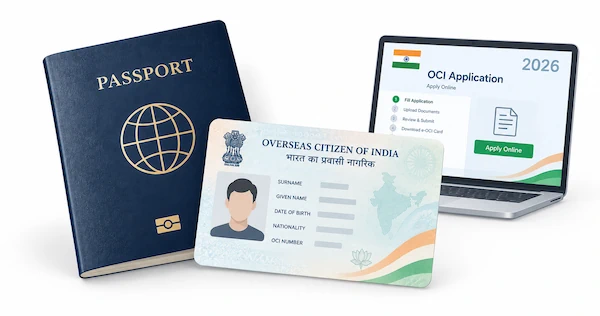
Read this article to learn what an e-OCI card means and how to apply, download, and update your card.
Table of contents:
- India's e-OCI card explained
- e-OCI card vs. physical OCI card
- Who can apply for a new OCI card? Eligibility and requirements
- Do existing OCI cardholders need to apply for e-OCI?
- How to apply for an OCI card for the first time
- OCI application documents
- OCI photo specifications
- Get your OCI photo online!
- How to download your e-OCI card online
- How to update your OCI card after getting a new passport
- OCI fees in 2026
- Can you travel with an e-OCI card?
- How long does an OCI application take?
India's e-OCI card explained
The e-OCI Card is India's new digital format for the Overseas Citizen of India (OCI) Card, which gives eligible people of Indian origin lifelong immigration and residency-related privileges in India. It does not grant Indian citizenship or dual citizenship, but provides benefits often associated with a long-term or “lifetime visa.”
What has changed with the e-OCI?
India has moved the OCI system toward a fully digital format, changing how applicants receive and manage their cards:
- Fully online process: New applicants can complete the OCI process online, from submitting the application to obtaining the digital card.
- e-OCI card for existing OCI holders: Existing OCI cardholders can access the official portal, generate their e-OCI, and download the digital document to a mobile device.
- No routine physical re-issuance: OCI cardholders no longer need a new physical booklet simply because they turn 20 or receive a new passport. However, they must update their passport details online within three months of receiving a new passport.
- Residency requirement removed: Eligible foreign nationals no longer need to reside in India for six months before applying for an OCI Card.
How to use an e-OCI card? Download the e-OCI PDF to your mobile device and present it together with your valid foreign passport when required. Existing physical OCI booklets remain valid, so current cardholders can still carry their booklet if they prefer.
e-OCI card vs. physical OCI card
The e-OCI Card and the traditional OCI booklet differ mainly in their format and use. Since June 30, 2026, the Indian government has issued OCI Cards exclusively in digital form. Physical booklets are no longer printed for new applications or renewals. Here's how the two formats compare:
| Feature | e-OCI card | Physical OCI Card |
|---|---|---|
| Issuance | Issued digitally for new applications and renewals | No longer issued for new applications or renewals |
| Travel | Can be displayed on a mobile device at immigration checkpoints; a printed copy is not required | Must be carried with a valid foreign passport |
| Re-issuance | No new card is required when you turn 20 or receive a new passport; update your passport details online instead | Re-issuance was required after turning 20 and when obtaining a new passport |
| Validity | Fully valid and linked to India's immigration systems | Existing booklets remain valid and continue to be accepted at immigration |
In practical terms, the e-OCI Card replaces the paper booklet with a digital document that you can access when needed. You can download it through the official OCI portal or the Indian Visa Su-Swagatam mobile app. Existing physical OCI booklets remain valid, but all new OCI documentation is now issued digitally.
Who can apply for a new OCI card? Eligibility and requirements
Foreign nationals can qualify for an OCI card mainly through Indian ancestry or marriage to an Indian citizen or OCI cardholder. The key eligibility categories are outlined below.
People of Indian origin
You may qualify if you are a foreign national who meets at least one of these conditions:
- You were an Indian citizen on or after January 26, 1950.
- You were eligible to become an Indian citizen on January 26, 1950.
- You belonged to a territory that became part of India after August 15, 1947.
- You are a child, grandchild, or great-grandchild of someone who meets any of the above criteria.
Spouses of Indian citizens or OCI cardholders
A foreign national may also apply if they are married to:
- an Indian citizen; or
- an OCI cardholder.
Spousal applications have additional requirements:
- The marriage must be officially registered.
- The marriage must have continued for at least two years immediately before the application.
- You must submit a valid registered marriage certificate.
Do existing OCI cardholders need to apply for e-OCI?
No, the Indian government has not made it mandatory for existing OCI cardholders to convert OCI to e-OCI. Physical OCI booklets remain valid for travel and other OCI-related services.
However, you can generate and download an e-OCI through the official OCI Services Portal if you want a digital version of your card on your phone. This gives you easier access to your OCI details without requiring you to carry the physical booklet.
How to apply for an OCI card for the first time
First-time OCI applications now follow a digital process. Once approved, new applicants receive an e-OCI Card rather than a physical booklet. Here's how the e-OCI card application process works:
Step 1: Submit your application online
Start on the official OCI portal and register an account. Complete the online application form (Part A and Part B) with your personal, passport, and family details.
Next, upload the required supporting documents, passport-style photograph, and signature in the specified format. Pay the applicable fee online.
After submitting the application, you will receive a unique application number. Download and print the completed form for your records.
Step 2: Provide biometrics and wait for processing
Under the 2026 rules, applicants aged 12 to 70 must provide biometric data in person. After your application receives in-principle approval, the relevant consulate will send your appointment details by email.
You must also provide consent for the use of your biometric information for enrollment in India's Fast Track Immigration Program.
Step 3: Check your application status
After submitting your application and completing the required biometric appointment, you can monitor its progress online through the Enquiry option.
Step 4: Get your e-OCI
After your application is approved, you will receive a notification via email or text message. Then, you can log back into the OCI portal to download your new digital e-OCI card. Please note that the physical booklet is no longer issued.
OCI application documents
You must upload supporting documents with your completed OCI application form. The exact documents depend on your circumstances, but the standard requirements include:
- Proof of current citizenship: This can be your valid passport, a naturalization certificate, or a surrendered/cancelled Indian passport. If you submit a passport, it should generally have at least six months of validity remaining.
- Proof of address: Provide evidence of your residential address in the country where you submit the application, such as an electricity bill or rental agreement. If you live with a relative, you may provide a statement from that person confirming your residence.
- Visa copy, if applying from India: Applicants in India must provide a copy of their valid visa. OCI applications cannot be submitted while holding a tourist, missionary, or mountaineering visa.
- Proof of Indian origin or descent: You generally need to establish both:
- your, your parent's, or your grandparent's Indian origin or citizenship; and
- your family relationship to the person through whom you claim OCI eligibility.
- Documents for minors: Provide evidence of the child's relationship to an OCI-eligible parent, such as the birth certificate, parents' marriage certificate, and parents' passports. If the parents are divorced, include the relevant legal documents.
- Documents for spouses: Spouses of Indian citizens or OCI cardholders must provide a marriage certificate and the spouse's passport. If the spouse holds an OCI card, include a copy of that card as well.
- OCI-compliant photograph: The photo must meet the official technical and appearance requirements.
Upload documents in PDF format, with each file no larger than 1,000 KB. Foreign-issued documents, including birth and marriage certificates, may also require an apostille or other authentication from the issuing country.
OCI photo specifications
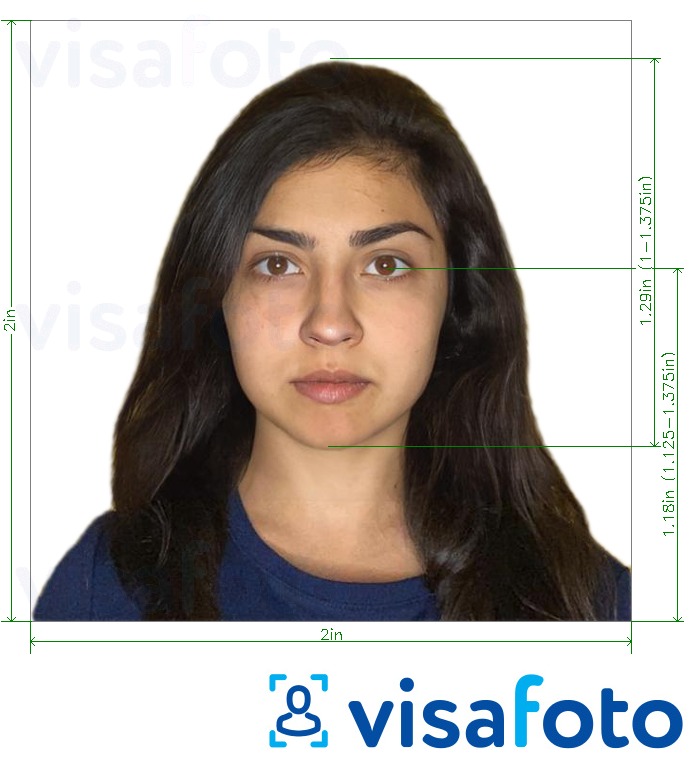
OCI applications require a photograph that meets specific technical and biometric standards. Use the following specifications when preparing your file:
- Dimensions: Square, with a minimum of 51 x 51 mm (200 x 200 pixels) and a maximum digital size of 900 x 900 pixels.
- File format: JPG or JPEG.
- File size: Maximum 500 KB.
- Face size: Your face should cover approximately 80% of the image.
- Background: Plain and light-colored, but not white.
- Position: Face the camera directly, with your head and shoulders centered in the frame.
- Head coverings: Permitted only for religious reasons. The full facial area—from the bottom of the chin to the top of the forehead and across both sides of the face—must remain clearly visible.
- Recency: The photograph must have been taken within the last six months.
Here is a photo example:
Get your OCI photo online!
A compliant photo is required when applying for OCI. With Visafoto, a trusted online ID photo service, you can create one from home in just a few minutes, without visiting a photo studio. Follow these two simple steps:
- Upload a photo taken in natural light to the Visafoto tool below.
- Select India as the country and OCI as the document type.
Visafoto then formats the image according to the required specifications, including the correct background, dimensions, and head position. You receive a digital file for online submission and a print-ready version.
The service can also improve photo quality when necessary. It can adjust lighting, enhance clarity and resolution, and correct framing when the original image is too tightly cropped. You can even photograph an existing passport photo with your phone and use Visafoto to improve its digital quality.
If the original image already meets the required quality standards, Visafoto leaves it unchanged.
Original photo:

Photo after Visafoto processing:


Visafoto reports a 99.7% acceptance rate based on more than 1,000,000 approved photos. If your photo gets rejected, you receive a full refund. Customer support is available 24/7.
How to download your e-OCI card online
Once your e-OCI is available, you can generate and download it through the official OCI Services Portal. The Indian Visa Su-Swagatam mobile app also provides access to the digital card.
1. Sign in to the OCI Portal
Visit the official OCI Services website. Sign in with your existing User ID and password. If you have not created an account, register using the email address associated with your original OCI application.
2. Generate your e-OCI card
After signing in, open the e-OCI section from your dashboard. Your application details will appear on the screen.
Select Generate e-OCI Card to create your digital card.
3. Download and store the card
Download the generated file and save it securely on your phone or another device. You can also access and download the card through the official Indian Visa Su-Swagatam mobile app.
Tip: Keep a backup by emailing a copy to yourself or storing the file in secure cloud storage.
How to update your OCI card after getting a new passport
You must update your passport details with the Indian government whenever you receive a new passport. Submit the update within 3 months (90 days) of the new passport's issue date to avoid the applicable fee of USD 25.
Follow these steps to update your passport details:
- Go to the official OCI Services Portal and choose “OCI Miscellaneous Services." Select the relevant option from the portal.
- Complete the application: Fill in Parts A and B of the online form. You'll need your OCI card number, the passport number currently linked to your OCI record, and your date of birth.
- Choose “Passport Particulars Update.” You can request only one service per application. If you also need to change your address, submit a separate application.
- Upload the documents. Provide clear scans of:
- the bio page of your new passport;
- your previous passport;
- your current OCI card; and
- a recent photograph, generally taken within the last 30 days.
- Review the information carefully and submit the application.
OCI fees in 2026
India revised its OCI fee structure from April 1, 2026, including a charge for passport-detail updates submitted after the three-month deadline. Below is a breakdown of Indian e-OCI card fees and charges.
- New OCI registration from abroad costs USD 275.
- New OCI registration in India: USD 275 equivalent in INR.
- Re-issue / Miscellaneous Services: USD 25.
- Replacement of a lost or damaged OCI Card: USD 100.
- Late passport-detail update: USD 25.
A separate ICWF contribution, typically around USD 3 or the local equivalent, may apply in some countries.
Applications submitted through authorized providers such as VFS Global may also incur additional service charges. The final amount can therefore vary by country and service provider.
Can you travel with an e-OCI card?
Yes. The e-OCI Card allows OCI Cardholders to use a digital version of their card when traveling to India, making the physical booklet unnecessary for immigration purposes.
Here are the main points to remember:
- Show the e-OCI digitally: You can display your e-OCI on a mobile phone at Immigration Check Posts (ICPs) in India and with participating airlines. The system is integrated with India's ICP network.
- Carry your passport: An e-OCI is not a travel document by itself. You must present it together with your valid foreign passport.
- Physical booklets remain valid: Switching to an e-OCI is optional for existing OCI cardholders. Your physical OCI booklet remains valid and accepted if you prefer to carry it.
- New applicants receive only an e-OCI: India no longer issues physical OCI booklets to new applicants.
Important: OCI Cardholders traveling to India must also complete the digital e-Arrival Card within 72 hours before arrival. This requirement is separate from the OCI process. Submit the e-Arrival Card through the Indian Visa Online Portal, not the OCI portal.
How long does an OCI application take?
A complete OCI application generally takes around 5–6 weeks after registration by the Indian mission. The total process can take 6–12 weeks or longer once you include VFS/BLS intake, document corrections, appointment availability, processing, and delivery.
You can monitor the application status online. First, check with your service provider, such as VFS Global, to confirm that the application has reached the relevant Indian mission. You can then check its status through the official OCI Services Portal using your registration and passport numbers.
How long does it take if my OCI card status says "Request Generated"? The “Request Generated” status means that the system has successfully created your request and it is awaiting further portal or mission processing. It does not mean that the application has received final approval or that the e-OCI is ready for download.
Typical processing times vary by request type:
- Existing OCI holder generating an e-OCI: Usually a few hours to 24–48 hours. Some requests may take several working days.
- Fresh OCI application: Around 5–6 weeks after registration of a complete application. The full process may take longer because of document checks, VFS/BLS handling, verification, and delivery.
- Passport-detail update or other miscellaneous request: Processing time varies depending on the service and whether the Indian mission requires additional documents.