My Number Card (Japan): application process and photo requirements

Japan's My Number Card acts as both an ID and a digital key. It lets you verify your identity online and access government services electronically.
To get one, you'll need to apply and submit a valid ID photo. The exact steps vary depending on which application method you choose.
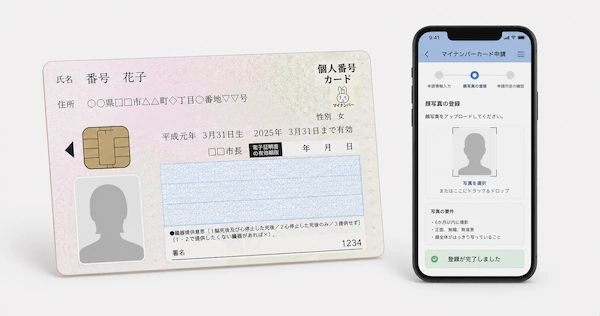
Read this article to learn how to apply for a My Number Card, how long the issuance takes, and how to prepare a compliant photo.
Table of contents
- What is a My Number Card?
- Who can apply for a My Number Card in Japan?
- How to apply for a My Number Card in Japan
- My Number Card photo requirements
- Get a photo for My Number Card online!
- What happens after applying for a My Number Card?
- How long does a My Number Card application take?
- My Number Card application fee
- My Number Card PIN requirements
- My Number Card expired: how to renew
- FAQ
What is a My Number Card?
The My Number Card (Individual Number Card) is Japan’s plastic identification card with a photo and IC chip. It shows your name, address, date of birth, gender, and 12-digit Individual Number, and stores electronic certificates for secure online authentication and government procedures. Applying for the card is voluntary.
You can use a My Number Card to:
- obtain certain official certificates from participating convenience stores;
- prove your identity and confirm your Individual Number;
- access online government services, including e-Tax and Mynaportal;
- use the card as a health insurance card after completing the required registration.
You can also add My Number Card functions to compatible iPhone and Android smartphones. A Smartphone My Number Card service supports identity verification with features such as Face ID or fingerprint recognition, allowing you to use supported services without carrying the physical card. You can set up the service yourself through the Mynaportal app.
My Number Card vs. Residence Card
The My Number Card and Residence Card serve different purposes for foreign residents in Japan:
- Residence Card: Foreign residents who hold an eligible status of residence must carry this card. Issued by the Immigration Services Agency, it confirms your residence status, period of stay, and other immigration details.
- My Number Card: This optional ID card is available to Japanese citizens and foreign residents with a Resident Record. It contains your 12-digit Individual Number and supports identification, tax, social security, and online government services.
Important update: Since June 14, 2026, eligible foreign residents can apply for a Specified Residence Card, which combines the functions of the Residence Card and My Number Card. The combined card is optional, so you can continue using the two separate cards.
Who can apply for a My Number Card in Japan?
Anyone with a Resident Record (住民票) in Japan can apply for a My Number Card. Foreign nationals generally receive a Resident Record after completing resident registration at their local city, ward, town, or village office.
Eligible applicants include:
- Japanese citizens with a Resident Record in Japan.
- Foreign residents registered in Japan, generally including people with residence statuses that allow stays of more than 3 months, such as work, student, dependent, spouse, or permanent resident status.
- Children, including those under 15. A legal representative must handle the application for a child under 15.
People staying in Japan as temporary visitors, including short-term tourists, generally cannot apply. Diplomats and officials also follow separate rules and are generally not eligible for a standard My Number Card.
Although applying for the card is voluntary, foreign residents should keep its validity period in mind. The card's expiration date is linked to the holder's period of stay. After renewing your residence status and receiving a new Residence Card, update the My Number Card at your local municipal office before its current validity expires. Otherwise, the card may become invalid.
How to apply for a My Number Card in Japan
Japan offers several ways to submit a My Number Card application, including online, by mail, and at certain photo booths. Here you’ll learn what you need for each application method and how to submit your application.
Before you apply, you will need two things: an application form and a compliant photo. The application form will be sent to you with your 'Individual Number Notification' letter. If you have lost it, you can download a new copy from the official website or request one by phone or in person at your city office.
My Number Card online application
Online application is available through a smartphone or computer and is the most convenient option for most applicants. You need the 23-digit application ID from your application form, an email address, and a suitable ID photo.
To apply by smartphone:
- Scan the QR code on your My Number Card application form and access the website for the application.
- Enter your name, email address, and other required information.
- Upload a suitable photo or take one with your smartphone during the application.
- Choose whether you want an electronic certificate and submit the application.
- After submission, you receive an email confirming that your application is complete.
To apply by computer:
- Visit the official online application website.
- Enter the 23-digit application ID.
- Enter your email address.
- Use the link sent to your inbox to upload your digital photo.
- You then enter your date of birth and other required details and submit the form.
My Number Card application by mail
- Complete the Individual Number Card application form.
- Write your name in the "Applicant Name" section and fill out any required fields.
- Attach an appropriate ID photograph measuring 4.5 × 3.5 cm.
- Check the form for errors.
- Place the completed application form (not any additional documents) in the return envelope.
- Mail the envelope to the Individual Number Card Acceptance Center at the following address:
- Japan Agency for Local Authority Information Systems, P.O.Box 2, Kawasaki-higashi, Japan Post Co., Ltd., 219-8650
If you no longer have the application form or envelope, you can download and print the necessary documents from the official My Number Card website or obtain an application form from your local municipal office. Do not use an expired envelope template.
My Number Card application at a photo booth
Some town ID photo booths allow you to take your photo and submit your application at the same time.
To apply at a participating booth:
- Find a participating booth.
- Select “Application for the Individual Number Card” on the touchscreen.
- Pay the photo fee.
- Scan the QR code on your application form using the booth's barcode reader.
- Enter the required information following the instructions on screen.
- Take your ID photo and submit the application directly from the booth.
Participating booth operators include DNP Photo Imaging Japan, Nippon Auto Photo, Fujifilm, Miyoshi Industry, and Hokuryo Print Technology. Availability varies by location.
My Number Card photo requirements
Your My Number Card photo must follow specific rules for timing, framing, background, and file format. The requirements differ slightly depending on whether you submit a printed photo by mail or upload a digital image online.
General photo requirements:
- The photo must have been taken within the past 6 months.
- Take the photo straight on, without a hat or head covering.
- The color of the background on my Number Card photo must be white, off-white, or light gray, without any shadows, patterns, or objects.
- Color and black-and-white photos are both accepted.
- Do not use heavy editing that makes it difficult to recognize you as the same person in real life.
Photo requirements for mail applications:
If you apply by mail, submit a printed photo measuring 4.5 × 3.5 cm. Write your name and date of birth on the back of the photo before attaching it to the application form.
Digital photo requirements for online applications:
- File format: JPEG
- Color mode: RGB color (CMYK is not accepted)
- File size: 20 KB–7 MB
- Width: 480–6,000 pixels
- Height: 480–6,000 pixels
Example of a suitable My Number Card photo:
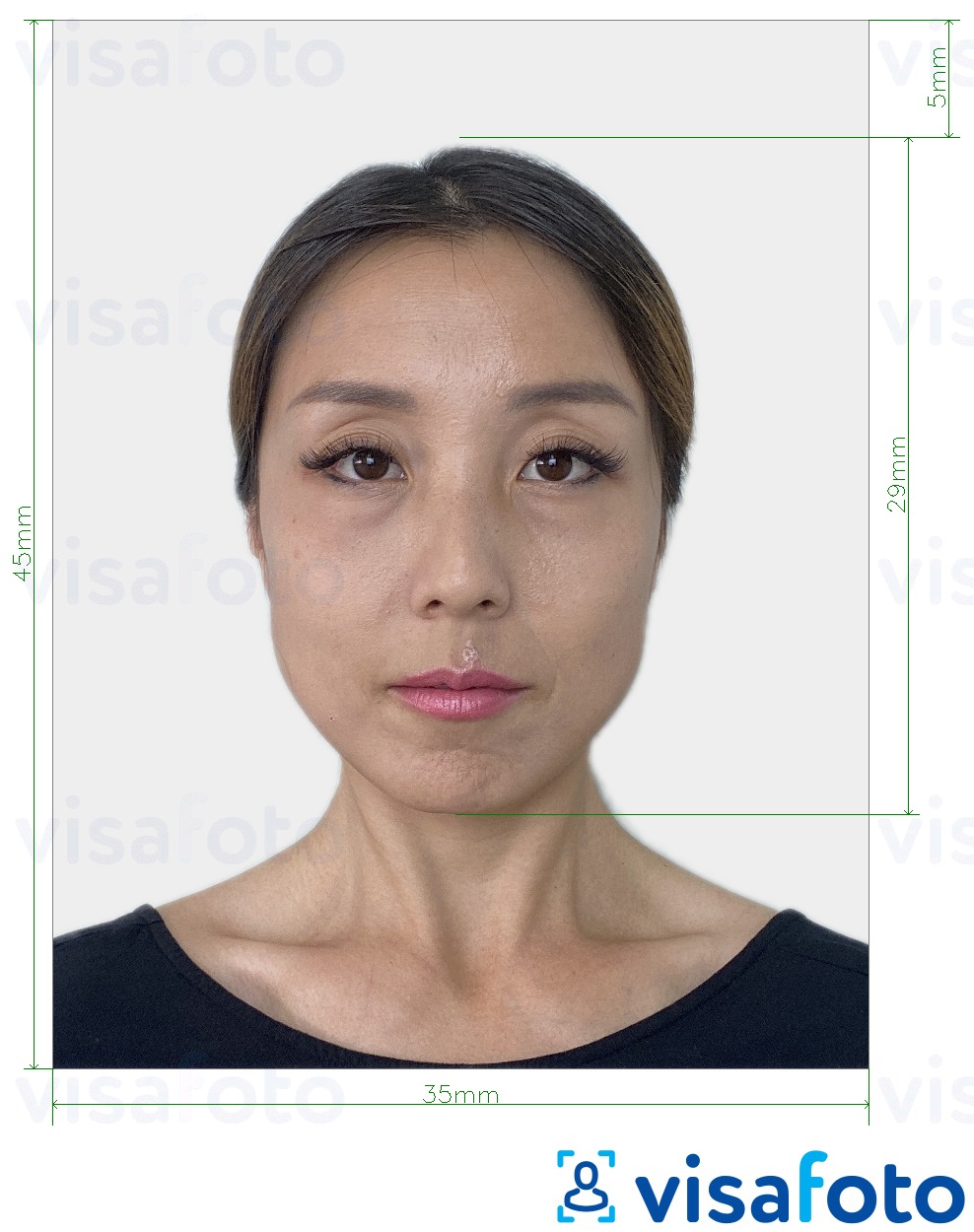
If you cannot meet a photo requirement because of a medical condition or another unavoidable circumstance, explain the situation on your application form. You can also contact the Individual Number Call Center at 0120-95-0178 with your application ID before submitting your application.
Get a photo for My Number Card online!
Using an incorrect photo is one of the most common reasons for application delays, so it's important to get it right. With Visafoto, a My Number Card photo size editor, you can prepare a My Number Card photo online from home without visiting a photo studio. The process takes just a few minutes and two steps:
- Upload a photo taken in natural daylight to the Visafoto tool below.
- Select Japan and My Number Card as the document type.
Visafoto then adjusts the image to the required format, including the photo dimensions, background, and head position. You receive a digital file for online applications and a print-ready template for applications by mail.
The tool can also improve image quality when necessary by adjusting lighting, increasing sharpness and resolution, or correcting framing. You can even photograph an existing printed passport or ID photo with your phone and use the image for processing. If the original already meets the requirements, Visafoto leaves it unchanged.
Original photo:

Edited by Visafoto:
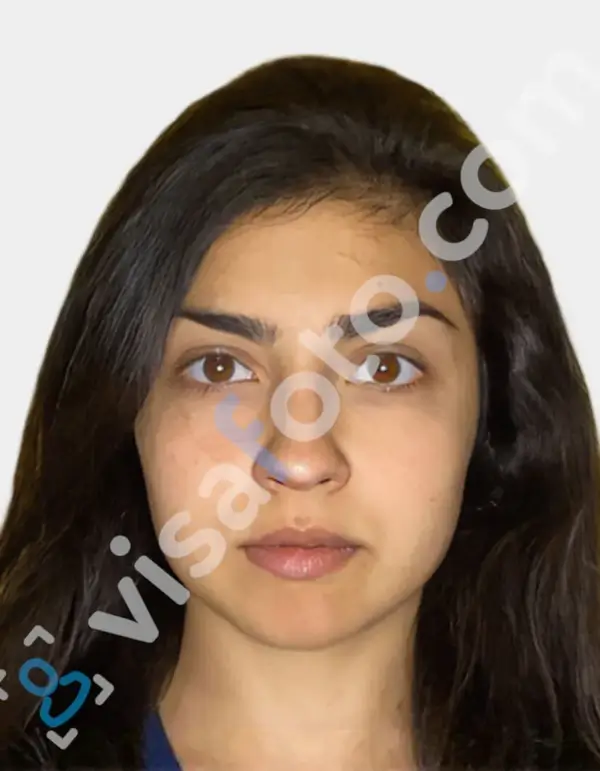
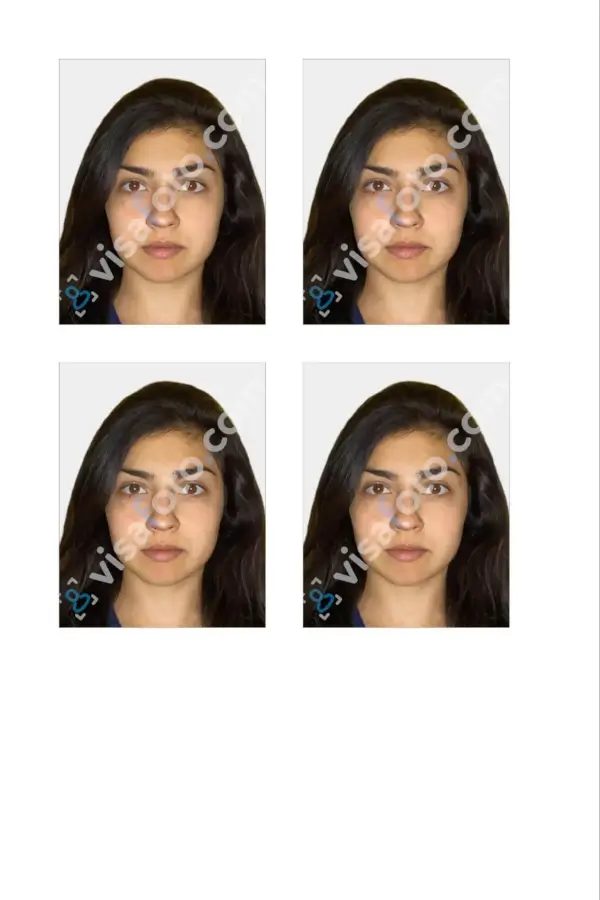
Visafoto reports a 99.7% acceptance rate and more than 1,000,000 approved photos. If your photo is rejected, the service offers a full refund. Our tech support is available 24/7.
What happens after applying for a My Number Card?
Once you submit your My Number Card application, the process moves through several stages: application review, card production, collection, and PIN setup. You can track the application while you wait, then collect the card at your municipal office when it is ready.
1. Your application is reviewed
After submission, the application is checked, including the photograph and personal information. If the photo does not meet the requirements or the details do not match, you may need to correct the application and submit it again.
You can check your My Number Card application status online using the 23-digit application ID shown on your application form and your date of birth.
2. Your card is produced
For a standard application, the Japan Agency for Local Authority Information Systems (J-LIS) produces the card and sends it to your municipality. The municipal office then prepares it for collection. The entire process generally takes around 1 month, although processing times vary depending on the municipality and application volume.
The card is normally not mailed directly to you. Instead, your city, ward, town, or village office receives the card and sends an Issuance Notice (交付通知書) to your registered address.
3. Arrange card collection
Once the Issuance Notice arrives:
- Follow the instructions provided on the notice.
- Book an appointment if your municipality requires one.
- Visit the designated municipal office by the stated deadline.
- Bring the notice and the required identity documents.
Foreign residents will generally need to show their Residence Card. The exact documents depend on your situation, so check the instructions from your local municipality before visiting.
4. Receive the card and set your PINs
At the municipal office, an official verifies your identity and gives you the My Number Card. You then set the PINs required for its different functions, including a four-digit PIN and, where applicable, a longer alphanumeric password for the electronic signature certificate.
Keep your PINs secure and never write them directly on your My Number Card.
How long does a My Number Card application take?
A standard My Number Card application usually takes around 1 to 2 months from submission to card issuance. Once your card is ready, your municipality will send you a notice with instructions for collection.
Japan also offers a Limited Express Issuance service for certain applicants with urgent needs, including newborns, people whose cards were lost or stolen, and some people who have recently moved to Japan from abroad. Depending on the case, this service can reduce processing time to about one week and may require an application at the municipal office.
My Number Card application fee
Applying for and receiving an ordinary My Number Card for the first time is free of charge in Japan. This applies whether you submit the application online, by mail, or through a participating photo booth. Renewal of the card and its electronic certificates is also generally free.
A fee applies when you request a replacement in certain circumstances. Typical charges are as follows:
- First issuance: Free.
- Reissue (lost, stolen, or damaged): 1,000 yen (for card & electronic certificate).
- Reissue without electronic certificate: 800 yen (card only).
- Reissue expedited ("Limited Express"): 2,000 yen (for card & electronic certificate).
The exact fee and procedure depend on the reason for the reissue and your municipality. Confirm the applicable charge with your city, ward, town, or village office.
A replacement may be free when the loss or damage occurred due to circumstances outside your control, including certain natural disasters.
My Number Card PIN requirements
A My Number Card uses four PINs, each designed for a different function. Three PINs consist of 4 digits, while the signature PIN uses a combination of uppercase letters and numbers. The table below shows what each PIN is used for and the format it must follow.
| PIN type | Format | Main purpose |
|---|---|---|
| User Certification (利用者証明用) | 4-digit number | Used to log in to Mynaportal, obtain certificates at convenience stores, and complete electronic identity verification. |
| Signature (署名用) | 6–16 alphanumeric characters, using uppercase letters and numbers | Used for online procedures that require a digital signature, such as e-Tax. This PIN is generally not issued to people under 15 or adult wards. |
| Basic Resident Register (住民基本台帳用) | 4-digit number | Used for procedures involving changes to information such as your address or name at the municipal office. |
| Card Information Entry (券面事項入力補助用) | 4-digit number | Used to read information printed on the card, such as your name, address, and date of birth, as electronic data. |
Important PIN rules:
- Too many incorrect attempts: Entering an incorrect PIN repeatedly locks the relevant function. A 4-digit PIN locks after 3 consecutive errors, while the signature PIN locks after 5.
- Using the same 4-digit PIN: You can choose the same number for the User Certification, Basic Resident Register, and Card Information Entry PINs.
- Signature PIN format: The signature PIN must contain 6–16 characters and may use uppercase English letters and numbers only.
My Number Card expired: how to renew
A My Number Card has two separate expiration dates: one for the physical card and another for the electronic certificates stored on its IC chip. The renewal procedure depends on which one has expired.
How to renew an expired My Number Card
If your physical My Number Card is expiring, you need to apply for a new one. The procedure is similar to the original application.
Step 1: Receive or request the application form
J-LIS (the local government IT agency) usually sends a Notice of Expiration (有効期限通知書) by mail about 2 to 3 months before the card expires. If you do not receive it, for example after moving, contact your municipal office to obtain the necessary application form.
Step 2: Apply for a new card
Use the application form to submit your application through one of the methods described earlier in the article.
Step 3: Collect your new card
The new card generally takes about 1 to 1.5 months to prepare. You will receive a notification when it is ready for collection. Take your current My Number Card, even if it has already expired, to the municipal office when you collect the replacement.
If you cannot return your old card because it was lost, the replacement may be treated as a lost-card reissue, and a fee may apply.
My Number Card rules for foreigners:
Your My Number Card does not automatically update after a visa renewal. Since its validity is tied to your period of stay, you must visit your municipal office in person to update the expiration date of your card. Make sure to complete the procedure right after your visa extension before your current My Number Card expires. Otherwise, the card may become invalid.
There is no fully online extension process for a My Number Card. The process is a two-step hybrid: you can submit your renewal application online, but you must visit a municipal office in person to receive your new card and update the electronic certificate.
How to renew the electronic certificate
The electronic certificates stored on the IC chip have their own expiration date, generally 5 years after issuance. You need a valid certificate to use services such as e-Tax and Mynaportal.
To renew it, visit your municipal office with your My Number Card and the required PINs. Even when the physical card remains valid, an expired electronic certificate prevents you from using the card's online authentication functions.
Key points to remember:
- Japanese citizens: The physical card generally expires on the holder's 10th birthday after issuance. For minors, the validity period is generally five years.
- Health insurance: After the electronic certificate expires, the card may still be usable as a health insurance card for a limited period, subject to the applicable rules.
- Renewal fee: Renewal is generally free when you return your existing card. A fee may apply if the old card has been lost and you need a reissue.
FAQ
Can a tourist apply for a My Number Card in Japan?
No. Tourists with “Short Stay” status cannot apply for a My Number Card. The card is available to people who have a resident record in Japan, including eligible mid- and long-term residents.
Can I apply for a My Number Card before registering my address in Japan?
No. You must complete resident registration at your local municipal office first. Your Individual Number and application documents are issued based on your registered address, after which you can apply for the physical My Number Card.
Can someone else complete the application form for me?
Yes, in certain circumstances. For example, if illness or a disability makes it difficult for you to visit the municipal office, a city official may visit your home and assist with the application. Having another person complete the form simply for convenience is not generally provided as a standard option.
Do I need to make an appointment to collect the card?
It depends on your municipality. Many municipal offices require an appointment, while others allow collection without one during designated hours. Check the Issuance Notice for the applicable reservation procedure, which may include an online booking option or a telephone number. A Reservation ID printed on the notice may also be required.
How to link My Number Card with health insurance?
You must register your My Number Card for use as a health insurance card. You’ll need your card and 4-digit PIN ready. There are three ways to register:
- At a medical institution or pharmacy: Place your card on the facial-recognition reader, select the health insurance registration option, and follow the instructions.
- At a Seven Bank ATM: Select “Individual Number Card Procedures”, then “Application for Use of Individual Number Card as a Health Insurance Certificate”, and follow the prompts.
- Through Mynaportal: Open the Mynaportal app or website, log in, select health insurance card registration, and complete the on-screen steps.
What should I do if I forgot my My Number Card PIN?
Do not repeatedly enter the wrong PIN, as this can lock the card. Contact your municipal office or My Number Card counter with your card and identification documents to reset it. If you remember another required PIN, you may also be able to reset the forgotten PIN at a convenience store.