Emirates ID renewal in 2026 (for UAE residents and nationals)

The Emirates ID is essential for accessing services across the UAE, and keeping it valid is a legal requirement. The renewal procedures have been simplified while maintaining clear guidelines for residents and nationals. This guide explains everything you need to know about your Emirates ID card renewal via ICP in the UAE and provides you with tips on getting a compliant ID photo online.
Table of contents
- Emirates ID renewal explained
- Who can renew an Emirates ID
- When can you renew your Emirates ID
- Documents required for Emirates ID renewal
- Is a photo required for Emirates ID renewal?
- Emirates ID photo requirements
- Get your Emirates ID photo online
- How to renew Emirates ID online (step-by-step)
- How to renew Emirates ID in Etisalat app
- Can you renew Emirates ID outside the UAE?
- How much does it cost to renew Emirates ID?
- How long does it take to renew Emirates ID
- How to check Emirates ID renewal status
- How long does it take for Emirates ID to be ready after approval
Emirates ID renewal explained
The Emirates ID, issued by the Federal Authority for Identity, Citizenship, Customs and Ports Security (ICP), is the official identification for UAE citizens and residents. This card is essential for accessing government services, banks, telecoms, healthcare, and more. It contains biometric security features and has generally replaced older forms of ID and insurance cards in the UAE.
Carrying a valid Emirates ID is mandatory. An expired ID can complicate visa renewals, banking, telecom processes, and access to certain government and notary services until the renewal is processed. Timely renewal ensures your details are current in the ICP system, facilitating seamless digital verification and access to online services.
Both UAE nationals and expatriates must renew their Emirates ID regularly, though procedures vary:
- UAE nationals:
- Required for all citizens from birth; renewal is every 5–10 years, depending on age.
- Independent renewal process through ICP, separate from visa requirements.
- Residents:
- Expatriates and GCC nationals renew their ID with residence visa expiry, typically every 1–10 years.
- Renewal is linked to visa status, with a 30-day grace period post-expiry before fines are assessed.
The ICP has launched a simplified, “single-step” Emirates ID renewal service through the UAE’s Zero Bureaucracy Programme, initially targeting UAE citizens. This service minimizes repetitive data entry by allowing users to log in (using UAE Pass), verify pre-filled information, and complete payment in a unified process. This can be done via the ICP website, mobile app, or Customer Happiness Centres.
Key advantages of the ICP’s single-step Emirates ID renewal system
- Streamlined process:
- Replaces multi-step procedures with a single screen to log in, review data, confirm, and pay - eliminating repeated entries and separate pages.
- Automatically retrieves information like your address from ICP records, drastically reducing completion time.
- Unified application:
- Merges renewal and replacement processes, now including synchronized passport and ID renewals when both are set to expire within six months.
- Offers a single payment and tracking for individual or family documents, preventing staggered renewals.
- Faster processing:
- Cuts processing time by at least 50% via automation and smart forms, enabling quicker approvals and digital ID access while waiting for the physical card.
- Provides real-time status updates and proactive app alerts, expediting the entire process from submission to receipt.
Can I renew my Emirates ID without a visa? Expat residents cannot renew an Emirates ID without a valid residence visa. The renewal system requires an active residency permit, and the Emirates ID validity is directly linked to the visa’s expiration date.
You can renew your Emirates ID in Dubai, Abu Dhabi or other emirates via the ICP online services or at a Customer Happiness Centre.
Who can renew an Emirates ID
Emirates ID can be renewed by UAE nationals, expatriate residents, GCC nationals living in the UAE, and their children and dependents. Below is a closer look at who can renew:
Emirates ID renewal for residents
Expatriate residents must renew their Emirates ID in tandem with their residence visa renewal, as the ID's validity typically aligns with the visa period (usually 1–3 years, up to 10 years for Golden Visa holders). Renewals can be processed online, at service centres, or through typing centres by either the visa sponsor (employer or family sponsor) or the resident.
Emirates ID renewal for UAE nationals
All Emirati citizens with an existing Emirates ID can renew it. This is typically done 6–1 months before expiry, with the option of a 5- or 10-year validity period, depending on the category. Citizens renew directly through digital channels or Customer Happiness Centres with no link to visa requirements or medical fitness tests. The new simplified “single-step” flow is available, provided they hold a valid UAE passport and have accurate civil registry details.
Emirates ID renewal for children and minors
All children who are UAE nationals, GCC residents, or expatriate residents must have an Emirates ID, renewed upon expiration. A parent or legal guardian (the sponsor) must handle the renewal application for minors. For younger children, no new biometrics are needed. The renewal primarily updates the validity in line with the child’s passport or visa and applicable validity period.
Renewal rules for dependents and family members
Spouses, children, and other dependents sponsored by a UAE resident, UAE national, or GCC national must renew their Emirates ID along with their dependent residence permits. The sponsor is responsible for initiating and authorizing the renewal, including providing proof of relationship when necessary (such as marriage or birth certificates). Family dependents follow the same renewal processes and timelines as the main sponsor, with ID validity reflecting the duration and type of their dependent residence permit.
When can you renew your Emirates ID
Can you renew your Emirates ID before it expires? Yes, you can. Your Emirates ID renewal can start when it's less than six months (180 days) from its expiry. Expatriate residents typically renew their IDs at the same time as their residence visas, rather than before.
How many days before we can renew the Emirates ID? You can renew your Emirates ID up to 180 days before it expires. It's best to begin the renewal process at least 30 days before expiry to avoid any penalties or service disruptions.
Early renewal of your Emirates ID is permitted in certain cases and under specific restrictions:
Eligible cases:
- UAE Nationals: You can renew your ID up to six months early through the ICP portal or app. This practice helps prevent any gaps in validity.
- GCC Nationals: You have the same six-month window for early renewal.
- Residents: Early renewal is possible if your visa is renewed ahead of its expiry, such as after a job change. Renewal usually matches the visa expiry.
Restrictions:
- You cannot renew more than six months in advance; applications outside this period are blocked.
- Residents need an early visa renewal first to renew their ID early.
- After expiry, there is a 30-day grace period before fines start. Early renewal isn't possible if your passport or other necessary documents are invalid.
Documents required for Emirates ID renewal
Document requirements depend on the applicant’s legal status, age, and nationality. Preparing the correct set in advance helps avoid processing delays or repeated submissions. Below is what you need for Emirates ID renewal for different categories.
Standard documents for residents
- Original passport and a clear copy.
- Valid UAE residence visa (either the sticker, e-visa page, or an electronic version).
- Current or expired Emirates ID card.
- Recent passport-sized photo meeting ICP standards (required for children and sometimes applicable for adults).
Documents for UAE nationals
- Original passport and a clear copy.
- Valid UAE residence visa (either the sticker, e-visa page, or an electronic version).
- Current or expired Emirates ID card.
- Recent passport-sized photo meeting ICP standards (required for children and sometimes applicable for adults).
Documents for children
- Child's passport and residence visa copy (for expatriates/GCC nationals).
- Recent passport-size photo with a white background.
- Birth certificate of the child, especially for first-time or dependent renewals.
- Sponsor or parent's Emirates ID and visa copies (as the parent or legal guardian handles the application).
Is a photo required for Emirates ID renewal?
A photo is typically always required for Emirates ID renewal. However, the need for an in-person biometric photo depends on specific circumstances. Below is a breakdown of when a photo is sufficient and when you might need a new biometric photo.
When a new photo is NOT required:
- Routine adult renewals: If ICP has a recent, ICAO-compliant biometric photo on file and your appearance hasn't changed significantly, your existing photo will usually be reused. Many find no new photo is needed if their prior biometrics remain valid.
- Recent biometrics capture: If you've recently provided biometrics for a visa, first Emirates ID, or previous renewal, ICP often uses that image within a short period.
Cases where ICP may request a new biometric photo:
- Significant appearance change: If your appearance has notably changed (due to weight fluctuation, surgery, or major facial hair changes), ICP may request a new biometric photo. You might receive an SMS or portal message to upload an updated image if the current one is flagged as unsuitable.
- Poor quality or non-compliant photo: If the existing photo doesn't meet biometric standards (issues with resolution, lighting, background, or face size), ICP may ask for a compliant photo. Rejection reasons include shadows, filters, incorrect sizing, or face-obscuring accessories.
- Minors or children reaching new age bands: For children, a fresh photo may be required, especially as they grow. Age thresholds could prompt new biometrics when the current photo no longer matches.
Most renewals are completed fully online, but some applicants may be asked to visit a service centre. Here is renewal via digital channels vs. in-person biometrics:
- Digital renewal (website/app): For standard renewals, you confirm details online and upload a recent photo if prompted. If your stored image is accepted, you can complete renewal digitally without an appointment.
- In‑person at ICP or service centres: If new biometrics are needed, you'll be directed to a Customer Happiness Centre or service point where staff capture a new photo and, if necessary, fingerprints. In-person capture is more common for first-time applicants, significant appearance changes, or previous photo rejections.
Emirates ID photo requirements
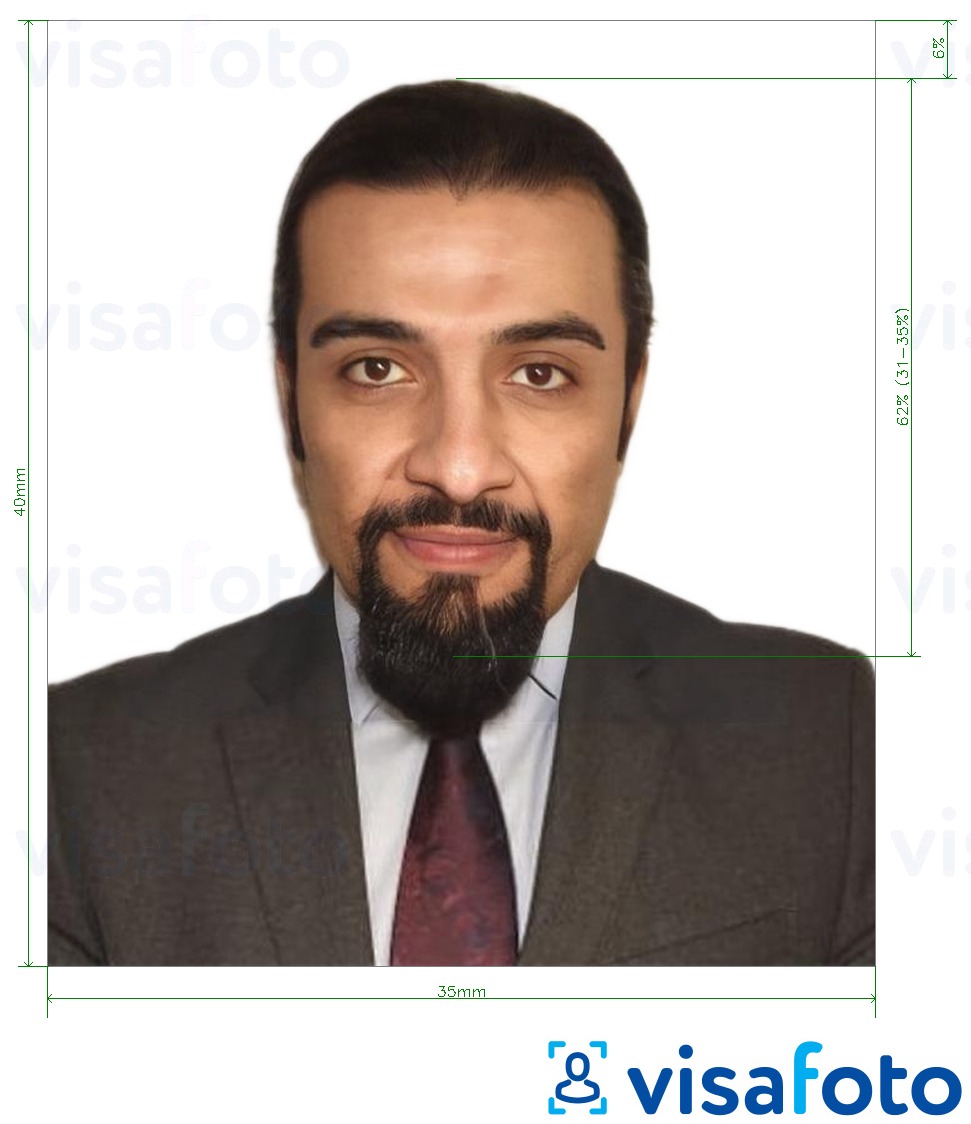
For Emirates ID, the photo essentially follows UAE biometric/passport-style standards. Here are the photo requirements:
- The photo size should be 35 mm wide by 40 mm tall.
- The face should cover about 70–80% of the photo, capturing the head and top of the shoulders.
- The image must be high-resolution, in color, with at least 600 dpi. It should be clear, with no pixels, marks, or creases.
- The photo should be taken within the last six months to reflect your current appearance.
- Use a plain white background that is evenly lit, with no patterns or objects visible.
- Ensure there are no shadows on your face or in the background.
- Your head should be straight and centreed, facing the camera directly.
- Maintain a neutral expression with your mouth closed and eyes open.
- Glasses are acceptable as long as they don't obscure the eyes or cause glare. Avoid tinted or colored lenses.
- Medical or religious head coverings are permitted as long as they don't cast shadows or conceal any facial features from the chin to the forehead.
Here is a photo example:
Get your Emirates ID photo online
Here you’ll find out how to take a professional-quality ID photo at home in minutes.
Thanks to today's online photo tools, there's no need to visit a photo studio to get a professional passport photo taken anymore. Read on to find out how to take a compliant passport photo in just a few minutes with Visafoto, a trusted photo editing service. It only takes two simple steps:
- Take a photo in natural daylight and upload it to Visafoto.
- Choose your country and document type (e.g., UAE, Emirates ID).
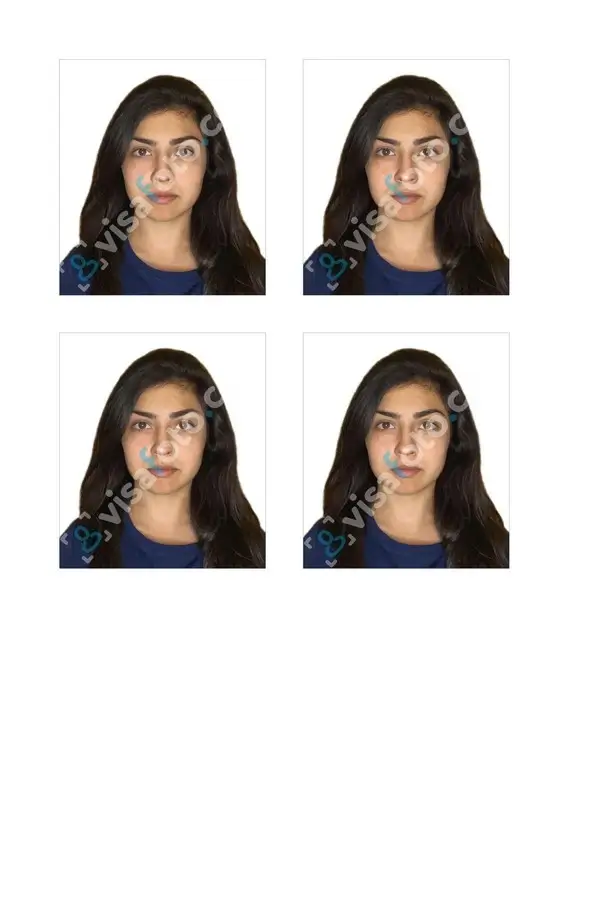
That’s it! Visafoto will handle the rest, adjusting the background, size, and head position to meet official requirements. You’ll receive a perfect digital copy for online submissions and a format ready for printing.
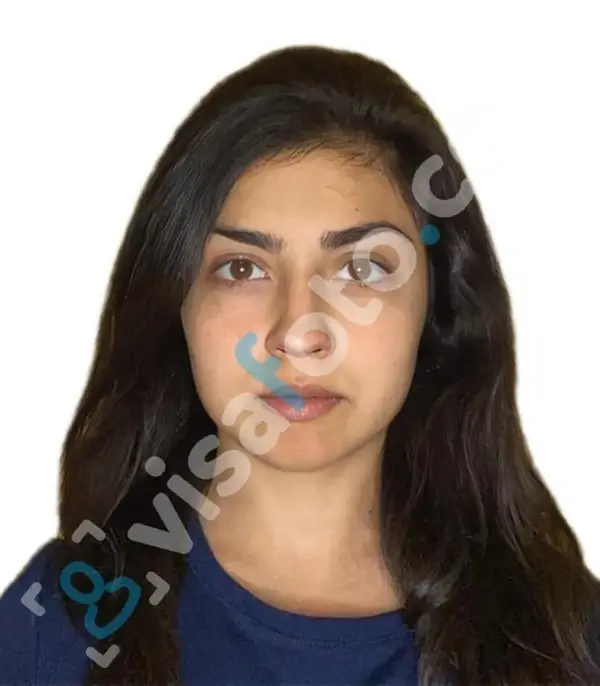
Example of the photo you can upload to Visafoto:

Result by Visafoto:
Visafoto guarantees compliance with official requirements or a full refund, backed by an impressive 99.7% acceptance rate and more than 1,000,000 photos accepted by government authorities. If you encounter any issues, our tech support is available 24/7.
How to renew Emirates ID online (step-by-step)
You renew Emirates ID online through the UAEICP website or app by logging in, confirming your details, paying the fee, and then tracking delivery. The process varies slightly between residents and nationals, but the overall procedure is similar. Here’s how to renew Emirates ID online using UAE Pass:
- Access the UAEICP website or open the UAEICP app. Sign in using UAE Pass or your ICP account.
- Navigate to services and select the "Renew Emirates ID" option, applicable to residents, nationals, or GCC residents. You will see your current Emirates ID details. Pick the card you need to renew and access the renewal form.
- Upload the necessary documents and your photo.
- Choose the card validity period if applicable (e.g., 5- or 10-year options for nationals) and confirm the renewal fee. Pay the fee online via card and submit your application.
- You will receive an application or reference number with confirmation on the screen and typically by SMS or email.
- If you need to update your biometrics, you will be instructed via SMS to visit an ICP Customer Happiness Centre for fingerprints and a photo. If not, your application will be processed online using your existing biometrics.
- Upon approval, you'll get an SMS with delivery or post-office collection details. Collect your physical card and continue using the digital Emirates ID on the app.
Can I renew my Emirates ID without a blood test?
- For UAE nationals: Yes. Renewing an Emirates ID does not require a blood test or medical fitness certificate for citizens.
- For expatriates: In most cases, no. For expatriate residents, Emirates ID renewal is tied to residence‑visa renewal, and that usually requires a medical fitness exam (at minimum a blood test, and in many cases a chest X‑ray) before the ID can be issued. Exact requirements can vary by emirate, visa type and current health regulations, so applicants should always check the latest instructions for their category.
How to renew my kids' Emirates ID? Parents or legal guardians renew children's Emirates ID via ICP channels, as minors under 15 cannot apply independently. Here is how:
- Log into the ICP website or app using UAE Pass, and select your child's record.
- Upload your child’s passport, visa (for residents), birth certificate, recent photo, and your own Emirates ID or visa.
- Pay the fee of AED 140–270. Minors under 15 do not require biometrics. Track the application and collect the ID via post.
How to renew Emirates ID in Etisalat app
Etisalat is a telecom provider, not an identity authority. You can’t renew your Emirates ID through the Etisalat app. Instead, the app allows you to update your mobile registration by connecting your renewed Emirates ID to your Etisalat number. Consider this step 2, after renewing your ID via UAEICP.
Follow these steps in the Etisalat App:
- Open the My Etisalat UAE app and log in using your UAE Pass or Etisalat account.
- On the home screen, tap the reminder banner like “Update Emirates ID / Mobile Registration Renewal” or navigate to Profile and select “Update my Emirates ID”.
- Choose “Continue with UAE Pass” for Etisalat to retrieve your new Emirates ID details. Confirm in the UAE Pass app and allow document sharing.
- Select the mobile account(s) you need to link to the renewed ID, then review the fetched ID information (name, ID number, expiry, etc.).
- Confirm your contact details, agree to the terms, and submit. You’ll receive confirmation in the app and later an SMS once Etisalat verifies and updates your registration.
This process updates your mobile registration with Etisalat, ensuring your number remains active and compliant.
Can you renew Emirates ID outside the UAE?
Renewing your Emirates ID abroad is possible online, but it comes with conditions. Let’s discuss them below.
Both UAE citizens and expatriates can use the ICP smart services portal to submit renewal applications from anywhere, provided their residence visa and passport are valid. You complete the form, upload documents, and pay fees while abroad, then collect the new card upon returning to the UAE, usually at a post office or service centre.
However, if both the Emirates ID and residence visa have expired, you typically cannot renew your ID while outside the UAE. You might need a new entry permit or visa regularization before renewing. Attempting to re-enter the UAE with an expired Emirates ID can result in fines, immigration delays, or issues with residence renewal. To avoid complications, it’s safest to renew before traveling whenever possible.
How much does it cost to renew Emirates ID?
Emirates ID renewal fees vary by applicant category (UAE nationals vs. residents), validity period, and processing method, with a base issuance fee of AED 100 per year plus service charges. Below is a clear breakdown of costs.
For UAE nationals:
- 5-year validity: Total costs between AED 140 and AED 170 (comprising AED 100 issuance fee plus AED 40–70 service/typing fee).
- 10-year validity: Total costs between AED 240 and AED 270 (comprising AED 200 issuance fee plus AED 40–70 service/typing fee).
- Urgent (Fawri) processing adds AED 150 to the total cost.
Emirates ID renewal fees for expats:
- Fees align with residence visa duration, charged at AED 100 per year plus extras:
- 1-year: Total costs between AED 140 and AED 170 (AED 100 + AED 40–70 service/typing).
- 2-year: Total costs between AED 240 and AED 270 (AED 200 + AED 40–70).
- 3-year: Total costs between AED 340 and AED 370 (AED 300 + AED 40–70).
- Golden Visa (5–10 years): Fee ranges from AED 500 to 1,000, leading to a total cost between AED 1,075 and 1,262.
- Urgent processing incurs an additional AED 150.
How long does it take to renew Emirates ID
Renewing an Emirates ID generally takes between 3 and 10 business days from the submission of your application to receiving your card. The duration depends on the processing method, the completeness of your documents, and the need for biometric data.
Most standard renewals, whether completed online or through typing centres, are finalized within 7 to 10 business days. This covers approval, printing, and preparing the ID for pickup or delivery through Emirates Post.
How to check Emirates ID renewal status
To check the status of your Emirates ID renewal, use the official ICP website or mobile app. You'll need your application number (PRAN), Emirates ID number, or passport number. Here's how:
Online via the ICP Website:
- Go to the ID status page on the ICP website.
- Enter your PRAN (for new applications), Emirates ID number (for renewals/replacements), or passport number, complete the captcha, and submit.
- View the current status, such as "Pending," "Approved," "Printed," "Dispatched," or "Ready for Collection," along with a detailed history log.
Using the UAEICP Mobile App:
- Download or open the UAEICP app, log in with UAE Pass, and select "ID Card Status".
- Enter your PRAN, Emirates ID, or passport number for instant progress updates.
- Access your digital Emirates ID with a QR code if approved, which you can use while awaiting the physical card.
For inquiries, you can also contact ICP at 600 522222 and use the menu to check the status.
How long does it take for Emirates ID to be ready after approval
Once ICP approves your Emirates ID application, the card is usually printed and ready for collection or delivery within 1 to 5 working days. For urgent (Fawri) cases, the card is printed and available within 24 to 48 hours of approval.
You will know that your Emirates ID is ready when its status changes to 'Printed', 'Dispatched' or 'Ready for Collection/Pickup'. You will usually receive an SMS with collection or delivery details.