Lost Emirates ID: How to get a replacement in the UAE

Losing an ID in the UAE can interrupt access to essential services, from banking to residency procedures. Many residents immediately ask: Can a person be tracked by the Emirates ID? And how can I get my lost Emirates ID online?
This guide explains how to apply for a new Emirates ID if lost and provides you with tips on getting a compliant ID photo online.
Table of contents
- What to do immediately if your Emirates ID is lost
- How to get a police report for a lost Emirates ID
- How to find a lost Emirates ID number
- Where to apply for an Emirates ID replacement
- Step-by-step process to replace a lost Emirates ID
- Documents required to replace a lost Emirates ID
- Emirates ID photo requirements
- Instantly get an Emirates ID photo online!
- Emirates ID replacement fees
- How long does it take to replace a lost Emirates ID
- What to do if an Emirates ID is lost outside of the UAE?
- Can you track your Emirates ID if lost?
I lost my Emirates ID. What to do immediately?
If you've lost your Emirates ID, take immediate action by reporting it to the Federal Authority for Identity, Citizenship, Customs and Port Security (ICP). This prevents unauthorized use. You can report the loss online through the UAEICP app or at an ICP Customer Happiness Centre. Here is how to report your lost Emirates ID:
Online reporting:
- Download the UAEICP app from the App Store or Google Play.
- Log in using UAE Pass.
- Select "Emirates ID Services."
- Choose "Report Lost ID" or "Replacement for Lost ID."
- Enter your passport number and unified number.
- Submit your information to block the card.
In-person reporting: Visit an ICP Customer Happiness Centre with your original passport, a copy of your passport and residence visa, and a passport-sized photo. They will deactivate your card on-site.
What will happen if I lose my Emirates ID? Without it, access to banking and government services will be halted until a replacement is issued, which takes 3–5 days. You may also be fined AED 1,000 for not having an ID. So, it is essential to act quickly.
How to get a police report for a lost Emirates ID
For extra protection, particularly if you suspect theft, file a police complaint for lost Emirates ID using the local police app or website. Below, you'll find instructions on how to file your Emirates ID lost complaint online.
If your Emirates ID was lost in Dubai:
- Download the Dubai Police app or visit the Dubai Police website.
- Navigate to "Services" > "Lost Certificate."
- Enter your Emirates ID or passport details, email, and lost item details.
- Submit to receive the Lost Item Certificate via email within 1-3 days.
In Abu Dhabi and other Emirates:
- Access the Abu Dhabi Police website or app, and use the "Lost Items Report" service.
- Input your ID or passport details and describe the incident.
- Receive electronic confirmation quickly.
For Sharjah, use the Sharjah Police website or app for similar services.
If online methods are unavailable, visit a police station with your passport, but remember, online procedures are faster.
How to find a lost Emirates ID number
If you misplaced your Emirates ID card, you can easily find your 15-digit ID number using digital or in-person methods. Here are the steps.
Digital retrieval
- UAE Pass: Log into the UAE Pass website or app, go to "Documents", then "ID card", and click "View Document" to see all your Emirates ID details.
- UAEICP App: Sign in using UAE Pass, select "Emirates ID" under your profile to view or download a PDF with your ID number.
- QR Code method: Generate a QR code in the UAEICP app with your passport details or mobile number to access your ID number and expiry date temporarily.
In-person retrieval
Visit an ICP Customer Happiness Centre or a recognized typing office with your original passport, a copy of your visa, and a photo. They can verify and retrieve your ID number as part of the replacement application process.
Ensure your UAE Pass is set up. Register using your passport if needed. If you are overseas, contact the UAE embassy for a verification letter.
Always report the loss first through ICP to deactivate the card.
Where to apply for an Emirates ID replacement
Knowing where to apply prevents unnecessary visits and delays. Here you’ll find out which authority processes replacement requests and how to choose the right service centre or online platform.
You can apply for a replacement Emirates ID through official ICP channels either online or in person. Start by reporting the loss using the UAEICP app, then proceed with the application.
For an in-person application, go to ICP Customer Happiness Centres (major locations in Abu Dhabi, Dubai, Sharjah), Amer Centres (like Al Quoz Mall in Dubai), or accredited typing centres for direct submission. For a full list of locations, visit the ICP Smart Services website.
For an online application, use the UAEICP app or visit the ICP Smart Services portal.
Step-by-step process to replace a lost Emirates ID
Replacing a lost Emirates ID follows a clear, structured procedure. Here is how to reapply for a lost Emirates ID:
- Report the loss online or to an ICP Customer Happiness Centre.
- Prepare the documents listed below to streamline your application.
- Apply for a replacement:
- How to apply for a lost Emirates ID online: Log in to the UAEICP app or visit the ICP Smart Services portal. Use UAE Pass to search for "Replace Emirates ID for Residents." Complete the form with your personal, passport, and contact details, select the "lost" reason, upload your documents, and choose your preferred delivery method (home or courier).
- In-person: Visit an ICP Customer Happiness Centre, Amer Centre, or accredited typing office to apply directly.
- Pay the necessary fees.
- Visit the ICP office for biometrics and signature, if required, during your application process.
Emirates ID renewal guideline (for UAE residents and nationals)
Documents required to replace a lost Emirates ID
Having everything ready in advance helps avoid rejection or resubmission. Here you’ll find the list of essential documents, whether you are applying through the UAEICP app or visiting an ICP centre.
Mandatory documents:
- Original passport (needed for in-person applications; copies suffice for online submissions).
- Copy of your passport (all pages, including the visa page).
- Copy of a valid residence visa.
- Recent passport-sized photo meeting ICP specifications (white background, 4.5×3.5 cm).
Optional/conditional documents:
- Copy of the old Emirates ID (if available).
- Police report or certificate (mandatory if stolen, advised for lost cards).
- Sponsor's passport copy (for family members or dependents).
- Father's passport and Emirates ID copies (for child dependents).
- Birth certificate (for children under 15 or newborns).
Note: Upload scans or PDFs for online applications. The ICP might request additional documentation based on your status (e.g., entry permit or disability certificate). If you use UAE Pass for pre-filled data, document uploads aren't needed, but you'll need your passport details for verification.
Emirates ID photo requirements
To meet the Emirates ID standards, your photo must comply with UAE biometric and passport-style specifications. Here’s what you need:
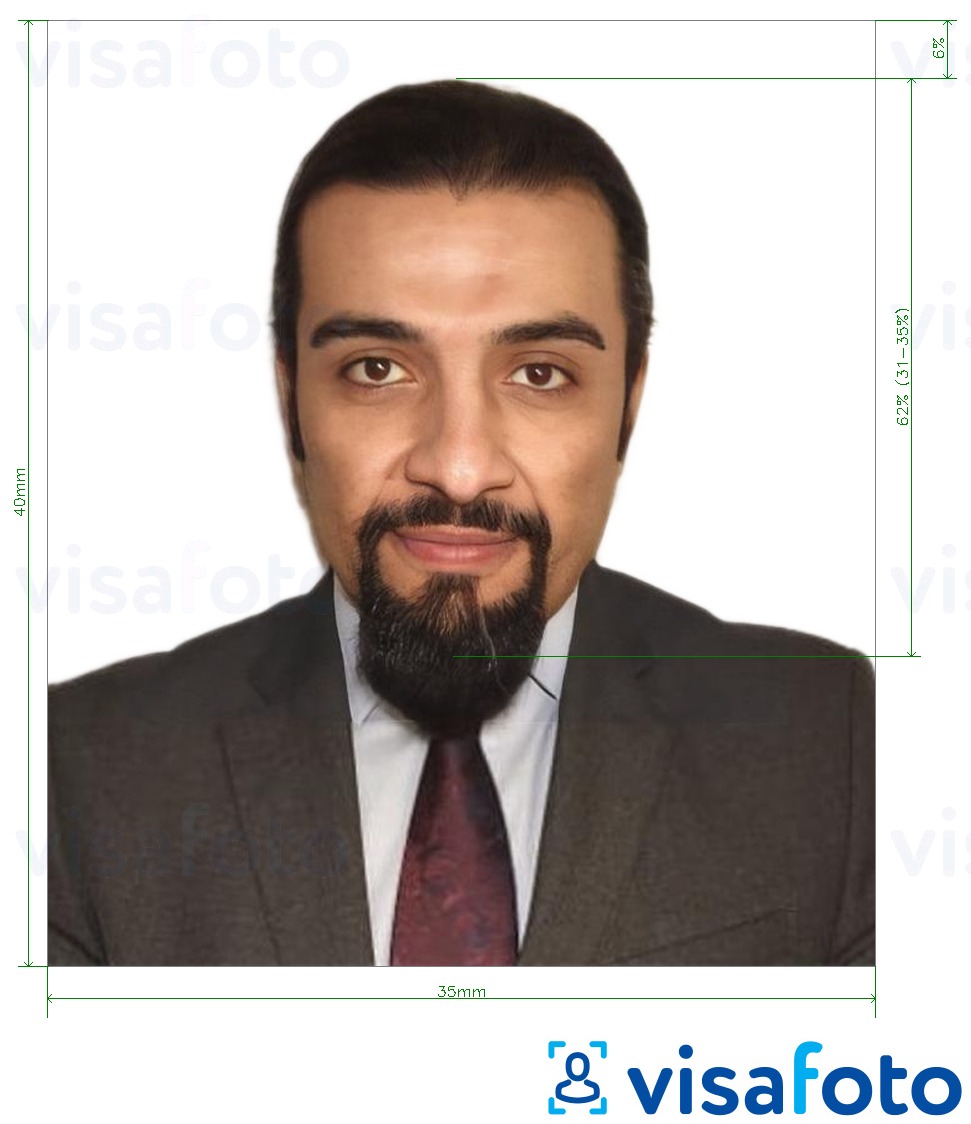
- The photo size must be 35 × 40 mm.
- Your face should occupy 70–80% of the image, clearly showing your head and shoulders.
- The photo must be in color, high-resolution, with at least 600 dpi. It should be free of pixels, marks, or creases.
- Use a plain white background with no patterns or objects, uniformly lit to avoid shadows.
- Face the camera directly with your head straight, maintaining a neutral expression with your mouth closed and eyes open.
- Glasses are allowed, provided they don’t obscure your eyes or create glare. Avoid tinted or colored lenses.
- Medical or religious head coverings are permitted if they don’t shadow or conceal facial features from the chin to the forehead.
- The photo should be taken within the last six months to reflect your current appearance.
Here is an example of an Emirates ID photo:
Instantly get an Emirates ID photo online!
Read on to find out how to take an ID photo that will be accepted by the authorities.
Thanks to today's online photo tools, there's no need to visit a studio to have your photo taken for official documents. Read on to find out how to take a compliant Emirates ID photo in just a few minutes with Visafoto, a trusted photo editing service. It only takes two simple steps:
- Upload a photo taken under daylight to the Visafoto tool below.
- Select the country and document type (e.g., United Arab Emirates/Emirates ID).
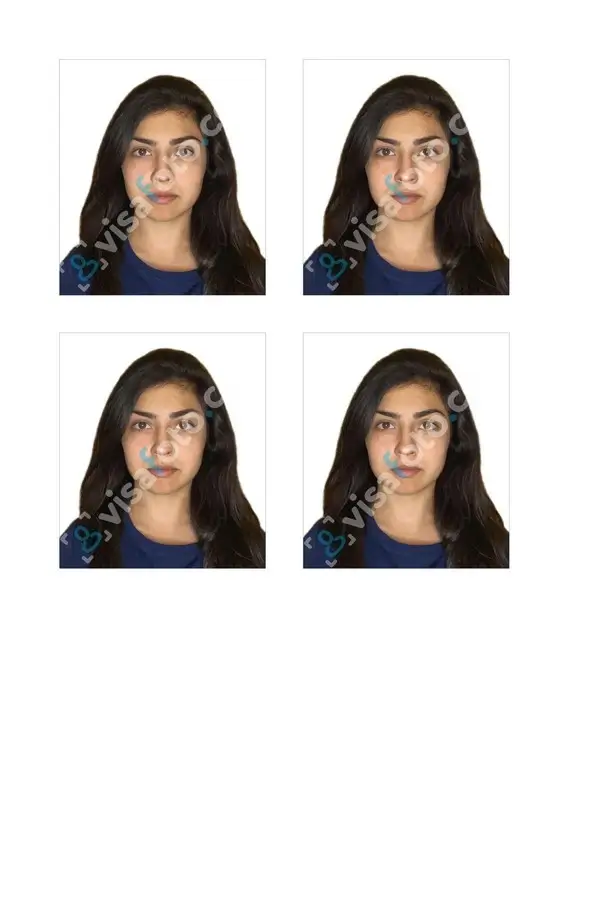
That’s it! Visafoto will automatically adjust the background, size, and head position to match official requirements. You’ll receive a digital version suitable for online submissions and a format ready for printing.
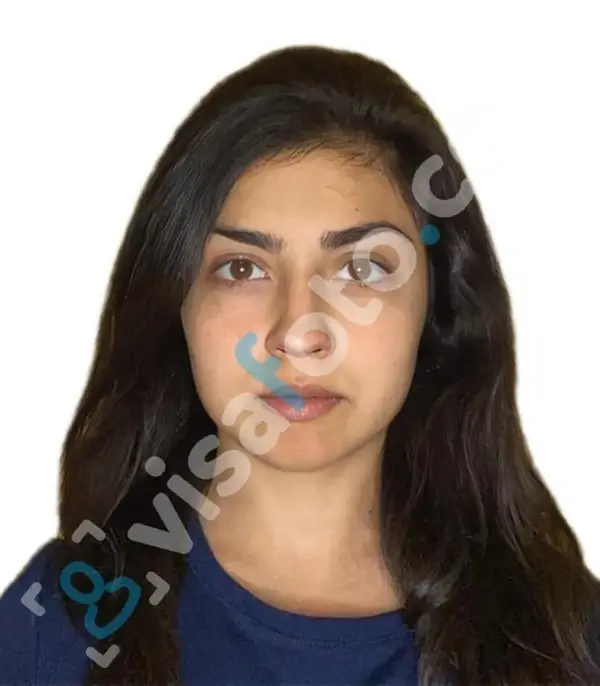
Example of the photo you can upload to Visafoto:

The result after Visafoto editing:
Visafoto boasts an impressive 99.7% acceptance rate, with more than 1,000,000 photos accepted by government authorities. We guarantee compliance or offer a full refund. Our 24/7 tech support team is ready to assist with any issues.
Emirates ID replacement costs
The base fee for replacing a lost or damaged card is AED 300. Additional costs may arise depending on the application method and any expedited services chosen. Below are the fees for a lost or damaged Emirates ID.
Standard fees:
- Lost Emirates ID replacement fee: AED 300.
- Applying online or via eForm: AED 40.
- Using a typing center: AED 70 (may vary between AED 30-70).
Urgent and additional fees:
- Fawri/Express service (1-2 days at ICP centers): additional AED 150.
Delivery by courier through Emirates Post: AED 20-35.
How long does it take to replace a lost Emirates ID
The timeframe for replacing a lost Emirates ID varies based on the method used.
Online applications through the UAEICP app or submissions at ICP and Amer centers usually take from 48 hours up to 5 working days from the approval date, assuming all required documents are submitted, and no biometrics are needed.
If I choose the express service, how long does it take to replace a lost Emirates ID? For those opting for the Fawri/Express service, the replacement ID is delivered within 24 to 48 hours for eligible residents.
What to do if an Emirates ID is lost outside of the UAE?
I lost my Emirates ID abroad. How can I replace it? Losing your Emirates ID while abroad requires swift action to safeguard your personal information. You can manage the following steps online without needing to return to the UAE immediately.
Step 1: Report the loss
Reach out to the nearest UAE Embassy or Consulate to file an official report. They will provide you with a verification letter, which acts as a substitute for a police report.
Concurrently, use the UAEICP app or the ICP Smart Services portal. Log in with UAE Pass, select "Report lost ID," and input your passport details or unified number to deactivate the card promptly.
Step 2: Apply for a replacement
Use the UAEICP app or the ICP portal to initiate a "Replace Emirates ID (Lost)" application. Upload your passport copy, visa copy, recent photo, and the verification letter. Pay the applicable fees and opt for courier delivery to your overseas address or UAE sponsor/home.
Step 3: Return to the UAE
Present the embassy verification letter, your passport, and digital ID proof (via UAE Pass) when re-entering the UAE. These documents, along with a valid visa, will be accepted temporarily by airlines and immigration. Once back, complete any necessary biometric processing at an ICP center. Remain vigilant for fraudulent activity, and notify banks and other services of your lost ID.
Can you track your Emirates ID if lost?
Unfortunately, you cannot track a lost Emirates ID in the same manner as a GPS-enabled device, as it lacks location-tracking technology. Here you’ll find why tracking is not possible and what you can track instead.
The Emirates ID functions as a biometric smart card for identification, not as a device with location services. Once it’s lost, it cannot be located remotely. Immediate deactivation through the UAEICP app or ICP prevents unauthorized use.
You can monitor your replacement application status with your application number (PRAN) using the UAEICP app, ICP portal, or through SMS updates from Emirates Post. You can also track the courier delivery once it’s on its way by calling 600-53-0003.