DGIP Pakistan passport application: requirements, fees and photo rules

Your Pakistani passport application starts with choosing the right service: a first passport, renewal, replacement or change of details. Pakistani citizens can apply through passport offices in Pakistan or Pakistani missions abroad, while eligible applicants can use DGIP's online passport service.
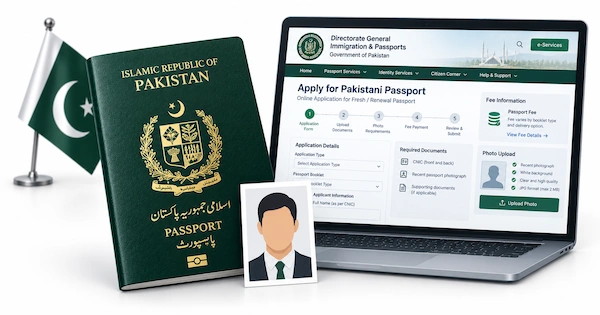
This guide explains who can apply online, which documents to prepare, the published passport fees and how to track your application. It also covers an important practical difference: passport offices normally take your photograph during the visit, but eligible online applications require a photo upload.
Table of Conents
- What is DGIP, and which passport service do you need?
- Pakistani e-passport versus an online passport application
- Who can apply for a Pakistani passport online?
- Documents required for a DGIP passport application
- Do you need to provide a photo for a Pakistani passport application?
- DGIP passport photo requirements
- Get your DGIP passport photo online with Visafoto!
- How to apply at a passport office in Pakistan
- How to apply through DGIP online
- Applying through a Pakistani embassy or consulate
- Pakistan passport fees, validity and processing times
- How to track and receive your Pakistani passport
- What if DGIP asks for more documents or rejects your photo?
- Frequently asked questions
What is DGIP, and which passport service do you need?
The Directorate General of Immigration & Passports, usually shortened to DGIP or DGI&P, issues Pakistani passports. The National Database and Registration Authority (NADRA) manages identity records and documents such as the Computerised National Identity Card (CNIC) and National Identity Card for Overseas Pakistanis (NICOP). A NADRA identity application is not a passport application.
Choose the category that describes your situation before collecting documents or paying. A renewal and a lost-passport replacement can require different evidence, even when both result in a new booklet.
First Pakistani passport
A first passport is normally an in-person application. Bring your identity documents to a passport office in Pakistan or contact the appropriate Pakistani mission if you are overseas. There is a separate online exception for eligible overseas newborn applications, explained below.
Passport renewal
Renewal is appropriate when you still have your previous passport and need a new one. For online renewal, the details must match your existing passport and NADRA records, and your passport must be expired or within its final year of validity.
You can also renew in person. DGIP allows renewal before expiry, although the office may ask why you need a new passport early. The online eligibility window does not limit every office application.
Lost, damaged or full passports
Choose a replacement service if your passport is missing, damaged or has no remaining blank pages. Keep a damaged or full passport rather than disposing of it: DGIP may need to inspect it or request scans.
If it is lost, report the loss to the police and include the passport number in the report. Overseas online replacement is available for specified cases, but a third loss requires a mission visit and further consideration.
Changes to passport details
If your name, date of birth or other identity information needs correcting, update the relevant CNIC or NICOP record first. Ordinary online renewal is not the right way to introduce conflicting details.
Some limited modifications are available online to overseas applicants. More extensive changes may require an office or mission appointment and supporting evidence.
Pakistani e-passport versus an online passport application
An e-passport is a physical passport booklet with an electronic chip. An online passport application is a method of submitting your request. Applying online does not, by itself, establish which booklet you will receive.
DGIP announced a move towards e-passports in 2026, alongside cashless payment and home-delivery initiatives. Check the booklet type and delivery options offered by your chosen service rather than assuming that every office and overseas route operates identically.
The fee schedules also distinguish between a machine-readable passport without a chip and an e-passport. Confirm the product before paying, especially if you are comparing a quoted fee with an older passport receipt.
Who can apply for a Pakistani passport online?
Online renewal is available to eligible Pakistanis both inside Pakistan and overseas. The additional online categories below are specifically for overseas Pakistanis, not a general first-passport service for everyone.
Applicants living in Pakistan
You can use online renewal when you have your previous passport, its details match your NADRA record and it is expired or has no more than one year remaining. For a first passport or a case outside the renewal conditions, use the appropriate passport office.
Overseas Pakistanis
In addition to renewal, DGIP lists these online services for overseas applicants:
- A first passport for a newborn child up to two years old;
- Reprinting a damaged passport;
- Reprinting an exhausted passport with no blank pages remaining;
- Replacing a passport after a first or second loss;
- Limited modifications, including marital status or profession; female applicants can also make the related husband's-name or surname changes covered by this category.
These categories have separate evidence requirements. For example, having a few blank pages left does not satisfy the online exhausted-passport category.
When an office or mission visit is necessary
An overseas child's first application above the newborn age limit requires a mission visit. Third-loss cases, changes outside the available online categories and applications referred for additional checks also need the appropriate in-person follow-up.
Submitting online does not remove DGIP's ability to request an interview or further verification. The official DGIP online-service guidance sets out the categories and their document and photo requirements.
Documents required for a DGIP passport application
Prepare originals and readable copies for an office application. For an online application, scan the documents requested for your category and keep the originals available. A cropped corner, missing reverse side or unreadable passport number can make an otherwise valid document difficult to verify.
Adults
The usual documents are:
- A valid original CNIC or NICOP and a photocopy;
- Your previous Pakistani passport and a copy, if you have been issued one;
- A departmental No Objection Certificate if you are a government, semi-government or autonomous-body employee;
- Your foreign passport and a copy if you hold dual nationality;
- A police report showing the previous passport number if the passport was lost.
When applying abroad, also prepare the residence or immigration documents required by the mission. A visa, residence permit or local identity card may form part of its checklist.
Children and applicants under 18
DGIP's current checklist distinguishes between two age groups:
| Child's age | Identity document on DGIP's checklist |
|---|---|
| Under 10 | Original Child Registration Certificate (CRC/Form B) or Family Registration Certificate (FRC), plus a copy |
| 10 to 17 | Original updated CRC containing a photograph and fingerprints, or a Juvenile Card, plus a copy |
Bring both parents' valid original CNICs or passports and copies. The child must attend with a parent or a court-appointed guardian. Also bring any previous passport and a foreign passport if the child is a dual national.
Separated or divorced parents need custody documents and the other parent's permission, either through that parent's attendance or consent on duly attested non-judicial stamp paper. A guardian needs the court's guardianship certificate; if a parent has died, include the death certificate.
Check the child's NADRA record before your visit, particularly after an age-related CRC update. NADRA separately requires a child's photo on a CRC used for passport issuance, including for children under three. This identity-record step is different from submitting the passport portrait.
Overseas newborn applications
The online newborn route requires evidence of the child's identity and relationship to the parents. Prepare:
- The child's NADRA-issued NICOP/Smart Card, or the alternative Form B, CRC or FRC accepted for the child's case by the portal;
- Parents' or the legal guardian's valid identity documents and passports;
- Birth-registration evidence, with Pakistani-mission attestation where required for a foreign-issued certificate;
- The signed minor application form requested by the portal;
- Applicable parental visa, residence, asylum or foreign-passport evidence;
- The child's digital portrait and the parental or guardian biometric verification requested for the case;
- Custody, guardianship or death certificates where relevant.
Complete any required birth registration and attestation before starting the passport application. A foreign birth certificate alone should not be assumed to complete the child's Pakistani identity registration.
Replacement and modification applications
For damage or exhausted pages, keep the original passport and prepare the pages and declarations requested by the system. For a loss, prepare the police report and the relevant lost-passport declaration. For a modification, provide the revised identity document and evidence of the change, such as a marriage certificate where applicable.
The DGIP requirements and fee schedule provides the general checklist. Overseas missions can ask for additional local documents or copies.
Do you need to provide a photo for a Pakistani passport application?
For a standard in-person application, the passport office captures your photograph. A prepared digital portrait is needed for an eligible online application. Some missions also request a printed photo as an additional document.
| Application route | How the photograph is provided |
|---|---|
| First passport at an office in Pakistan | Captured during the office visit |
| Renewal at an office in Pakistan | Captured during the office visit |
| Standard in-person application at a Pakistani mission | Captured at the mission; bring an additional print if its checklist requests one |
| Eligible online renewal | Upload a portrait following the renewal application's instructions |
| Eligible overseas newborn application | Upload the child's portrait |
| Eligible overseas reprint or partial modification | Upload a portrait following that category's instructions |
For a concrete example, the Pakistani Embassy in Brasilia asks passport applicants for one recent photo measuring 35 mm wide by 45 mm high, with a white background, even though it also captures a photograph during the appointment. This is a mission-specific checklist requirement, not a rule that everyone must bring printed photos to every Pakistani passport office.
DGIP passport photo requirements
Photos for overseas newborns and additional online categories
DGIP publishes the following specifications for its additional overseas categories, including newborn, damaged, exhausted, lost and relevant partial-modification applications:
- Pixel dimensions: 350 pixels wide × 467 pixels high
- File format: JPEG/JPG
- Maximum file size: 3 MB
- Colour: Colour photograph
- Background: White
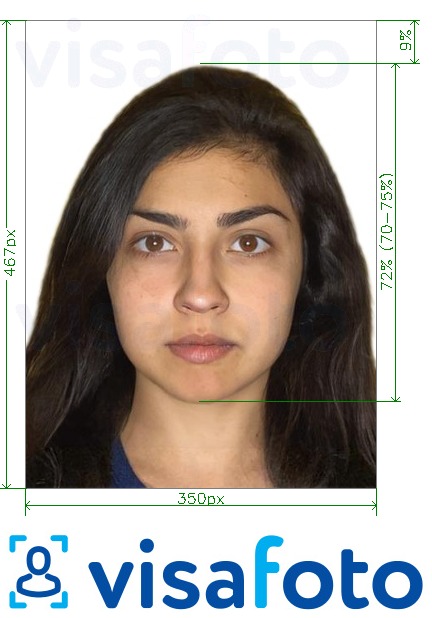
The portrait and passport scan are separate uploads. Do not use the small photograph cropped from an old passport as your new portrait.
Photos for online renewal
The renewal application has its own photo instructions. Read those beside the upload field before preparing the file, including the accepted format, pixel dimensions and file-size limit. The 3 MB specification above is documented for DGIP's additional overseas categories and should not be presented as a verified universal renewal limit.
If you are ordering a photo, keep the renewal field's instructions available so you can select the matching digital format rather than relying on a generic printed passport-photo size.
Facial appearance and image quality
For a clear passport-style portrait, face the camera directly and keep your head upright. Aim for a neutral expression, open eyes and a closed mouth, with the whole face visible. Leave room around the head and shoulders rather than cropping tightly before processing.
Avoid motion blur, glare and anything that hides facial features. Dark sunglasses are not suitable. If a head covering or medical item affects the photograph, check the applicable instructions before submitting.
Baby and child photographs
For an eligible overseas newborn application, prepare a separate portrait of the child. Keep adult hands, toys and pacifiers away from the face and try to capture a calm, front-facing moment. Do not assume that eye or expression exceptions allowed by another country also apply to DGIP.
For an office or mission application, the child must attend for the required capture and checks. Our Pakistan baby passport photo guide explains the different routes in more detail.
Get your DGIP passport photo online with Visafoto!
If your application accepts a prepared photo, you can get it ready at home without arranging a studio visit. Visafoto turns a clear smartphone or camera portrait into a document photo, so you can concentrate on your application rather than manually editing the crop and background.
Prepare your photo at home
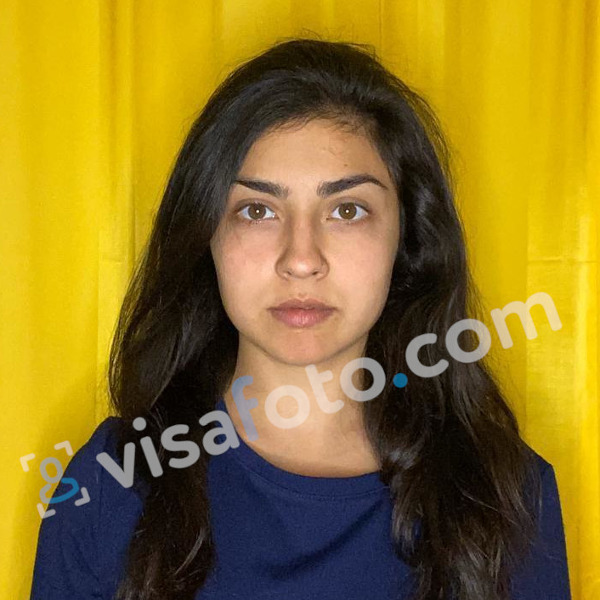
Ask someone to take a front-facing picture with enough space around your head and shoulders. The starting background does not have to be white, and you do not need professional lighting or camera equipment.
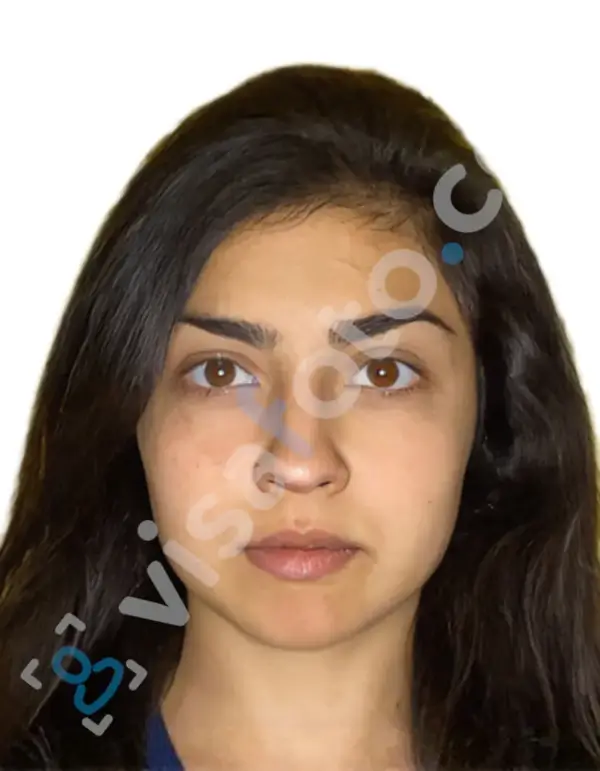
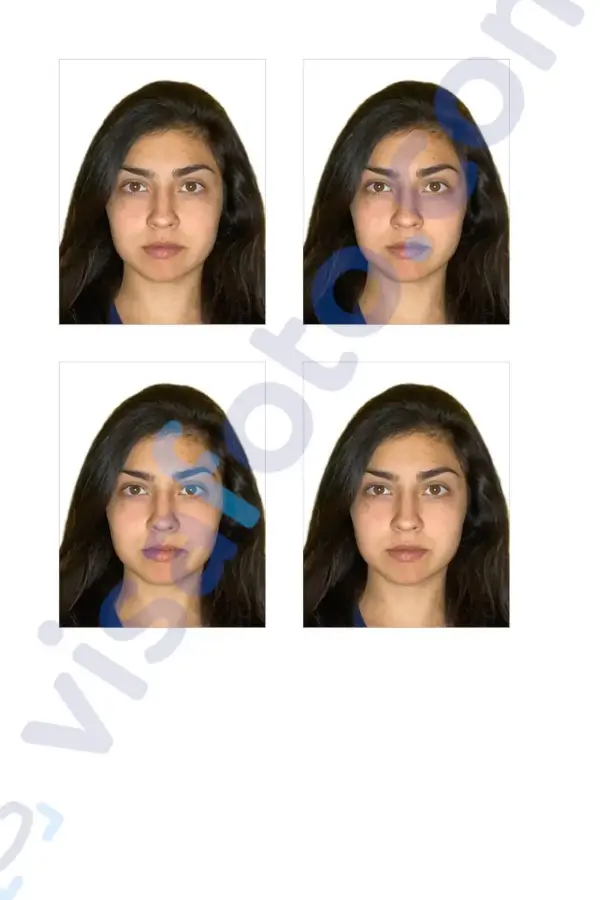
Upload the picture to Visafoto and select Pakistan and the relevant document-photo format. The service automatically crops and resizes the image, adjusts framing, replaces the background and enhances lighting, contrast and resolution. You do not have to produce a finished passport-style photo before uploading.
Use the format that matches your DGIP category. If you need the 350 × 467-pixel output or have different instructions in the renewal field, Visafoto's support can help you choose the matching format. Keep the application's specifications handy when asking for assistance.
Example of the photo you can upload to Visafoto:
The result after Visafoto editing:
Make the baby's photo less stressful
For an eligible overseas newborn application, take 20 to 60 photos across short, relaxed attempts at home. You can photograph your baby lying on a blanket or sheet on the floor while you stay beside them. Hold the camera above their face, leave space around the head and pause if they become upset.
Choose one sharp frame where the face is unobstructed and looking towards the camera, then upload it to Visafoto. The service handles the background and framing, so you do not need to keep disturbing your baby to perfect those details. If the source is unsuitable, support can explain what to look for in another frame.
Download the file, or prepare prints where needed
Download the digital portrait for an application that accepts an upload. If your mission specifically requests printed photos, use Visafoto's printable template for the required photo size. Print it at its intended scale without automatic enlargement or shrinking; do not assume that every document uses the same photo or printing-paper format.
Visafoto's document photos have a 99.7% acceptance rate, and its support team is available 24/7. If a photo purchased from Visafoto is rejected by the passport authority, you can request a 100% refund.
A prepared photo helps with the upload or print requirement. It does not replace live capture at a standard passport-office appointment or the identity and biometric checks needed to issue the passport.
How to apply at a passport office in Pakistan
You can apply at a Pakistani passport office regardless of the address recorded on your CNIC, NICOP or CRC. Check that the office provides the service you need and confirm its token hours before travelling.
DGIP's published office process follows these stages:
- Present your documents. Start at the customer-service counter with your originals and copies.
- Have your photograph taken and receive a token. Check the application category, priority and identity number printed on the QR-based token.
- Provide fingerprints. Staff capture the required biometric information.
- Review the entered details. Check spelling, dates, identity numbers and contact details before approving the application record.
- Complete record verification. The office carries out the necessary checks against its records.
- Attend the officer's interview. Provide any additional evidence or minor-form attestation requested for your case.
- Pay using the instructed payment reference. The current process includes QR-based payment through supported digital channels, such as mobile wallets or online banking. Keep the payment confirmation.
- Keep your token for collection. Follow the office's collection or offered delivery instructions after processing.
At a one-window counter, several of these tasks may happen in one place. You still need to check the entered information carefully before final approval.
How to apply through DGIP online
Use the official passport service, not an unrelated visa or identity-card application. Have your documents and portrait ready before you begin, but do not pay until you have checked the completed application.
- Open the official DGIP online passport portal. Create an account or sign in, and complete the account verification requested.
- Choose the correct category. Select renewal, or an additional overseas category for which you qualify.
- Enter your details. Match names, identity numbers and passport information to the supporting records. Check the delivery address carefully.
- Upload your photograph. Use the specifications shown for that application rather than uploading a passport scan in the portrait field.
- Upload the supporting documents. Include complete, readable scans and the required declarations or minor forms.
- Complete biometric verification. Follow the method presented for your case. If DGIP directs you to PakID, use the official app and the application's requested identity and tracking details. A child's case may require parental or guardian verification rather than the adult procedure.
- Review and pay. Check the category, personal details, documents, photo and address, then pay with the supported credit or debit card. DGIP states that online passport fees are non-refundable and non-transferable.
- Submit and save the reference. Keep the Tracking ID, payment record and confirmation email together.
- Watch for DGIP messages. Respond to requests for more information or an office or mission visit; payment alone does not mean the passport has been approved.
Complete the biometric capture or verification presented for your application; a scanned fingerprint form and app-based verification are not interchangeable unless DGIP permits that option. For more background on the renewal route, see our Pakistan online passport renewal guide.
Applying through a Pakistani embassy or consulate
A Pakistani mission is the in-person option when you live abroad and your case needs an appointment rather than an eligible online submission. Check its passport service, booking procedure and checklist before visiting.
Bring the identity and passport documents relevant to your case, plus the local residence evidence and copies it requests. Expect an in-person photograph and the required biometric capture. Payment arrangements, extra prints, appointment availability and collection or postal delivery depend on the mission.
Our guides cover passport renewal in the United Kingdom, United States and United Arab Emirates.
Pakistan passport fees, validity and processing times
Your passport fee depends on the booklet type, number of pages, validity and processing priority. The tables below show DGIP's published domestic base fees, checked on 7 October 2026. They are not a universal quote for overseas applications or online delivery.
Published machine-readable passport (MRP) fees
All amounts are in Pakistani rupees (PKR). DGIP's published normal and urgent rates took effect on 7 March 2024; the fast-track rates took effect on 8 May 2024.
| Pages | Validity | Normal fee | Urgent fee | Fast-track fee |
|---|---|---|---|---|
| 36 | 5 years | PKR 4,500 | PKR 7,500 | PKR 12,500 |
| 36 | 10 years | PKR 6,700 | PKR 11,200 | PKR 16,200 |
| 72 | 5 years | PKR 8,200 | PKR 13,500 | PKR 18,500 |
| 72 | 10 years | PKR 12,400 | PKR 20,200 | PKR 25,200 |
| 100 | 5 years | PKR 9,000 | PKR 18,000 | PKR 23,000 |
| 100 | 10 years | PKR 13,500 | PKR 27,000 | PKR 32,000 |
These are the MRP rates still published by DGIP, not confirmation that a non-chip booklet is offered through every service during the e-passport transition.
Published e-passport fees
| Pages | Validity | Normal fee | Urgent fee |
|---|---|---|---|
| 36 | 5 years | PKR 9,000 | PKR 15,000 |
| 36 | 10 years | PKR 13,500 | PKR 22,500 |
| 72 | 5 years | PKR 16,500 | PKR 27,000 |
| 72 | 10 years | PKR 24,750 | PKR 40,500 |
DGIP's published schedule does not offer fast-track e-passport delivery. Executive Passport Offices and Passport Processing Counters can have additional NADRA service charges. DGIP lists double the applicable passport fee for a first loss and four times the fee for a second loss. A third loss needs further approval rather than an ordinary renewal submission.
For an overseas or online application, use the amount displayed for your actual category, currency and delivery choice. Our Pakistan passport fees guide provides further context.
Passport validity
The usual validity options are five and ten years. Children under 15 are eligible only for five-year passports. Choose the correct validity before paying, particularly when applying for a child.
How long does a Pakistani passport take?
DGIP's published processing table and September 2026 FAQ list these periods:
| Priority | Published processing period |
|---|---|
| Normal | 21 working days |
| Urgent | 5 working days |
| Fast track | 2 working days, where the service is available |
There is a difference in the official information: on 30 April 2026, Radio Pakistan reported the Interior Minister's announcement that normal passport delivery had been reduced to 14 days. DGIP's later published FAQ still states 21 working days. Do not treat the shorter announcement as a guaranteed delivery date for your individual case.
Allow for document verification and shipping, especially when the passport must reach a foreign mission or your overseas address. Fast track is limited to participating services and is not the same as urgent e-passport processing. Ask for the expected timeframe for your chosen route before booking travel around the new passport.
How to track and receive your Pakistani passport
Keep your online Tracking ID or office token until the passport is in your hands. For online applications, check your account and registered email, including the spam folder. In Pakistan, DGIP uses SMS notifications from 9988 when you provide a valid mobile number; overseas applicants can receive email updates.
A dispatch message means the passport has left the production facility, not that it has arrived at the collection counter or your address. Follow the collection or delivery arrangement recorded for your application. For office collection, keep the original token and check the instructions if a blood relative will collect it.
For general enquiries, DGIP lists +92-51-111-344-777 and info@dgip.gov.pk. Online application queries go to mrponline@dgip.gov.pk; online delivery queries go to onlinedelivery@dgip.gov.pk. Include your name, Tracking ID, contact details and the relevant identity number so staff can locate the case. Send documents only through the official channels requested.
What if DGIP asks for more documents or rejects your photo?
Read the request to identify what needs correcting. A portrait problem, an unreadable document and a failed biometric check need different solutions; replacing the photo will not resolve an identity-record mismatch.
If DGIP requests a replacement portrait, check the application's dimensions, file format and background instructions, then submit the replacement through the requested channel. For document queries, provide the missing evidence or clearer scans. If the case is referred to a passport office or mission, follow that instruction rather than assuming another upload will complete it.
If you purchased your photo from Visafoto, contact its 24/7 support with the rejection explanation. Support can help assess the photo issue, and you can request a 100% refund if the authority rejected the purchased photo. This photo guarantee is separate from DGIP's government application fee and passport decision.
Frequently asked questions
Can I apply for my first Pakistani passport online?
Not through the ordinary online renewal service. First applications normally require an office or mission visit. The specific exception is DGIP's eligible overseas newborn route for children up to two years old.
Can I renew my passport online while living in Pakistan?
Yes, if you meet the renewal conditions: you have your previous passport, the details match your NADRA record and the passport is expired or within its final year of validity.
Do I need printed photos at a Regional Passport Office?
Not as a general requirement for the standard live-capture process: staff photograph you during the visit. Follow any additional instructions for your particular case. A foreign mission may separately request a print on its local checklist.
Can my baby's first Pakistani passport be issued through an online application?
Eligible overseas parents can apply through the newborn category for a child up to two years old. It requires the child's identity and birth-registration evidence, a digital portrait and the relevant parental or guardian documentation and verification. This exception does not cover every first passport for a child.
Can I use a NADRA photo for a DGIP passport application?
Do not assume that a NADRA photo automatically meets DGIP's instructions. The agencies and application routes are different. An uploaded file must match your DGIP category, while a standard office application uses a newly captured photograph.
Does applying online guarantee an e-passport?
No. Online submission and a chip-enabled passport are different concepts. Confirm the booklet type offered for your application before paying.
Last updated: 7 October 2026.