36×47 mm photo online: Finnish passport and ID photo requirements

A 36×47 mm photo is the printed format used for Finnish passports and identity cards. You can create a 36×47 mm photo online from a clear phone photo, then download the version you need for printing or electronic submission.
This guide explains the measurements, Finnish ID photo requirements and how to create your passport-type photo with Visafoto. It also covers printing and the difference between a digital photograph and the official photo code used in Finnish applications.
Contents
- 36×47 mm photo dimensions
- Which documents use 36x47 photo format?
- Finnish 36×47 mm photo requirements
- Get your 36×47 mm photo online with Visafoto!
- How to take a passport-type photo at home
- How to print a 36×47 mm photo
- How to submit a digital Finnish passport photo
- Frequently asked questions
36×47 mm photo dimensions
A 36×47 mm photo measures 36 millimetres wide and 47 millimetres high. That is 3.6×4.7 cm, or approximately 1.42×1.85 inches, in portrait orientation.
The numbers describe the individual photograph, not the paper on which several copies may be printed. If you order a print containing multiple passport photos, each cut-out picture must have these dimensions.
Several document-photo formats look similar on screen but differ in print:
| Photo format | Width × height | Same as 36×47 mm? |
|---|---|---|
| Finnish printed passport photo | 36×47 mm | Yes |
| 35×45 mm photo | 35×45 mm | No, both measurements are smaller |
| 2×2-inch photo | 50.8×50.8 mm | No, this is a larger square |
Simply stretching a different-sized photo can distort the face. A proper conversion adjusts the crop and head positioning while keeping the person's proportions natural. Our guides to 35×45 mm photos and 2×2-inch photos explain those separate formats.
Which documents use 36x47 photo format?
Finnish passport and identity-card applications use the Finnish passport-photo specifications. The same style of photograph is also relevant to several immigration documents, but the way you supply it depends on the application.
| Document or application | Photo preparation to consider |
|---|---|
| Finnish passport | Finnish-format photo, supplied electronically or as a print through the applicable route |
| Finnish identity card | Finnish passport-photo specifications and the submission method requested |
| Residence permit or residence card | Recent passport photo or official photograph retrieval code, as instructed by Migri |
| Alien's passport or refugee travel document | Recent passport photo or photograph retrieval code for the relevant application |
The Finnish Immigration Service's appointment guidance lists the immigration applications for which a photograph or photo code is needed. It also states that citizenship applications and EU registration do not require a passport photo. Do not assume that every Finnish administrative application needs one.
A visa application is a separate process: use its particular photo checklist rather than applying the passport-photo size automatically. Our Finnish passport and ID photo guide covers these document photos more broadly. For application details beyond the photograph, see our guides to Finnish identity cards and Finnish residence permits.
Finnish 36×47 mm photo requirements
The Finnish Police photograph instructions distinguish printed measurements from electronic-file specifications. The head must be positioned correctly in either version.
Printed Finnish passport photo dimensions
- Photo, width × height: 36×47 mm
- Crown-to-chin head height: 32-36 mm
- Space above the crown: 4-6 mm
- Space below the chin: 7-9 mm
- Photo age at application: No more than six months
Measure the head without including hair or beard. This is why fitting a portrait inside a correctly sized rectangle is not enough.
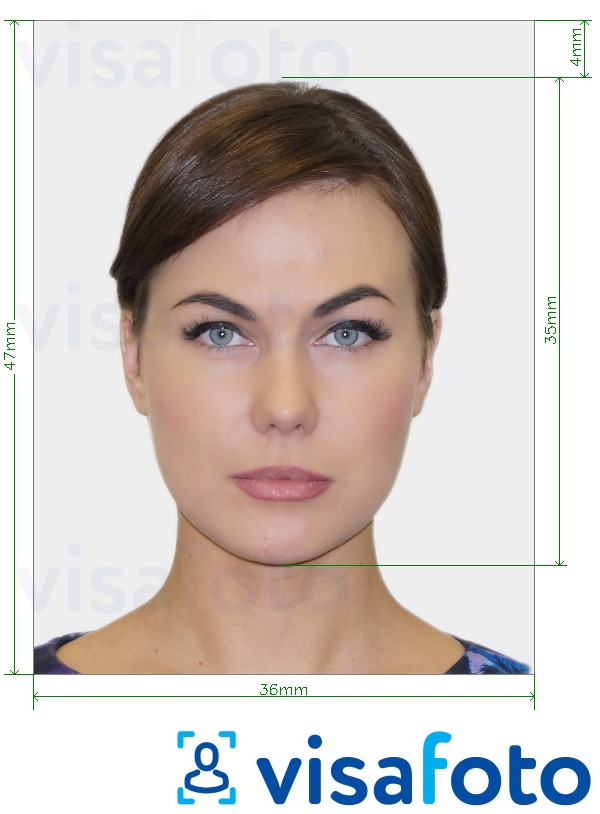
Digital 36×47 mm passport photo requirements
For electronic delivery, use exactly 500×653 pixels, width × height, in JPEG format (.jpg or .jpeg), with a maximum file size of 250 KB. PNG, PDF and JPEG2000 are not substitutes.
These are fixed pixel dimensions, not a general DPI conversion. Setting a 36×47 mm document to 300 DPI in an editor does not automatically produce the required electronic file.
Background, expression and appearance
- Use a plain, light, neutral background; light grey is recommended.
- Face the camera, with your head straight, eyes visible and mouth closed.
- Keep a neutral expression, even lighting and a sharp likeness.
- Glasses must not hide the eyes or create reflections; tinted lenses need a medical reason.
- Permitted religious, traditional or medical head coverings must leave the face visible.
- Colour and black-and-white photos are accepted. Do not reshape facial features or add digital makeup.
Get your 36×47 mm photo online with Visafoto!
With Visafoto, you can prepare a compliant ID photo from a portrait taken at home, including when you live abroad and nearby photo counters mainly offer another country's format.
- Take a clear photograph with your phone or camera, leaving room around your head and shoulders.
- Upload the original image to Visafoto.
- Select Finland and the required document, such as the Finnish passport 36×47 mm format. Use the document-specific option rather than a generic crop when available.
- Review the prepared photo, then download your digital photograph and printable layout.
Your starting background does not need to be perfect. There is no need to arrange a studio-style backdrop just to take the source picture.
What Visafoto adjusts
Visafoto resizes and crops the image, prepares the head positioning and replaces the background. It can also improve lighting, contrast and image quality while preserving your facial features. Instead of trying to estimate the crop by eye, you receive a photo prepared for the selected document format.
Use a sharp original with a clearly visible face. If you are unsure which picture to upload or need help with the result, our support team can review your question and explain what needs attention. You do not have to keep experimenting with an unfamiliar image editor.
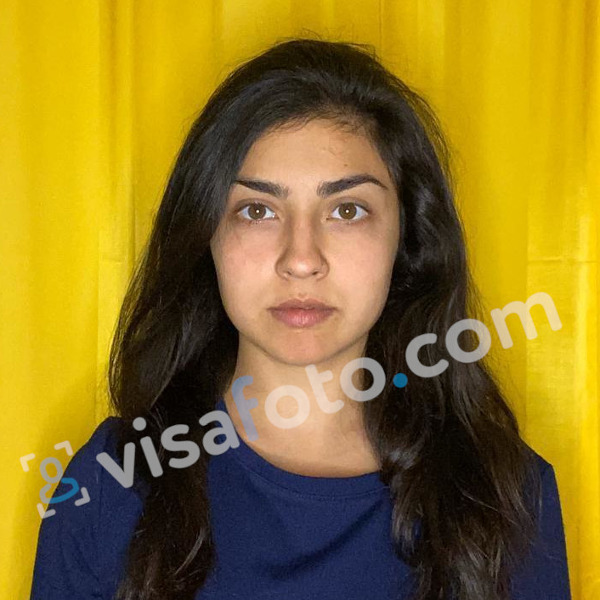
Digital and printable results
The digital result is a single portrait file. The printable layout arranges copies on a sheet for a photo-printing service or home printer. Choose the output that matches your application, and check the saved digital file's dimensions and size before sending it to an official system.
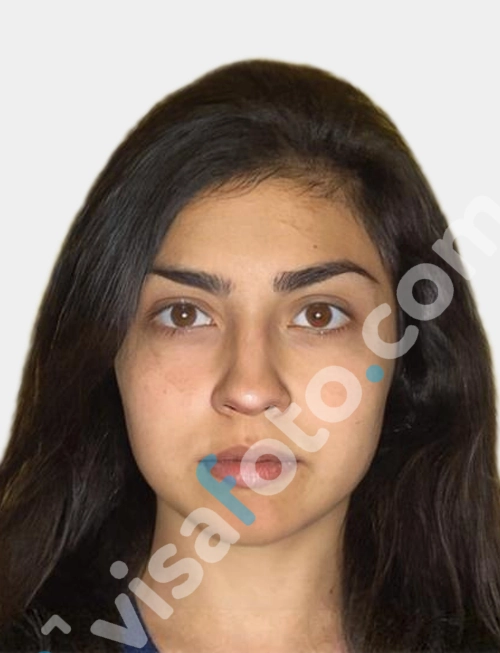
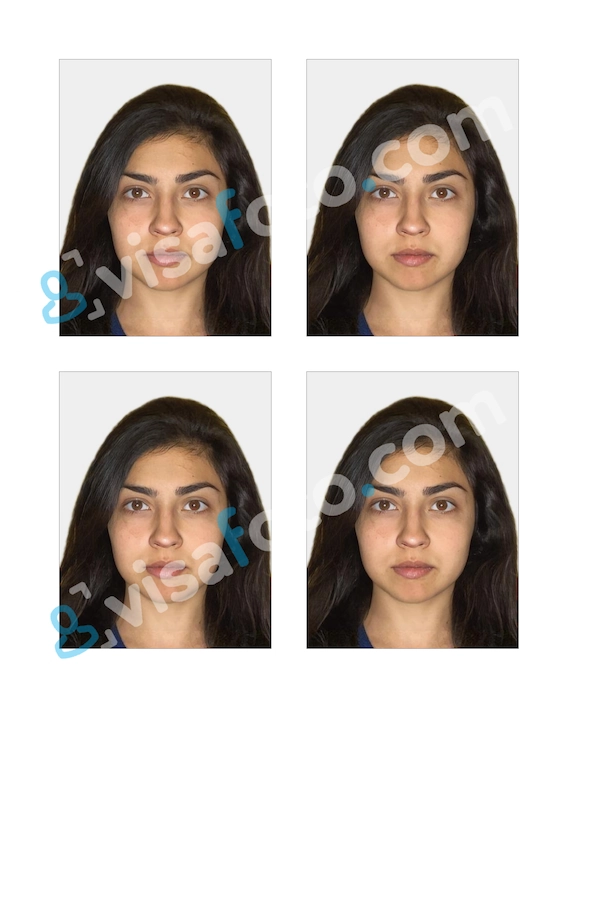
Downloading a file from Visafoto does not itself create a Finnish Police photograph retrieval code. The electronic-photo submission step is explained below.
Visafoto support is available 24/7 at support@visafoto.com. If an authority rejects a photo purchased from Visafoto, you can request a 100% refund of the photo-service payment.
How to take a passport-type photo at home
A phone or ordinary camera is enough to take the source photograph. Leave the format preparation to Visafoto and concentrate on a clear, natural-looking portrait.
- Place the camera at eye level. Ask someone to take the picture, or use a stand and timer.
- Keep some distance from the camera instead of taking a close-up, arm's-length selfie. Leave space for cropping rather than filling the frame with your face.
- Include your whole head and shoulders. Stand or sit facing the camera without turning sideways.
- Keep hair and accessories away from your face. Take off glasses if reflections make your eyes hard to see.
- Take several photographs and choose a sharp frame. Check the eyes and face before putting the camera away.
- Upload the original file, not a screenshot or a heavily compressed copy sent through a messaging app.
Window light can make the capture easier, but you do not need a perfect wall or curtain. Visafoto can prepare the background and improve lighting; what matters in the source is a recognisable, unobstructed face.
Taking a 36×47 mm photo of a baby or child
Choose a calm moment and take a short series of pictures rather than trying to get one perfect shot. For a baby, a lying-down photograph taken from directly above can be easier than trying to keep the child sitting upright. Pause when your child needs a break.
Finnish guidance allows a very young baby's mouth to be slightly open, but the eyes must remain open. Keep supporting hands and toys outside the finished photograph. The head-size and positioning requirements are the same for children and adults.
If the first few frames are not suitable, take more when your baby is settled. Our guide to taking a baby's passport photo without the stress explains how to plan a relaxed home session.
How to print a 36×47 mm photo
Print the prepared layout on the paper size it was designed for, keeping each individual portrait at 36×47 mm. The size of the sheet and the size of the photo are separate measurements.
You can use a home colour printer with photographic paper or a photo-printing service that accepts your file. When ordering, explain that you already have a prepared layout and need it printed without resizing, rather than asking the shop to create a new passport photo in its usual local format.
For either option:
- Download the original print file.
- Select the paper size specified for that file. Do not assume every layout is made for 4×6-inch paper.
- Choose actual size or 100% scaling.
- Disable fit-to-page, automatic cropping and enlargement to fill the paper.
- Measure one portrait with a ruler before cutting. It should be 36 mm wide and 47 mm high.
Use photographic paper suitable for the application and check the print for clear detail.
Prepare the print before your appointment and put it with your other documents. If you are applying through a Finnish mission abroad, follow that mission's instructions about the number of copies and how to present them. Our Finnish passport renewal guide for the United States covers that specific application route.
How to submit a digital Finnish passport photo
For an online Police application, the photograph is supplied through the official photograph server and linked to the application using a retrieval code. It is not enough to keep the prepared JPEG on your phone.
What is a photograph retrieval code?
A photograph retrieval code, also called a kuvatunnus, identifies the image stored in the official system. It is different from a Visafoto order number or a download link.
The Finnish Police submission guidance permits applicants to upload their own photograph. For self-upload, prepare the file, use the official receiving service and complete the required identification. Save the code issued for the uploaded image, then use it in the application.
Upload a newly taken photo promptly, not weeks later. A studio cannot submit a home-taken image on your behalf through its photographer account. Official quality review takes place with the application; uploading is not preliminary approval. If you use a paper photo for a Police application, apply in person instead of online.
Frequently asked questions
What is a 36×47 mm photo size in pixels?
For the Finnish electronic-photo system, use 500×653 pixels. A generic converter's result at a different DPI is not a substitute for the specified upload dimensions.
Can I convert an existing photograph to 36×47 mm?
Yes, if the source is suitable for the intended use. Resizing does not make an old photo recent or restore missing facial detail. For a new electronic upload, use a newly taken source rather than uploading an older stored portrait later.
Can I take a passport photo with my phone?
Yes. Use a clear original with natural facial proportions and leave room for cropping. A timer or someone helping with the camera is preferable to a very close selfie.
Does Visafoto provide a Finnish photograph retrieval code?
Visafoto provides prepared photo files. A downloaded image or Visafoto order reference is not an official code; that code belongs to the separate official photo-submission process.
Last updated: 22 October 2026.