How to take a passport photo of a baby without the stress
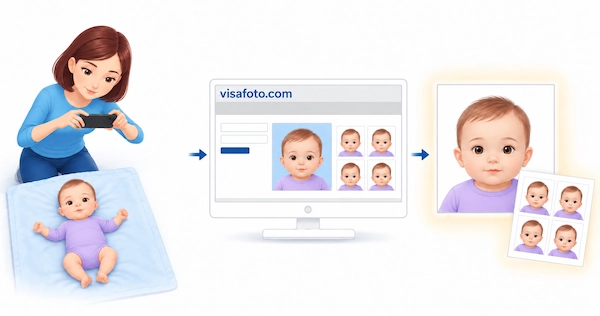
You can take a passport photo of a baby at home with your phone, without packing a changing bag for a trip to a studio. A blink, a wriggle or a sudden fascination with the ceiling does not mean the session has failed. Take several photos in short, comfortable attempts and choose a clear frame afterward.
This guide explains which baby passport photo rules really matter, how to photograph a newborn lying down, and what to do when an older baby will not sit still. You will also learn how Visafoto can prepare the file or prints, so the photo is one task you can finish before the passport appointment.
Table of contents
- Baby passport photo requirements: what actually matters?
- Prepare your baby's passport photo online with Visafoto
- Before you take photos: make the session easier
- How to take a newborn passport photo while your baby is lying down
- How to photograph a baby who can sit or keeps moving
- Take plenty of photos, then choose one good frame
- What to do when your baby will not cooperate
- Download or print the correct photo before the appointment
- What if your baby's passport photo is rejected?
- Frequently asked questions
Baby passport photo requirements: what actually matters?
Check the rules for the country issuing your baby's passport before you start. Advice from a friend whose baby has a different passport may not apply, even if your children are the same age and you live on the same street.
Check the requirements for your baby's passport
Check whether the application needs a digital upload, prints, or a photo captured at the office. Confirm the dimensions, number of copies, permitted photo age and infant exceptions.
If the office captures the picture during the application process, a prepared file may not replace that step. Otherwise, choose the correct document format before preparing your photo.
Find the guidance for your child's passport in our English-language articles below:
- Australia: baby passport photos
- Canada: baby passport photos
- Hong Kong: baby passport photos
- India: baby passport photos
- Ireland: baby passport photos
- Nepal: baby passport applications and photos
- Pakistan: baby passport photos
- Singapore: baby passport photos
- United Arab Emirates: baby passport photos
- United States: baby passport photos
Related child-passport application guides with photo guidance:
- Argentina: child passport applications for foreign parents
- Australia: child passport applications
- Canada: child passport applications
- India: baby passport applications
- Ireland: child passport applications
- New Zealand: child passport applications and baby photo requirements
- Singapore: child passport applications
- United Kingdom: child passport applications and baby photo requirements
- United States: child passport applications
- United States: parental attendance and preparing a child's passport photo
Do babies need their eyes open and a neutral expression?
Before trying to catch wide-open eyes and a perfectly serious face, check the infant exceptions. Some passports allow more flexibility than parents expect, but the rules are not the same everywhere.
| Passport | Eyes | Expression and direction |
|---|---|---|
| United States | A baby's eyes do not need to be entirely open. Other children must have their eyes open. | The child must face the camera with a neutral expression and the full face visible. |
| United Kingdom | Children under one do not need their eyes open. | Children under six do not need to look directly at the camera or have a plain expression. |
These exceptions come from the U.S. Department of State's passport photo guidance and the UK government's passport photo rules. The U.S. wording is not a blanket permission to submit a photograph of a sleeping baby with fully closed eyes.
What should stay out of the photo?
Look at the little things that can creep into the frame: a pacifier, a fist over the mouth, a bib pushed up under the chin. The baby's face needs to be unobstructed. Keep toys outside the photograph and remove the pacifier when your baby is settled enough for a few shots. Another person should not appear in the finished photo, including their hands.
A cluttered background can be addressed during photo preparation. A hand over the mouth hides facial detail that needs to be visible in the source image.
Prepare your baby's passport photo online with Visafoto
With Visafoto, you can create your baby's passport photo from a picture taken at home, while the changing supplies and spare clothes are already within reach. Photograph your baby when they are comfortable, then deal with the technical details afterward.
Take the photo at home, on your baby's schedule
Use your phone or camera and take several photographs during a settled moment. You do not need to rearrange the living room or find a perfectly white curtain: Visafoto can replace the starting background. Concentrate on getting a clear view of your baby's face rather than making the surroundings look like a studio.
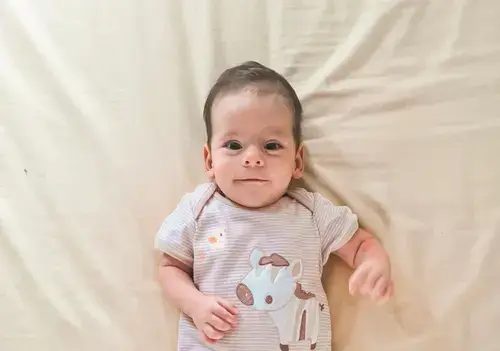
If your baby blinks just as you press the button, take another photograph. If they turn away, wait for them to look back. You can review the pictures afterward and upload the most suitable one, without trying to judge every frame while keeping a baby comfortable.
Let Visafoto handle the technical preparation
Select the passport-issuing country and the appropriate document option, then upload your chosen photograph. Visafoto automatically adjusts the size, crop and head placement for that format. It can replace the background and improve lighting, contrast and image quality, so you do not have to work out the crop or prepare the image in a separate editor.
You receive an individual digital photo and a printable template for the selected document. Upload the portrait where a digital file is required, or have the template printed for a paper application. For an in-person appointment that requires prints, you can have the photos ready in the document folder before you leave home.
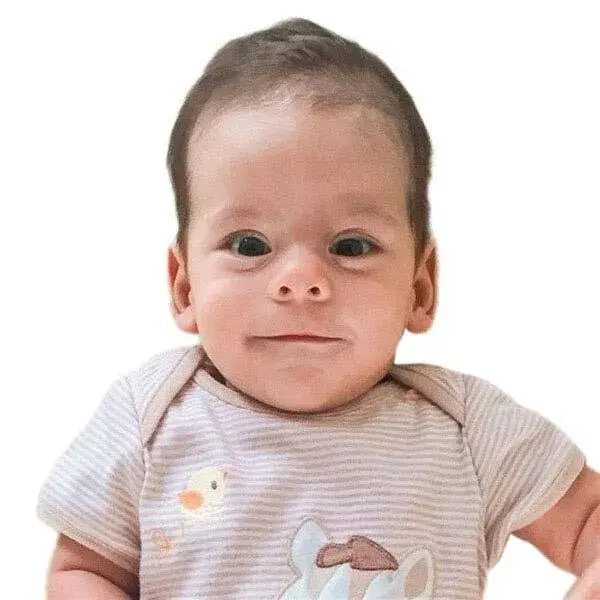
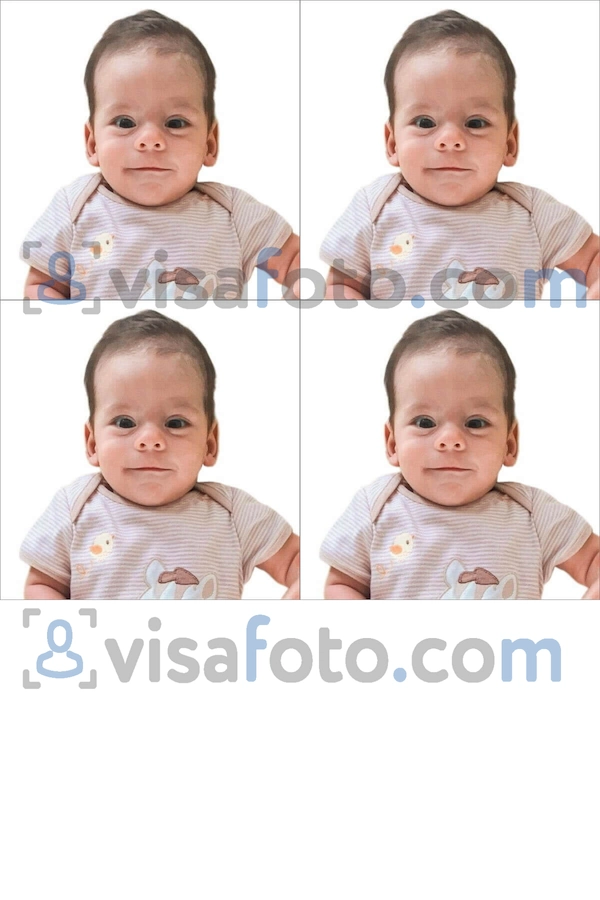
Keep the original photograph too. The issuing authority's rules, including any limits on image processing, remain the final standard for submission.
Get help when you are unsure
Visafoto provides 24/7 support at support@visafoto.com. If you are unsure about the source image or result, explain what concerns you and ask for help. You do not have to keep guessing whether a soft-looking image or awkward head angle needs another attempt.
The service reports a 99.7% acceptance rate across its photos, not a separate baby-photo success rate. If a government agency rejects a photo purchased from Visafoto, you can request a 100% refund.
Prepare your baby's passport photo online when you have a clear frame ready.
Before you take photos: make the session easier
Choose a settled moment rather than the moment you had penciled into your day. If your baby needs a feed or a change, deal with that first. If a short window opens up when they are comfortable and looking around, have the phone ready and use it.
Wipe the camera lens: a fingerprint can make an otherwise useful photo look hazy. Open ordinary photo mode, not a beauty filter or portrait effect, before positioning your baby. A bright spot with soft daylight can help you capture a sharp face without professional equipment. Look for visible detail on both cheeks rather than a bright patch on one side and a dark shadow on the other.
A second adult can stay beside the baby while you take photos. Give them a simple job: help keep the baby comfortable, with their hands out of the frame whenever possible. On your own, choose a safe position that lets you supervise throughout. Put anything you need within reach first; never leave your baby unattended to fetch equipment or inspect images.
How to take a newborn passport photo while your baby is lying down
For a newborn who cannot sit independently, photograph from above rather than trying to prop them upright. Prepare a safe space where your baby can lie comfortably, then position the camera above the face.
- Choose a firm, flat surface. A suitable mat on the floor avoids a fall from an elevated surface. Supervise throughout; do not use pillows or improvised head supports.
- Position the camera above the face. Hold the phone securely and point it straight down, not upward from the baby's feet. Check the screen: you should see the face from the front, not mainly the underside of the chin.
- Leave room for cropping. Include the whole head and upper shoulders, with space around them. If the forehead touches the top of the frame, move the camera farther away before taking more pictures.
- Check that the face is visible. Move loose clothing or blankets away from the chin and mouth. Keep your hands outside the photograph wherever possible.
- Take several photos. Focus on the face and capture a short sequence. Check one image for sharpness before taking more. If your camera lets you tap the screen to focus, tap on the face rather than the surrounding sheet.
- Stop when a break is needed. Pause if your baby becomes upset. Keep the photos you already have; the next attempt does not have to start from zero.
A sheet can make the setup convenient, but it does not have to be a perfect finished background for a Visafoto source image. Keep loose material away from your baby's face.
Can you take the photo in a car seat?
A car seat may be an alternative if it gives you a clear, front-facing view. Keep your baby safely positioned and secured; do not alter straps or add padding to change the pose.
If the seat creates deep facial shadows or a tilted head, use the lying-down method instead. Never force a pose. The finished photo must meet the passport's positioning rules.
How to photograph a baby who can sit or keeps moving
For a baby who can sit safely, bring the camera to face level. That may mean crouching down rather than photographing from your usual standing height. A low angle can exaggerate the chin, while a high angle may make the baby look downward.
A helper can use a familiar voice or hold a favorite toy just beside the lens, outside the frame. If the toy is far above your head, your baby may look upward instead of toward the camera. There is no need for a performance to make them laugh if the passport rules require a neutral expression. Take a short burst when they glance toward you, then let them move again.
Stay close enough to keep your baby safe. If they cannot sit securely, use the lying-down method rather than propping them up.
Take plenty of photos, then choose one good frame
Try taking 20 to 60 photos across short, comfortable attempts. A camera roll full of blinks and turned heads can still contain the frame you need. The number is a suggestion, not a quota: stop sooner if you have a suitable photograph or your baby needs a break.
Review the photographs when your baby no longer needs your attention. Set aside the turned heads and blurred faces, then enlarge the most promising images on your screen. Check the face itself, not just whether the little outfit looks lovely. Look for the full, unobstructed face with clear detail around the eyes and mouth, space around the head, and an expression that meets the age-specific rules.
Your favorite family photo may be the one with the enormous smile. The passport photo may be the quieter moment just before it. Save both, and stop the session once you have a suitable passport frame.
Keep the original, full-quality file. A screenshot or a compressed copy from a messaging app may lose detail. Upload the selected photograph to Visafoto individually; you do not need to combine the photographs into a collage.
What to do when your baby will not cooperate
If you have tried the toy, changed the angle and watched your baby turn away again, it is reasonable to pause. Your baby is not doing anything wrong. A break may be more useful than another ten photographs taken while everyone is frustrated.
- Your baby keeps turning away: Move the camera or your helper's attention cue. Do not force the head into position.
- Your baby starts crying: Pause and try again when your baby is settled.
- The eyes are closed: Check the issuing country's infant exception before deciding whether another frame is needed.
- The photograph is blurry: Use better light, steady the camera and take another short burst. Choose a frame with clear facial detail.
- The pacifier covers the mouth: Remove it briefly when your baby is calm. If this causes distress, pause rather than forcing the session.
- The starting background is cluttered: Concentrate on the visible face. Visafoto offers background replacement as part of photo preparation.
- A hand or blanket hides part of the face: Take another frame with the face unobstructed.
Background and framing adjustments are different from recovering missing facial detail. If the face is hidden or blurred beyond recognition, choose another source photograph.
Download or print the correct photo before the appointment
Prepare the version your baby's application actually requires. A digital portrait and a sheet containing several photos serve different purposes.
For a digital application
Download the individual portrait file and check the application's accepted file type, pixel dimensions and file-size limits. Do not upload the printing template instead of the portrait.
Save the source image, prepared portrait and order details in a folder you can find easily. A name such as "Baby passport photo" is more useful than hunting through hundreds of camera-roll images while completing a form.
For printed photos
Use the printable template for the selected document. Match the printing paper size to that template rather than assuming every passport photo should be printed on a 4 × 6 inch sheet.
Ask the printer or photo lab not to enlarge, shrink or automatically crop the template. Measure one finished photo and check the required number of copies before the appointment. Paper type and any signing or photographer-information requirements also depend on the issuing authority.
Our passport photo printing guide explains the printing process. Put the finished photos with the application documents before the appointment, not loose at the bottom of the changing bag. You can then leave home knowing you have the required photos, rather than hoping to squeeze a photo session in before your appointment.
What if your baby's passport photo is rejected?
A rejected photo is frustrating, especially after you have finally found a calm frame. Read the reason before arranging another session: an incorrect print size needs a different solution from a blurred or obstructed face.
Contact Visafoto support with your order details and the rejection message. The problem may concern the prepared image, source photograph, printing or upload settings.
If a government agency rejects your Visafoto photo, you can request a 100% refund of the photo purchase.
Frequently asked questions
Can I take my baby's passport photo with my phone?
Yes. Capture a sharp image of the full head and upper shoulders, keep the original file, and follow the infant rules for your baby's passport.
Can a baby be asleep in a passport photo?
It depends on the passport. The UK allows closed eyes for children under one. The U.S. says a baby's eyes need not be entirely open, not that sleeping-baby photos are universally acceptable.
Can I hold my baby while taking the passport photo?
You can support your baby, but the face must remain unobstructed and no other person should appear in the finished photo. Photographing a newborn lying down can make this easier.
Does the starting photo need a white background?
No. Visafoto can replace the source background. Concentrate on a clear face, then check the finished photo against the issuing authority's submission rules.
What size should a baby's passport photo be?
There is no universal size. Use the dimensions for the child's passport and application route. A printed U.S. passport photo, for example, is 2 × 2 inches (51 × 51 mm).
Do I need to print my baby's passport photo or upload it online?
Follow your application's instructions. It may require prints, a digital file, or capture at the office. Prepare any required photos before attending.
When you have a clear frame, prepare your baby's passport photo with Visafoto and save the version your application needs. If prints are required, get them ready with the documents. The photo can be finished before appointment day, when you already have plenty to carry.
Last updated: 5 October 2026.