Passport and ID photo sizes in Saudi Arabia

The correct photo size for Saudi documents depends on how you apply. Paper passport procedures that request a printed image usually require a 4x6 photo format. Electronic passport issuance can use the picture already held in government records. National ID, residency and visa services have their own requirements.
This guide explains which photo format to prepare, how digital uploads differ from printed photographs, and what to check for background, clothing and framing. You will also learn how to make a biometric photo at home with Visafoto and print it at the correct size.
Contents
- Saudi passport and ID photo sizes at a glance
- Saudi document-photo requirements: background, pose and clothing
- Get your Saudi passport or ID photo online with Visafoto!
- How to take a passport-style photo at home
- Digital photo dimensions versus printed photo sizes
- How to print passport and ID photos in Saudi Arabia
- Can you use the same photo for different Saudi documents?
- Frequently asked questions
Saudi passport and ID photo sizes at a glance
Measurements are given as width × height.
| Document or application | Photo size or format | How the photo is supplied |
|---|---|---|
| Saudi passport, paper procedure requesting photographs | 4 × 6 cm, or 40 × 60 mm | Colour photographs with a white background, following the applicable checklist |
| Ordinary Saudi passport issued electronically | Photograph already registered in government systems | The service uses the registered photo; buying a new print does not update that record |
| Saudi National ID, electronic renewal or replacement | Published proportions in multiples of 2:3; maximum 1 MB for the specified electronic services | New upload, or existing-photo reuse where the service permits it |
| Iqama / Resident ID photo update | Digital portrait meeting the resident-photo service's current upload specifications | Photo-update request through the relevant Absher service |
| Tourist eVisa through Visit Saudi | 200 × 200 pixels; file size from 5 to 100 KB | Individual digital portrait uploaded to the tourist eVisa application |
| Other Saudi visa applications | Format specified by the particular visa portal, mission or application centre | Digital photo, printed copies or both, depending on the route |
| Saudi driving-licence application with a printed-photo checklist | 4 × 6 cm where requested | Printed copies in the number required for that procedure |
| Foreign passport or visa application made in Saudi Arabia | The issuing country's format, not automatically 4 × 6 cm | Follow the foreign authority's digital or printed-photo instructions |
A 4 × 6 cm document photo is not a 4 × 6 inch print. The first is a small portrait; the second is a much larger sheet of photographic paper that can hold several portraits.
Saudi passport photo size: when do you need a new photograph?
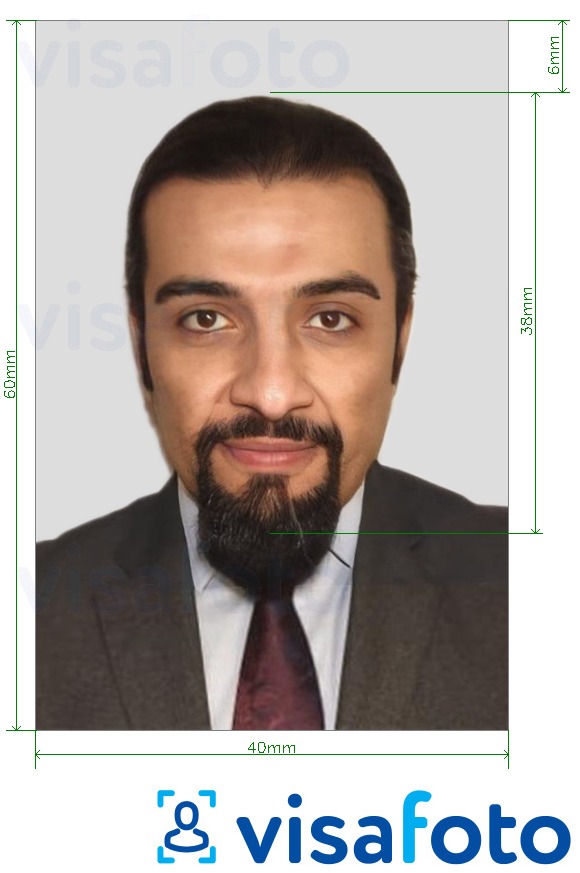
For a Saudi passport procedure that asks for supplied prints, prepare the specified 40 mm wide × 60 mm high photograph. The Ministry of Interior's passport application form labels the photograph 4 × 6, in colour, with a white background. Bring the number of copies required for your particular procedure.
Ordinary electronic issuance is different. Absher's passport service requires a photograph and fingerprints to be registered in Ministry of Interior systems and states that the registered photograph will be used in the issued passport. A new image saved on your phone does not replace it automatically.
Children's passport services and applications that cannot be completed through the ordinary electronic route can involve a supplied photograph. Use the instructions for the child's service or the passport office rather than assuming the adult workflow applies. For more detail, read our Saudi passport photo guide.
This is an example of Visafoto's Saudi passport 4 × 6 cm format:
Saudi National ID photo requirements through Absher
For the electronic National ID services described in Absher's official requirements, the published photo dimensions are multiples of 2:3, and the file must not exceed 1 MB. The photograph must be in colour, have a white background and have been taken within the previous six months.
For a lost or damaged National ID replacement, the published service allows the previous photo to be reused if no more than 720 days have passed since it was changed. A new photograph can also be uploaded. This option should not be treated as a blanket rule allowing an old photo in every Saudi application.
Iqama photo size and Resident ID photo updates
To update the photo on your Iqama (Resident ID), upload a digital portrait through Absher's resident-photo update service.
You only need 4 × 6 cm printed photos if your residency application's checklist asks for them. A printed photo is not a substitute for the digital file used in an Absher update.
If Absher asks you to confirm your identity through Nafath, complete that check as well as uploading your photo. For help with the process, see our Absher photo requirements guide.
Saudi visa photo sizes
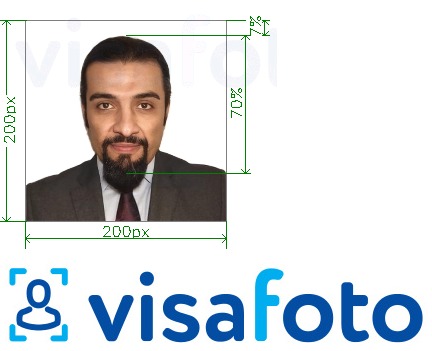
The Visit Saudi tourist eVisa portal uses a square 200 × 200 pixel photo, with a file size between 5 and 100 KB. Its official photo specifications require a white background and a photograph no more than six months old. The face and top of the shoulders should be visible, with the head centred in the frame.
These specifications are for the Visit Saudi tourist eVisa portal. They do not establish the size for every KSA Visa application, family visit, work visa, Hajj application or consular submission.
Do not stretch a 4 × 6 cm portrait into a square, or upload a sheet containing several printed-photo copies. Use an individual portrait prepared for the correct digital format. Our Saudi visa photo guide explains the application routes in more detail.
Saudi driving-licence photo size
Saudi driving-licence checklists can request 4 × 6 cm printed photographs. For example, the Ministry of Human Resources and Social Development's 2024 expatriate services guide lists six photographs in that size for the driving-licence application procedure it describes.
Use that as a procedure-specific checklist. Confirm the current instructions for your driving school or Traffic Department appointment, especially when renewing an existing licence rather than applying for the first time.
Saudi document-photo requirements: background, pose and clothing
The finished photograph needs the right appearance as well as the right dimensions.
Photo background and lighting
Use the final background required for the selected document. The passport form, electronic National ID instructions and Visit Saudi tourist eVisa specifications cited above all call for white.
The face should be clearly visible, with natural skin colour and no glare or deep shadows obscuring features. A patterned background, an object behind the head or another person in the frame can make an otherwise sharp portrait unsuitable.
If you are preparing the photograph with Visafoto, the source image does not need a finished white background. The service can replace it and correct lighting while preserving your facial features.
Face position, expression and framing
Face the camera directly, keep your head upright and use a neutral expression. Keep your eyes visible and your mouth closed. Leave enough space around your head and shoulders for the final crop.
Glasses, hijab, ghutra and other head coverings
For the electronic National ID services cited above, Absher does not accept glasses or contact lenses that conceal the natural eye colour. Its instructions specify ghutra for men and hijab covering the hair and neck for women, without obscuring the identifying features of the face.
Visit Saudi's tourist eVisa guidance separately allows religious headwear when the face remains visible from the chin to the forehead and the covering casts no shadows on the face. Do not assume that the National ID clothing requirements apply to a foreign tourist's visa photograph.
Arrange any permitted head covering before taking your ID picture. Keep its edges away from the eyes and cheeks, and make sure the full face can be seen.
How recent must the photograph be?
The electronic National ID requirements and Visit Saudi tourist eVisa specifications give a six-month recency limit.
Even within an allowed period, choose a new photograph if your appearance has changed enough that the old image no longer represents you. An option for a government service to reuse its stored photo is separate from permission to upload an old portrait.
Get your Saudi passport or ID photo online with Visafoto!
Visafoto lets you prepare a passport-size at home without arranging a studio visit. Take a clear picture with your phone or camera, upload it, and select Saudi Arabia and the document format you need. For a paper passport application requesting 4 × 6 cm prints, choose the Saudi passport 4 × 6 cm photo format. For the Visit Saudi tourist portal, choose the separate 200 × 200 pixel eVisa format.
The service does more than resize the outside of the image. It adjusts the crop, head size, eye position and surrounding space for the selected format. It can replace a distracting background with the required colour and improve lighting, contrast and image quality, while preserving your facial features and identity. You do not need a perfectly white wall or studio lighting to take the starting photograph.
For a printable document format, you receive an individual photo and a template for printing copies at the required size. For an online application, use the individual digital file. A small eVisa upload is not a substitute for a high-quality printed passport photograph, so select the relevant format for each task.
An example of a source photograph you can upload:
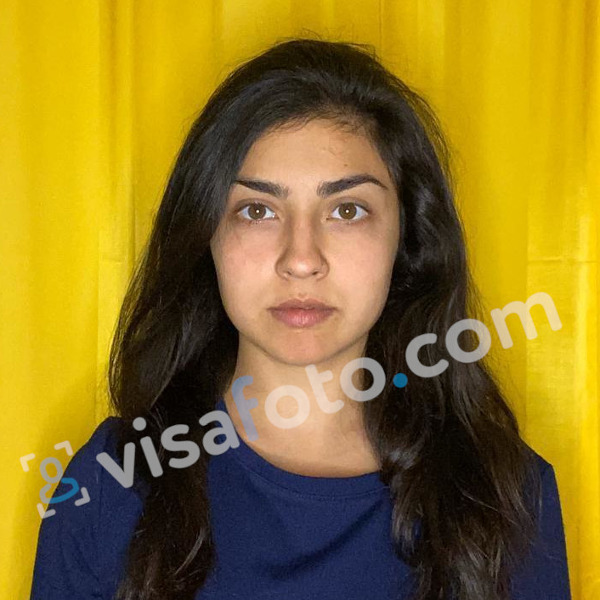
The selected passport format produces a portrait like this:
If your instructions differ from the available preset, send them to support before ordering. Experienced specialists consider each customer's photograph individually and can help with format selection, framing, downloads and printing. Support is available 24/7 at support@visafoto.com.
Visafoto reports a 99.7% acceptance rate, based on more than one million accepted photographs. If an authority rejects a photo purchased from Visafoto, you can request a 100% refund of the photo purchase. The service prepares photographs; it does not replace required identity verification or update a government record on your behalf.
How to take a passport-style photo at home
A phone and a little space are enough to take a suitable source portrait. Concentrate on a sharp, recognisable face and the correct pose; Visafoto can handle the final background, dimensions and framing.
- Put the camera at eye level. Keep it straight rather than pointing up from below your chin or down from above your forehead.
- Ask someone to take the picture. A little distance is better than holding a wide-angle selfie camera close to your face, which can distort your proportions.
- Leave room around your head and shoulders. Do not crop tightly before uploading. Extra space makes it easier to prepare either a portrait or square format.
- Follow your document's clothing and expression rules. Arrange any permitted head covering, look directly at the camera and keep your face unobstructed.
- Take several photographs. Choose a sharp frame without blinking or movement. Light from a window can help, but a perfect studio setup is unnecessary.
- Upload the original-quality image to Visafoto. Select the document, then download the appropriate digital file or printing template.
For babies and young children, work around a comfortable moment rather than trying to get one perfect shot immediately. Take 20 to 60 pictures if necessary and ask support for help selecting a suitable frame. You can photograph a baby lying safely on a firm, flat surface, with the camera directly above their face. Keep supporting hands, toys and other people outside the finished portrait, and follow the child's specific application instructions rather than borrowing another country's expression exceptions.
For more practical advice, see how to take a good passport-style photo at home.
Digital photo dimensions versus printed photo sizes
Centimetres and millimetres describe the size of a physical print. Pixels describe the dimensions of a digital image, while kilobytes and megabytes describe how much data the file contains.
| Specification | What it means | Practical example |
|---|---|---|
| Physical size | The width and height after printing | 4 × 6 cm is the same as 40 × 60 mm |
| Pixel dimensions | The number of pixels across and down the image | 200 × 200 pixels describes a square digital portrait |
| Aspect ratio | The relationship between width and height | A 4 × 6 cm portrait has a 2:3 ratio; a square has a 1:1 ratio |
| File size | The amount of data in the saved file | A file can have the correct dimensions but exceed a 100 KB upload ceiling |
| File format | The way the image is encoded | The application must accept the actual image format, not just the name of its extension |
Before submitting, inspect the actual portrait preview. A successful upload confirms that the system received a file, not that an official has accepted its background, framing or likeness.
How to print passport and ID photos in Saudi Arabia
Use the printable template for your selected document, then print it at the paper size specified for that template. A local photo lab or a suitable home photo printer can produce the sheet, provided the finished copies meet your application's paper and quality requirements.
- Download the printing template.
- Tell the lab the template's intended paper size. If printing at home, select that exact size.
- Disable automatic resizing, borderless enlargement or cropping that changes the size of the individual portraits. Use actual size or 100% where appropriate.
- Print on photo paper with a sharp, clean result and natural colour.
- Measure an individual portrait before cutting. A requested 4 × 6 cm photograph must be 40 mm wide and 60 mm high.
- Cut the copies neatly and bring the number listed in your application instructions.
Our 4 × 6 cm photo guide explains that portrait format. The number of copies that fits on a sheet depends on the template and document size; there is no universal Saudi requirement to use one particular printing sheet.
Can you use the same photo for different Saudi documents?
You may be able to use the same recent source image to prepare more than one document photo, but the finished files may need different crops, dimensions or file sizes. Check the background, clothing, recency and submission rules for each application.
A Saudi citizen, for example, might need a portrait-shaped photo for a paper passport application and a square photo for a U.S. visa application. The same recent source image can be cropped separately for each document, but stretching the portrait into a square would distort the face. Keep the high-resolution original for printing rather than enlarging a small upload file.
Government reuse is a separate matter. When Absher permits an existing National ID photograph to be reused, or a passport service uses the picture already in official records, the system handles that choice. It is not the same as choosing an old file yourself.
If you are an expatriate renewing your home-country passport in Riyadh, Jeddah or another Saudi city, the issuing country's rules apply. For example, British paper passport applications use 35 × 45 mm photographs, while U.S. passport prints are 2 × 2 inches, conventionally stated as 51 × 51 mm. Neither becomes a Saudi 4 × 6 cm photograph because it was taken in Saudi Arabia. The same principle applies to a U.S. visa photo or another foreign visa application.
Frequently asked questions
What photo size does Absher require?
It depends on the service. The published electronic National ID instructions specify proportions in multiples of 2:3 and a maximum file size of 1 MB. Do not transfer those limits to every passport or Iqama transaction; use the instructions in the relevant application.
Can I prepare a Saudi document photo using my phone?
Yes, for a procedure that accepts a supplied photograph. Take a clear front-facing picture and use Visafoto to prepare the selected document format. A phone photo does not replace a registered government image or live verification where the service requires those steps.
What should I do if my passport or ID photo is rejected?
Read the message and check whether the problem concerns the file format, dimensions, file size, framing or appearance. Follow the application's replacement instructions rather than resubmitting the same file unchanged. If you purchased the photograph from Visafoto, contact its 24/7 support for individual help; if the authority rejects it, you can request a 100% refund of the photo purchase.
Last updated: 29 October 2026