Thailand Visa Online

Thailand offers several ways to apply for a visa, including online applications for eligible travelers. This guide explains how to apply for a Thailand visa, what documents you need, and how to prepare a compliant visa photo.
Table of contents
- General Thailand visa types
- Who is eligible to apply for a Thailand visa online?
- How to apply for a Thailand eVisa
- Thailand e-visa photo requirements
- Get a photo Thailand e-visa application online!
- Thailand visa fees
General Thailand visa types
The types of visas are divided by entry purposes:
- Tourist visa. Suitable for recreational purposes and personal visits. A single-entry tourist visa is normally valid for entry within three months of issue and allows a stay of up to 60 days from arrival. A multiple-entry tourist visa is normally valid for six months, with up to 60 days per entry. You can apply to Thai Immigration for an additional 30 days; an extension is subject to approval. Visa validity is the period in which you can use the visa to enter, not the length of your permitted stay.
- Business or investor visa. The appropriate Non-Immigrant B or IB category depends on your business, employment or investment activity. A single-entry visa normally has three-month validity and allows an initial stay of up to 90 days. Longer stays require a qualifying extension or the appropriate multiple-entry visa; a one-year stay is not automatic.
- Study visa. The Non-Immigrant ED category is for eligible education, training or internship programs. A single-entry ED visa normally has three-month validity and allows an initial stay of up to 90 days, rather than an automatic year. Prepare the documents required from your school or institution. Any extension depends on your program and Thai Immigration's requirements.
- Transit visa. Do not assume that every connection under 12 hours is visa-free. The published airside-transit exception concerns passengers who remain in the international transit area for less than 12 hours. If you must pass immigration to collect baggage, check in again, change airports or leave the airport, you need an applicable entry permission, such as visa exemption or an appropriate visa. Check your nationality and itinerary with your airline and the responsible Thai mission.
- Non-Immigrant O visa. Thailand family visa is issued to spouses, children, and parents of Thai nationals. Its initial validity period is three months.
- Long stay visa. Retirement routes have different conditions. Non-Immigrant O-A is for qualifying applicants aged 50 or older and allows a stay of up to one year. Published financial requirements include at least 800,000 THB in deposits, monthly income of at least 65,000 THB, or an eligible combination of deposits and annual income totalling at least 800,000 THB. Insurance, medical and criminal-record documents are also required. Non-Immigrant O-X is a separate five-year route, potentially extendable for another five years, for eligible citizens of Australia, Canada, Denmark, Finland, France, Germany, Japan, Italy, the Netherlands, Norway, Sweden, Switzerland, the UK and the USA. Its financial requirements are higher: at least 3 million THB in a Thai bank, or at least 1.8 million THB in a Thai bank plus annual income of at least 1.2 million THB. Further deposit-maintenance and insurance conditions apply. See our Thailand retirement visa guide for more detail.
- Smart visa. This program requires endorsement by Thailand's Board of Investment (BOI); there is no universal 200,000 THB monthly salary requirement. The BOI's currently listed two-year SMART S route is for technology-based startup entrepreneurs in targeted industries. Its conditions include a deposit of at least 600,000 THB held for at least three months, health insurance, and being a director or holding at least 25% of a qualifying company already established in Thailand. Eligible dependants use SMART O. Follow the BOI's current qualifications rather than treating older salary and investment thresholds as rules for every applicant.
- Destination Thailand Visa (DTV). This multiple-entry visa is valid for five years and permits up to 180 days per entry. It covers qualifying remote workers, digital nomads and freelancers, eligible activities such as Muay Thai or cooking courses and medical treatment, and qualifying spouses and dependent children. It is not general permission to work for a Thai employer. Read our DTV application guide.
- Government official visa. It is issued to government and diplomatic organizations employees and to attend events organized by the Thai government. Family members of diplomats and officials working in Thailand are also eligible.
- Diplomatic visa. Designed for UN Laissez-Passer and official passport holders.
Who is eligible to apply for a Thailand visa online?
Thailand's eVisa system has been available through all 94 Royal Thai embassies and consulates-general worldwide since 1 January 2025. Your nationality, passport type, purpose of travel and current location still determine the appropriate application route. On the official Thai eVisa website, enter your passport country and current location, then select the responsible mission. Be ready to provide proof of where you are applying from and, where required, your residence status. Do not select a mission outside your applicable jurisdiction simply because its processing time looks shorter.
First check whether you need a visa for your planned visit. Under the visa-exemption and visa-on-arrival changes effective 15 September 2026, Thailand withdrew the previous 60-day visa-exemption scheme and revised the 30-day, 15-day and visa-on-arrival arrangements. The applicable route depends on your passport. Visa exemption, visa on arrival and an approved eVisa are different entry arrangements. These changes do not turn a 60-day tourist-visa stay into a 30-day stay.
How to apply for a Thailand eVisa
To apply for a Thai visa online, prepare a clear passport biodata-page image and a separate recent portrait. Depending on your visa and processing mission, supporting documents may include proof of your current location, travel bookings, accommodation, financial evidence and documents from your employer, school, host or activity provider. Use the checklist for your selected visa category.
- Create an account on thaievisa.go.th and activate it using the verification email. Check your spam folder if the email does not arrive.
- Start a new application. Enter your passport country and current location, select the responsible mission, then choose the visa category, purpose of visit and number of entries.
- Upload the passport biodata page and your portrait in their separate fields. Make the entire biodata page and machine-readable zone clear. Check any details read automatically from the passport against the original document.
- Complete your personal, passport and travel information, including your intended arrival and accommodation details. Enter names, passport numbers and dates exactly as they appear in your passport.
- Upload the supporting documents requested for your category. Follow each field's accepted file formats and size limit; document-upload rules are not necessarily the same as the portrait-upload rules.
- Review the application carefully before submitting and paying. Follow the payment method offered by your processing mission, which may be online payment or the mission's specified alternative. Save your application reference and payment receipt. Paying does not mean your visa has been approved.
- Monitor the application in your dashboard and check your email. If an officer requests more documents, open "Request Document", select the application and reference number, read the officer's remarks, upload the requested files and confirm submission.
- Once approved, download the eVisa confirmation and check the passport details and validity dates. Print a copy to carry with the passport used for the application and present it when requested by the airline or Thai Immigration.
Processing time depends on the mission, visa category and completeness of the application. For example, the Royal Thai Consulate-General in Los Angeles publishes approximately 15 business days for tourist-visa applications and states that expedited processing is not available. Additional-document requests can delay a decision. Apply well before departure and do not treat a pending application as permission to travel on that visa. A mission may also request an interview or further evidence.
Before arrival: The Thailand Digital Arrival Card (TDAC) is a separate, free immigration form, not a visa. Submit it within three days before arrival, including the arrival date, even if you already have an eVisa or qualify for visa-free entry. Keep the confirmation and QR code accessible. Passengers staying airside without passing immigration do not need a TDAC; entering Thailand during a connection changes that requirement.
Thailand e-visa photo requirements
The official Thai eVisa application manual, page 24, specifies JPG/JPEG, a maximum file size of 3 MB and a photograph taken within six months. Make sure your photo fulfills these parameters:
- Follow the portrait field's framing example and any additional instructions from your processing mission. A printed size such as 35 × 45 mm is not a digital pixel specification;
- Upload a JPG or JPEG file no larger than 3 MB;
- Use a photograph taken within the last six months;
- The image must have adequate brightness and contrast and show natural skin tone;
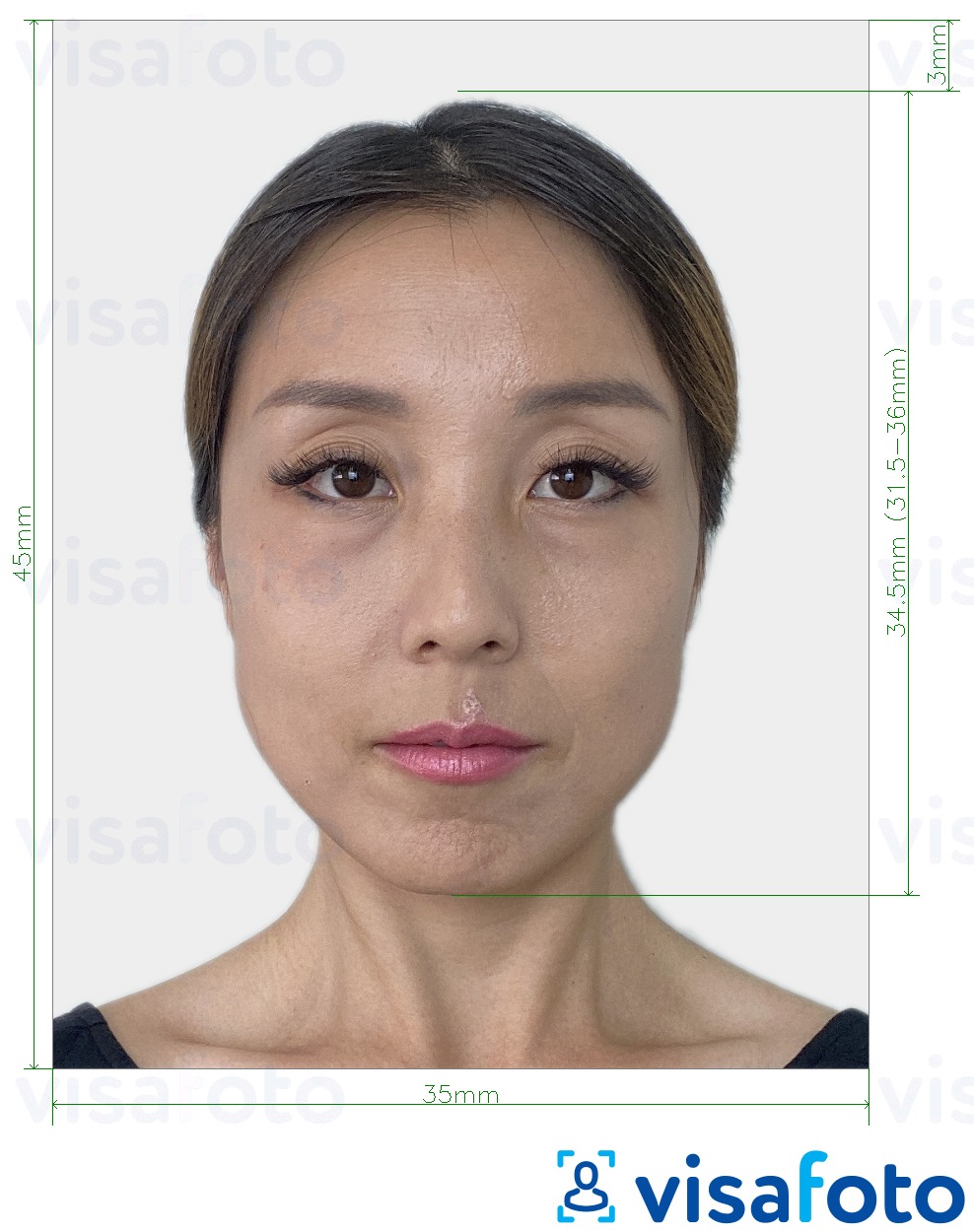
- It should show a close-up of the head and (partial) shoulders;
- Your head must be looking straight forward, centered with a neutral expression and in sharp focus, and clear with no ink marks/creases/lines;
- The face (from forehead edge to bottom of chin) should be 70 to 80% of the photo;
- The eyes must be open and no hair obscuring the face;
- Prescription glasses are allowed but have to be clear and thin framed and should not have flash reflection or obscure the eyes;
- Head coverings, hair, head-dress or facial ornaments should not obscure the face;
- The photo must have a plain white background with no other people or objects;
- The lighting must be uniform with no shadows on the face or behind;
- Photos should not have red eyes.
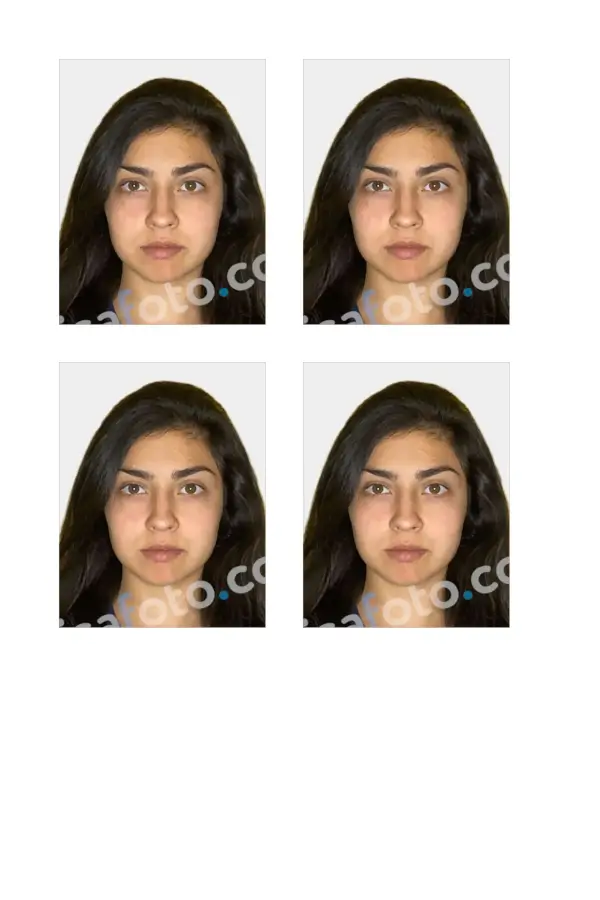
Here is an example of a Thai e-visa photo:
Get a photo Thailand e-visa application online!
Getting a Thai visa is now easier than ever, but that doesn’t mean you should be too relaxed with your application documents.
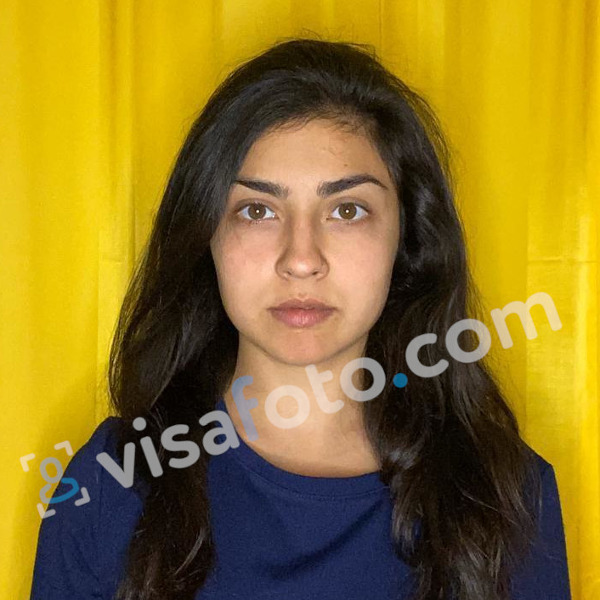
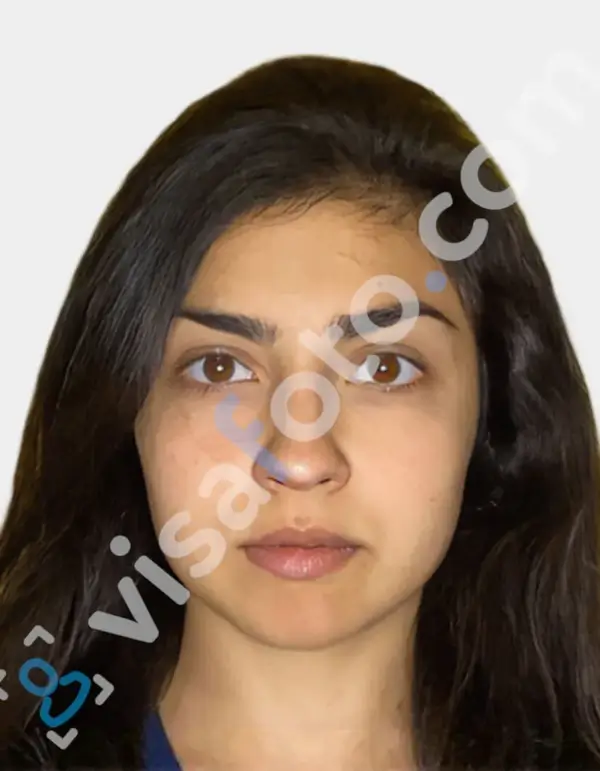
With Visafoto, you can ensure that the picture you use to apply for a Thai electronic visa is fully compliant. Just take a picture of yourself with good lighting and follow the guidelines, and we’ll take care of the technicalities. Just upload your photo below and get it corrected instantly.
First take a photo of yours which will look like this one:
The resulting picture will be 100% compliant with photo requirements for a Thai visa online application:
Thailand visa fees
The cost depends on your visa category, number of entries and processing mission. US$40 is not a universal worldwide tourist-eVisa fee. The published fee schedules of the Royal Thai Consulate-General in Los Angeles and the Royal Thai Embassy in London give these examples:
| Visa | Los Angeles | London |
|---|---|---|
| Single-entry tourist visa | US$40 | £30 |
| Multiple-entry tourist visa | US$200 | £150 |
These are mission-specific official visa fees, not currency conversions or prices charged by a visa agent. Los Angeles requires credit-card payment through the eVisa system; London publishes online payment in pounds sterling. Other missions may use different payment arrangements. Confirm the amount and method displayed for your application before paying. Visa fees are non-refundable, including when an application is refused.
Last updated: 13 October 2026.