US Passport Renewal Online vs by Mail: Key Differences Explained

Many people wonder, “Should I renew my U.S. passport online or by mail?” The method you choose can affect how quickly and smoothly your application is processed. Online and post office applications involve different steps, requirements, and risks. This guide explains the key differences between passport renewal online vs. in person so you can choose the right method.
Table of contents
- Online US Passport Renewal Eligibility
- When You Must Renew Your Passport in Person at the Post Office
- US Passport Processing Times: Online vs Mail
- Step-by-Step Online US Passport Renewal Process
- Steps to Renew Passport by Mail
- Passport Photo Rules for Renewal Applications
- US Passport Photo Maker
- When Online Renewal Beats Mail in 2026
- Why Choose Mail for Urgent Passport Renewal
- Summaries: Key Differences Between Renewing Passport Online VS Mail
- FAQ
Online US Passport Renewal Eligibility
You can renew a U.S. passport online only if you meet a specific set of criteria set by the Department of State:
- Age requirement: You must be 25 years or older.
- Passport type: It should be a 10-year adult passport.
- Expiration timeline: Your passport must expire within a year or have expired less than five years ago.
- Personal information: No changes are needed to your name, sex/gender marker, or birth details.
- Location: You must be in a U.S. state or territory and have a U.S. mailing address.
- Passport condition: You must have your current passport in hand. It must be undamaged and must never have been reported lost or stolen.
- Travel plans: Do not travel for at least six weeks after applying (routine service only; no quick processing).
- Payment and photo: You are capable of making an online payment via credit or debit card, and you are ready to upload a compliant digital photo.
If you don’t meet these criteria, consider renewing your passport by mail or by visiting a passport agency or center.
When You Must Renew Your Passport in Person at the Post Office
You must renew your U.S. passport by mail (using Form DS-82) whenever you are eligible to renew but do not qualify for online renewal. Below, we explain the situations when you renew your passport by mail.
Here's when mail renewal applies:
- You meet all DS-82 rules: Your last passport is undamaged, ready to submit, issued when you were 16 or older, issued within the last 15 years, and either in your current name or accompanied by legal proof of a name change.
- You are not in a U.S. state or territory, or you need expedited service unavailable online.
If your passport doesn't meet DS-82 criteria (e.g., too old, issued when you were under 16, lost, stolen, or damaged), apply in person at a post office with Form DS-11. In-person applications are needed if:
- You're applying for your first adult passport.
- Applying for a child under 16.
- Your last passport was issued when you were under 16.
- Your passport is lost, stolen, or significantly damaged.
- Your passport was issued over 15 years ago.
- You don't meet DS-82 conditions (e.g., can't submit the old passport or can't document a name change).
Remember, routine renewals of undamaged 10-year adult passports fitting the age and date rules must be mailed via DS-82 or processed online, not in person at post offices.
US Passport Processing Times: Online vs Mail
Is it quicker to renew a passport online or by post? For 2026, the State Department is quoting essentially the same core processing times for all adult renewals, whether you apply online or by mail. The main difference is convenience and the ability to use expedited service, not the base processing window. Here, you'll learn about typical waiting periods and what can affect them.
Timeline for online passport renewal (eligible adults only)
Routine service only, with no expedited option through the portal. The quoted processing time is 4–6 weeks, similar to routine mail renewals. However, you bypass mailing the application, and some users report faster turnaround, occasionally under two weeks when demand is low.
Timeline for passport renewal by mail (form DS-82)
Offers both routine and expedited services, with expedited service incurring an additional fee (about $60). Official processing times for passport renewal by mail are 4–6 weeks for routine or 2–3 weeks for expedited, plus mailing time.
Step-by-Step Online US Passport Renewal Process
You renew a U.S. passport online through the State Department’s MyTravelGov/OPR portal by confirming eligibility, preparing your materials, completing the digital DS-82, paying, and then tracking your status. Below is a structured walkthrough of the full process.
Follow these steps:
- Gather necessary documents. Decide if renewing a passport book, card, or both (must match existing type). Prepare before logging in:
- current passport details (number, issue date, expiration date);
- compliant digital passport photo;
- social security number and emergency contact;
- payment method (credit/debit card preferred).
- Create or access your MyTravelGov account. Visit travel.state.gov, navigate to “Renew Your Passport Online,” and ensure the URL ends in .gov (e.g., opr.travel.state.gov / mytravelgov). Create an account if needed, verify your email, and log in. Select "Renew Passport Online" from the dashboard.
- Complete the online application. Use the digital Form DS-82 to enter personal and passport information. Upload your digital passport photo when prompted.
- Pay the required fee. Use an accepted card to complete payment.
- Track your application. Receive email confirmations and status updates as your application moves from “Received” to “In Process,” “Approved,” and “Mailed.” Check status anytime via the State Department's online Status page linked from travel.state.gov.
If the Department requires more information, they will contact you via email or letter. Follow their instructions and respond within the specified timeframe, typically within 90 days.
Steps to Renew Passport by Mail
You renew a U.S. passport by mail using Form DS-82 and sending a complete package via USPS to the National Passport Processing Center. Below, we explain each step so you can submit a complete application.
Follow these instructions:
- Complete Form DS-82. Obtain the form from the State Department website as a fillable PDF or pick it up at a passport acceptance facility. Fill out all sections in black ink on single-sided white paper, if printed. Include your Social Security number, and remember to sign and date the form yourself.
- Prepare your photo. Ensure it meets the latest guidelines, which are detailed later in this document.
- Gather the required documents:
- completed and signed Form DS-82
- most recent passport book/card (must be undamaged; it will be returned separately)
- one passport photo attached to the form
- certified name-change document (original or certified copy) if your current name is different
- Pay the required fees. Make your check or money order payable to "U.S. Department of State."
- Package and mail your application:
- Use a flat envelope large enough to prevent folding the DS-82 or photo. Priority Mail or Priority Mail Express envelopes from USPS work well
- Include the completed DS-82, old passport, photo, any name-change document, and payment in the same package
- Address it to the appropriate National Passport Processing Center for your state and desired service level (routine or expedited), as specified on page 2 of the DS-82 form
- Send only via USPS, using a service with tracking, like Priority Mail with Delivery Confirmation or Priority Mail Express
Expect to receive your new passport separately from your old passport and any name-change documents, sent via USPS First-Class or Priority services.
Passport Photo Rules for Renewal Applications
Do you need a printed photo for online passport renewal? For online U.S. passport renewals, you don't need a printed photo. Instead, upload a recent digital color photo taken within the last six months that meets U.S. passport standards. This image must be in a suitable file format (like JPG, PNG, HEIC, or HEIF) and fit within specific size constraints. The system will automatically verify the photo before a human officer conducts a review.
If renewing by mail, include one printed photo stapled to Form DS-82. The photo requirements for mail renewal are as follows:
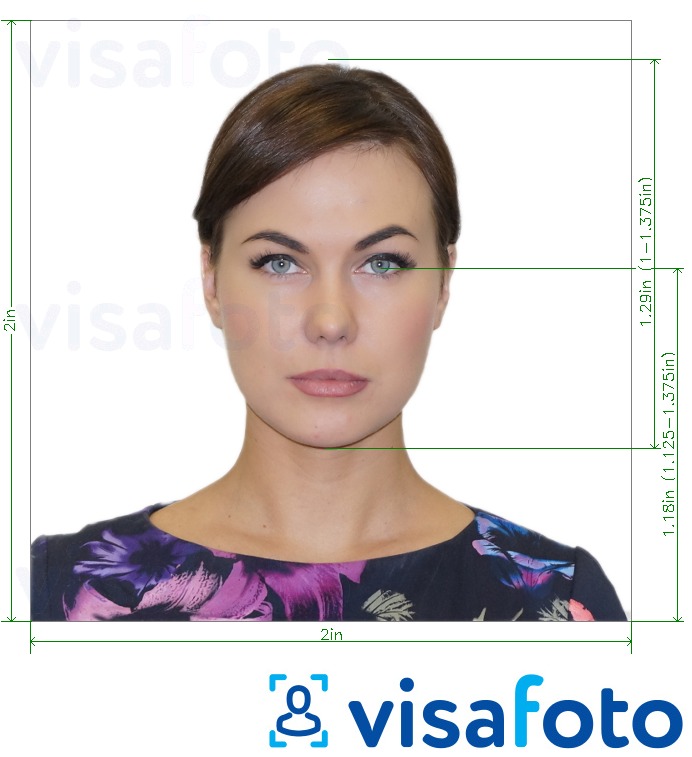
- The photo size must be 2 × 2 inches (51 × 51 mm).
- Head length from chin to top should be between 1 and 1 3/8 inches (25–35 mm).
- The head length, from the chin to the top of the head, should be between 1 and 1 3/8 inches (25 and 35 mm).
- The background must be plain white or off-white and free of patterns or shadows.
- The photo must be high-resolution with clear focus and correct exposure. Avoid blurriness, noise, stains, and printing defects. Use glossy or matte photo-quality paper.
- The photo must be taken within six months. Reusing old photos is not allowed.
- Face the camera directly with your head centered and level.
- Maintain a neutral expression or a slight, natural smile, and keep your eyes open.
- Remove your glasses unless you are medically exempt and can provide documentation. If permitted, do not wear glasses with glare or tinted lenses.
- Head coverings are permitted only for religious or medical reasons and must not cast shadows or obscure the face.
Here is a US passport photo example:
Attaching the photo to the DS-82 Form
- Place the photo in the designated area on Form DS-82.
- Use four vertical staples, one near each corner, close to the edges to avoid facial puncture and ensure the photo lies flat.
- Avoid using tape, glue, or paper clips; improper attachments may cause rejection or delays.
US Passport Photo Maker
Learn how to take a passport photo online that will be accepted by the authorities.
Creating a passport photo at home is now easier than ever, thanks to online tools. Visafoto, a reliable photo editing service, allows you to take a compliant passport photo in just a couple of steps:
- Capture a photo in daylight and upload it to Visafoto.
- Choose the country and document type (like a USA passport).
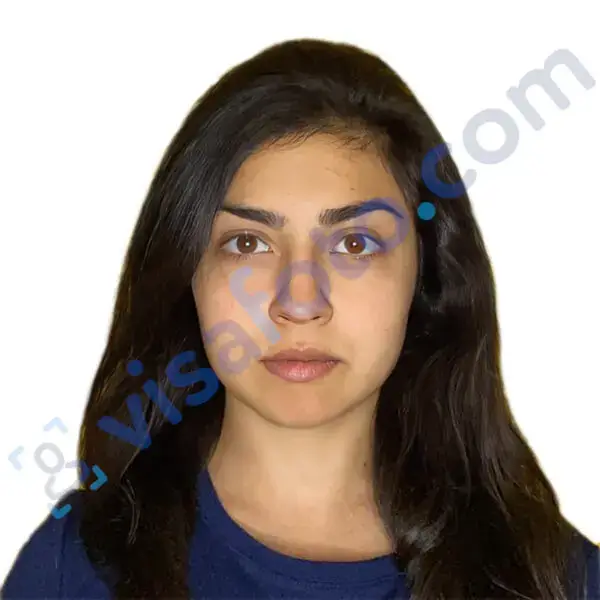
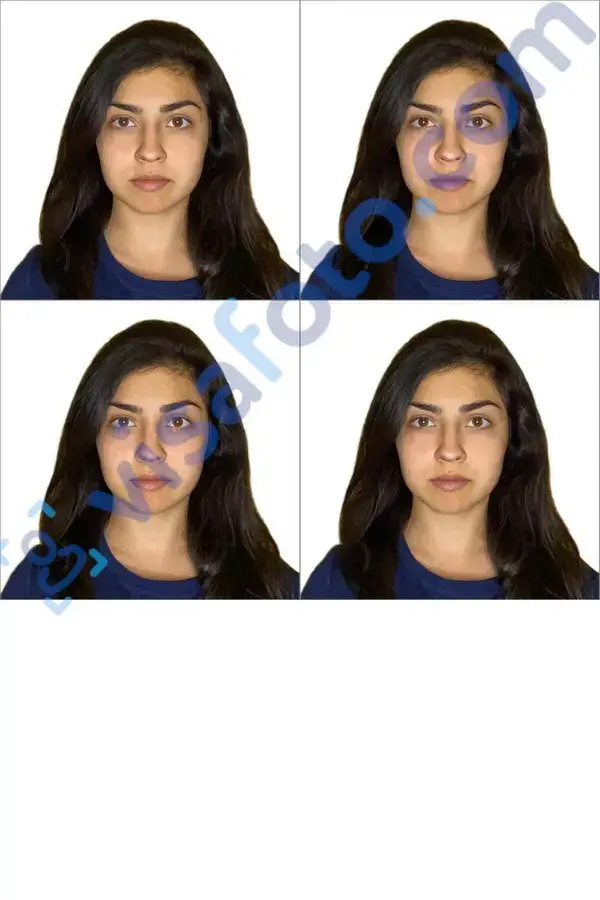
And that's it! Visafoto will take care of adjusting the background, size, and head position to meet official specifications. You'll receive a digital version ideal for online applications and a format ready for printing.
Example of the photo you can upload to Visafoto:

The result after Visafoto editing:
With a 99.7% acceptance rate and over 500,000 approved photos, Visafoto promises compliance with official standards and offers a full refund if there's an issue. Our tech support is available 24/7 for any assistance you may need.
When Online Renewal Beats Mail in 2026
In many cases, the online option is faster and more convenient. It reduces paperwork and eliminates mailing risks. Here, we highlight situations where choosing online renewal is the better decision.
- Eligibility compliance. You meet all criteria: you are age 25 or older, have a 10-year adult passport, have no changes to personal details, reside within the U.S., and don’t have travel plans within the next 6 weeks.
- Routine processing suffices. You’re comfortable waiting 4 to 6 weeks without needing expedited service.
- Convenience factor. Avoid the post office, handle forms digitally, pay online, and keep your current passport – it's unlike mail renewal, where it usually accompanies your application.
- Digital photo flexibility. You're able to take or obtain and upload a digital photo instead of opting for printed ones.
- Seamless tracking. Benefit from built-in email alerts and easy online monitoring through your MyTravelGov account.
Is it safer to renew a passport by mail or online? Both online and mail renewals are secure if you use the official U.S. government channels. Use travel.state.gov for online renewals, and rely on USPS with tracking for mailing. Steer clear of third-party "passport" websites.
Why Choose Mail for Urgent Passport Renewal
Mail renewal is the better choice for urgent U.S. passport renewals in 2026 because it is the only renewal channel that officially supports expedited service and rush return shipping. Here you’ll see why mail remains the more practical option for urgent passport renewal.
- Expedited processing. Only mail offers true expedited services. Online renewals are routine: you can't opt for expedited processing through the portal. By mail, add the $60 expedited fee on Form DS-82, cutting processing time to about 2-3 weeks instead of the typical 4-6 weeks.
- Fast return delivery options. You can opt for a 1-2 day return delivery from the State Department for an extra $20-$25 fee, marked on your envelope. Combined with expedited processing, mail is the sole option to shorten both processing and shipping time reliably.
- Structured urgent travel protocols. The State Department's guidelines recommend expediting renewals by mail for "urgent but not emergency" circumstances. For more critical cases (travel within 14 days or life-and-death emergencies), in-person appointments are needed – mail with expedited service is the step just below this urgency.
- Reliability and reduced risk. With mail, you have clear timelines: expedited mail is 2-3 weeks, plus mailing time. While online renewals may report quicker outcomes, official times remain 4-6 weeks. For trips in 3-7 weeks, trusting "unofficially fast" online routines could be risky compared to the assured expedited mail process.
Summaries: Key Differences Between Renewing Passport Online VS Mail
Is it better to renew a US passport online or by mail? The table below highlights the core differences between online passport renewal applications vs. post offices, based on current U.S. Department of State guidance. Use it to compare requirements, timing, and practical limitations before choosing your renewal method.
| Factor | Online Renewal | Mail Renewal (DS-82) |
|---|---|---|
| Eligibility basics | Age 25+, renewing a prior 10-year adult passport, no data changes, in the U.S., undamaged passport in hand, not traveling for several weeks. | Must meet DS-82 rules: prior passport issued age 16+, within last 15 years, undamaged, can be submitted, name same or documented. |
| Where you apply | Fully online via MyTravelGov / online portal. | You fill out DS-82 and mail a paper package to the National Passport Processing Center. |
| Service levels | Routine only (no standard expedited option through portal). | Routine or expedited (extra fee). |
| Official processing time | Routine: about 4–6 weeks processing, same as mail once received. | Routine: about 4–6 weeks. Expedited: about 2–3 weeks, plus mailing time. |
| Travel-date limits | Generally must not travel internationally for about 6–8 weeks after submitting. | If trip is 3–8 weeks away, guidance favors expedited by mail. Under 3 weeks, in-person agency, not mail or online. |
| Photo format | One digital color photo uploaded (JPG/PNG/HEIC/HEIF), meeting passport standards. | One printed 2×2 inch color photo, attached with staples to DS-82. |
| Payment method | Pay online (credit/debit card, ACH). No checks/money orders. | Pay by check or money order to the “U.S. Department of State.” |
| Shipping & postage costs | No outbound postage for the application itself. You just receive the new passport by mail. | You pay for tracked USPS mailing to the processing center. Can add 1–2 day return delivery for a fee. |
| Expanding/adding book/card | You can only renew the same document type(s) you already have (book→book, card→card, both→both). | You can change configuration: e.g., add a card when you only had a book, by mail. |
| Best use case | If you are fully eligible, not in a rush, and want maximum convenience and minimal postal handling. | If you need expedited/urgent processing, want to change product mix (add book/card), or don't qualify for online. |
So, is it better to renew a passport online or at the post office? The key takeaway is that online renewal is simpler and eliminates paperwork, but only offers routine processing. Although mail renewal requires more effort and time, it remains the only option for expedited service and broader eligibility.
FAQ
Can I renew my US passport online if I live abroad but have a US address?
No, you can't. You must be physically present in a U.S. state or territory to renew online. If you're living abroad, you'll need to renew through a U.S. embassy or consulate or by mail from that location, even if you have a U.S. address.
Can I cancel an online renewal and switch to mail if urgent?
Once you submit an online renewal, you generally can't cancel it. If you need faster processing, it's recommended to let your online application proceed and separately seek an in-person appointment or another expedited option. It's best to contact the passport helpline for advice tailored to your situation.
Does the 2026 peak travel season affect online more than mail renewals?
Both methods experience delays during peak travel seasons like spring and summer. Demand increases for both online and mail renewals, leading to extended processing times, often towards the longer end of the estimated 4–6 weeks.
Does mail renewal allow keeping my old passport while waiting?
No, you must send your existing passport with your DS-82 form when renewing by mail. It will be returned to you, usually cancelled. Unlike online renewal, where you retain your passport until the new one is issued, mail renewal requires you to relinquish it during processing.