Australian Visa Photo Online

Are you going to apply for a visa to travel to Australia? The photo you need depends on how you apply: a digital facial image for an ImmiAccount application, a live photograph in the Australian ETA app, or printed photos if specifically requested. This guide explains the Australian visa photo requirements and how to submit the right type of image.
Table of contents
- How to apply for an Australian visa online?
- Documents for Australian visa application
- Australian visa photo requirements
- Can I wear glasses in the Australian visa photo?
- Australian visa photo: matte or glossy
- Australian visa photo tool
- What types of Australian visas require photos?
- Links
High-quality photos are essential to your visa application.
How to apply for an Australian visa online?
For a Visitor visa (subclass 600), apply through ImmiAccount, attach the requested documents, pay the visa application charge and wait for a decision. Your nationality and purpose of travel determine which visa route you can use; not every Australian visa application follows the same photo-submission process.
Uploading an Australian visa photo in ImmiAccount
In the application's attachment area:
- Select the applicant and choose "Facial image".
- Upload a JPG file between 70 KB and 3.5 MB.
- Centre the face in the displayed frame and confirm the attachment.
- Check for the green tick and "Received" status.
Each applicant, including a child, needs their own facial image. The passport biographical-page copy is a separate attachment, not a substitute for the portrait. Upload success confirms receipt, not final acceptance of the photo.
If an upload fails, check its format and size. General supporting-document limits do not replace the photo limits. Before submission, you can delete an incorrect attachment. Afterwards, use "Notification of incorrect answers" under "Update details" and attach the correct file. See the official ImmiAccount attachment instructions.
Australian ETA photos and biometric checks
An Electronic Travel Authority (subclass 601) application uses the Australian ETA app, which takes a live photograph. The applicant must be present, including when a parent or agent helps with a child's application. A prepared image file does not replace this live capture.
A biometric identity check is separate from uploading an application photo. Follow your biometrics letter: eligible applicants with a Visa Lodgement Number beginning "AUI" can use the Australian Immi App to scan their passport and capture a live facial image. Otherwise, follow the collection-centre instructions. At a centre, staff capture the facial image and fingerprints. The Australian Immi App instructions explain eligibility. This is not the Australian ETA app.
Documents for Australian visa application
For a tourist-stream Visitor visa (subclass 600), prepare:
- The online application and payment of the applicable visa application charge;
- Your current passport's photo, personal-details, issue-date and expiry-date pages;
- A digital facial image for the applicant;
- A national identity card and name-change evidence, if applicable;
- Financial evidence, such as recent bank statements;
- Travel plans and, where relevant, an invitation from a relative or friend;
- Evidence of reasons to return home, such as employment, studies or family ties;
- English translations of non-English documents, alongside the originals.
Health insurance is strongly recommended, and some visas have condition 8501 requiring adequate cover. The insurance requirement depends on your circumstances and visa conditions. Police certificates and other additional evidence may be requested; use the official subclass 600 checklist for your circumstances.
The list is different for other types of visas and may include additional requirements depending on your nationality.
Find the detailed guidelines on how to get an Australian tourist visa in this article.
Australian visa photo requirements
For an ImmiAccount facial-image attachment, use JPG, 70 KB to 3.5 MB. Home Affairs links from its upload instructions to its photo guidance, titled "Photo requirements for citizenship applications". Its preferred digital resolution is 1200 × 1600 pixels, not a mandatory minimum.
- Digital file: JPG, between 70 KB and 3.5 MB for ImmiAccount photo attachments
- Preferred resolution in the linked guidance: 1200 × 1600 pixels
- Paper dimensions in that guidance: 35 to 40 mm wide × 45 to 50 mm high
- Chin-to-crown measurement for that paper format: 32 to 36 mm
For the photo itself:
- Use a colour photo taken within six months.
- Keep your head upright and centred, facing the camera.
- Keep your eyes open, mouth closed and expression neutral.
- Use a plain neutral or light-grey background that contrasts with your face.
- Keep the image sharp, with even lighting and no distracting shadows or glare.
- Keep hair, accessories and cosmetics from obscuring facial features.
- Religious head coverings are permitted when the full face and its edges remain visible.
Here is an example of an Australia visa photo:

Can I wear glasses in the Australian visa photo?
The linked Home Affairs photo guidance requires glasses to be removed unless there is a medical reason. If worn, frames must not cover the eyes and lenses must not reflect light. Tinted lenses require a medical reason.
Australian visa photo: matte or glossy
Paper finish does not apply to an online photo upload. If you are asked for printed photos, use good-quality photo paper and follow the application's printing instructions, including any specified finish. Matte paper is not a universal requirement for Australian visa applications.
Australian visa photo tool
What is the most reliable way to take a photo for an Australian visa application? Since the visa application requirements are indeed specific and different from most passport-sized photographs, it is best to commit this task to dedicated online tools. With Visafoto, you can take a photo for a visa to Australia everywhere in the world!
Use our visa photo maker for the quickest results. Simply upload a full-face shot taken under conventional lighting. Visafoto will instantly resize and format it as required, displace the background with a light grey colour and enhance the overall image quality. The resulting image will match 100% photo requirements for an Australian visa application.
First, take a photo of yours under daylight like this one:
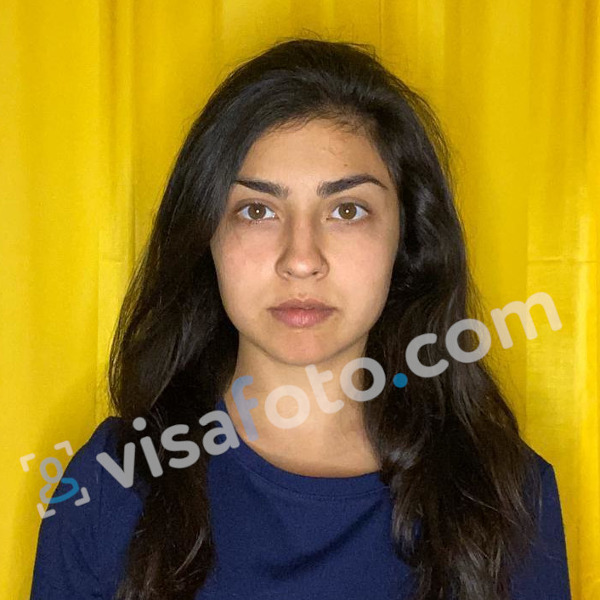
You will hold two types of photos. A digital one suits electronic applications and another one is for printing.


What types of Australian visas require photos?
Photo or identity-image requirements can apply to the following visa types:
- Australian tourist visas;
- Australian transit visas;
- Australian student visas;
- Australian medical visas;
- Australian work visas;
- Australian business visas.
The submission method depends on the route and the instructions for your application. An ImmiAccount photo attachment, an ETA live photograph and a requested biometric check are not interchangeable. This guide's prepared-file instructions apply where an image upload is requested, not instead of a live capture.
Links
- Australian Visa for Indian Tourists | Application, Photo, Fees
- Australian Tourist Visa Guide
- Getting Australian Student Visa
- Specifics of Skilled Visa to Australia
- Australia Work Holiday Visa
- Types of Australian Immigration Visa
- Get Australia visa photo online
Last update: 27 October 2026